


HPE Aruba ProCurve 2510 24 Manual
PDF manual · 90 Pages
English



Quick check
Incorrect answer, please try again.
Chat with your HPE Aruba ProCurve 2510 24 manual using AI
Get instant AI answers from your HPE Aruba ProCurve 2510 24 manual
Ask anything about the HPE Aruba ProCurve 2510 24. Answers come from this manual, with the pages they are based on.
Ask a Question
Do you recommend ProCurve 2510 24?
Yes NoFrequently Asked Questions
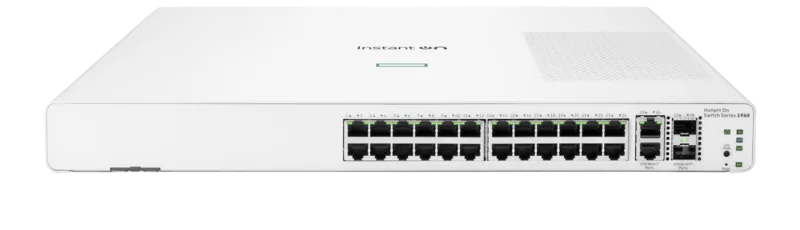
The device includes twenty-four 10/100Base-TX RJ-45 ports. It also features two dual-personality ports that can be configured as gigabit copper or fiber optic connections using mini-GBIC modules.
Is this answer helpful?
Yes. Administrators can configure an IP address to enable management via web browser, Telnet, or ProCurve Manager software. Remote access allows for monitoring and configuration changes without physical presence.
Is this answer helpful?
The unit supports rack mounting in standard 19-inch equipment cabinets, wall mounting, or placement on a horizontal surface using included rubber feet for stability.
Is this answer helpful?
Physical access is required to hold the clear button for at least one second. This action deletes all console access passwords, allowing reconfiguration of the management credentials.
Is this answer helpful?
Yes. It supports fiber-optic connections through the two dual-personality ports using supported ProCurve mini-GBICs for Gigabit-SX, Gigabit-LX, or Gigabit-LH standards.
Is this answer helpful?
The Switch supports the Spanning Tree Protocol to detect and eliminate network loops. This ensures stable operation by blocking redundant paths that could cause broadcast storms.
Is this answer helpful?
No manual adjustment is needed. The power supply automatically adjusts to input voltages between 100 and 240 volts at either 50 or 60 Hz frequencies.
Is this answer helpful?
Advantages and Disadvantages
Advantages

- High density with 24 auto-sensing 10/100 ports
- Dual-personality ports support copper or fiber
- Supports up to 64 VLANs for segmentation
- Stacking allows management of up to 16 units
- Multiple management interfaces including web and console
Disadvantages

- Fixed power input lacks physical on/off switch
- Limited Gigabit ports to only two combo ports
- Non-genuine mini-GBICs are not supported
- Requires specific ventilation for cooling
- Console requires VT-100 compatible terminal settings
Product Specification
Function
Switch
Type
Standalone, Rackmount (via mounting brackets)
Network Connections
24x RJ-45, 2x RJ-45/SFP
Speeds
24x RJ-45 (10/100Base-T), 2x RJ-45 (10/100/1000Base-T), 2x SFP (100M/1Gb/s)
PoE
N/A
Backplane
8.8Gb/s, 6.5Mp/s, 9KB Jumboframes, 384MB Packet Buffer, 8K MAC Addresses
Officially Supported Standards
802.1AX, 802.1AB, 802.1Q, 802.1X, 802.1p, 802.1s, 802.3, 802.3ab, 802.3u, 802.3x, IGMPv3
Configuration
Web interface, Console, Configuration Software, serial (RJ-45)
Cooling
Passive
Dimensions (WxHxD)
17.44 x 1.73 x 9.29 inches, 1U
Weight
4.89 lbs
Color
dark gray, light gray
Features
Metal enclosure, removable mounting brackets, firmware updates possible
Manufacturer Warranty
Lifetime (10 years in AT/DE)
Note
For this device, "link aggregation" was officially specified with the obsolete standard IEEE 802.3ad. The function is no longer managed by the IEEE "Working Group 3" (IEEE 802.3, CSMA/CD - Ethernet) since the year 2008, but by the "Working Group 1" (IEEE 802.1, High Level Interface - Internetworking) and technically unchanged defined via IEEE 802.1AX.
Product Description
Optimizing Network Connectivity
Building a reliable enterprise network requires robust hardware that delivers performance without compromising manageability. The HPE Aruba ProCurve 2510 24 Rackmount Managed Switch represents a solid entry point for organizations seeking high-density connectivity at a cost-effective price point. This device serves as an excellent wiring closet or desktop switch for modern workgroup environments. It supports plug-and-play networking, allowing immediate operation once power and cables are connected.
The unit features twenty-four auto-sensing 10/100Base-TX RJ-45 ports. These ports support automatic medium-dependency interface crossover functionality, meaning users can connect various network devices using standard straight-through cables. Additionally, there are two dual-personality ports available for high-speed uplinks. These ports can function as 10/100/1000Base-T RJ-45 jacks or accept mini-GBIC transceivers for fiber-optic connections. The 24x RJ-45 layout combined with the 2x RJ-45/SFP capabilities provides flexibility in network design, accommodating both copper and fiber backbones effectively.
Management and Configuration
Administrators can manage the equipment through multiple interfaces including a dedicated console port, a built-in web browser interface, or ProCurve Manager software. This multi-faceted approach ensures that local and remote management tasks are accessible. The console interface utilizes a standard terminal emulator for out-of-band access, while the web interface provides a graphical layout for easier navigation.
Security is maintained through user-defined passwords and network segmentation capabilities. The switch supports up to 64 IEEE 802.1Q-compliant VLANs. This feature enables logical grouping of end nodes based on business needs rather than physical location. Furthermore, the Spanning Tree Protocol is supported to prevent network loops, ensuring stability across redundant paths. Stacking capabilities allow up to sixteen switches to be managed through a single IP address for simplified network control.
Installation and Reliability
The ProCurve Series 2510 is designed for versatile installation. Users can mount the unit in a standard 19-inch telco rack, on a horizontal surface, or on a wall. The accessory kit includes necessary brackets and screws for secure placement. Proper ventilation is required around the sides and back to maintain optimal operating temperatures. The power supply automatically adjusts to various input voltages between 100 and 240 volts. It supports Gigabit-SX, Gigabit-LX, and Gigabit-LH mini-GBICs for various distances. The physical dimensions fit standard racks efficiently.
Troubleshooting is streamlined through diagnostic LED indicators. These lights display power status, fault conditions, and port activity. In the event of persistent issues, the factory default configuration can be restored using the front panel buttons. This ensures that software errors or configuration mistakes can be easily reset to return the equipment to a stable baseline state. Whether for a small office or a growing enterprise segment, this hardware offers the stability required for critical network operations. It remains a reliable choice for connecting servers, printers, and workstations with dedicated bandwidth.
Search for 67,706 Manuals online


Type-in Brand or Model