
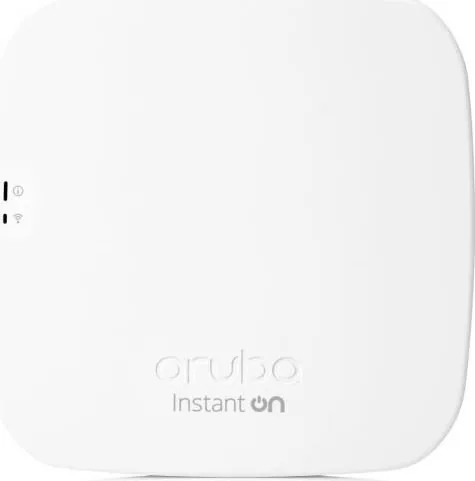

HPE Aruba Instant On AP11 Manual
PDF manual · 42 Pages
English



Quick check
Incorrect answer, please try again.
Chat with your HPE Aruba Instant On AP11 manual using AI
Get instant AI answers from your HPE Aruba Instant On AP11 manual
Ask anything about the HPE Aruba Instant On AP11. Answers come from this manual, with the pages they are based on.
Ask a Question
Do you recommend Instant On AP11?
Yes NoFrequently Asked Questions
Download the app, power on the device, verify the LED indicators blink green and amber, and follow on-screen instructions in the application.
Is this answer helpful?
Yes, if the site connects to the Instant On cloud. You can access and manage sites remotely through the application from anywhere with internet access.
Is this answer helpful?
Upgrades happen automatically when the software image is updated on the site. You can schedule preferred days and times for installation to minimize disruption.
Is this answer helpful?
You can use network passwords like WPA2 Personal or authentication servers like RADIUS for Enterprise networks. Guest networks support open access with captive portals.
Is this answer helpful?
Use the troubleshooting assistant in the app which relies on LED patterns. Review recommended actions in the Alert Details page for guidance.
Is this answer helpful?
Yes, each site can be managed by two different administrator accounts. You can assign a secondary email address in the Site Management Administration settings.
Is this answer helpful?
Place wireless APs within Wi-Fi range of a wired AP. Power them up without a cable connection and let the app scan and add them via the Extend Network page.
Is this answer helpful?
Advantages and Disadvantages
Advantages

- Simple and fast setup for small business networks
- Affordable ownership and easy usage
- Mobile app and web app provisioning
- Remote monitoring capabilities
- Automatic firmware upgrades and cloud management
Disadvantages

- Remote access requires stable internet connectivity
- Mesh network requires careful AP placement for signal
- Mobile app must be updated for backward compatibility with site software
- Limited admin accounts per site without transfer protocols
- Guest networks need captive portal config for open access
Product Specification
LAN
1x 1000Base-T (PoE PD)
Wireless
WLAN 802.11a/b/g/n/ac (Wi-Fi 5), simultaneous
Transfer Rate
300 Mbps (2.4 GHz), 867 Mbps (5 GHz)
Security
WPA2, WPA3
Antennas
internal
Ports
N/A
Power Consumption
Not specified (consumption, operation), Not specified (max. power supply rating)
Dimensions
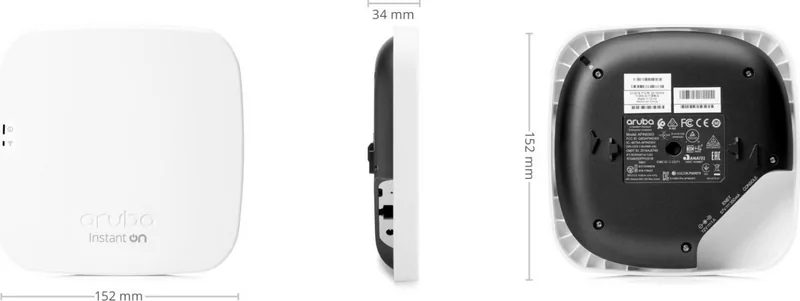
5.98 x 5.98 x 1.34 in
Features
MU-MIMO, Bluetooth 5.0, Bluetooth LE
Band Support
Dual Band (simultaneous)
Manufacturer Warranty
One Year
Product Description
HPE Aruba Instant On AP11 Overview
The HPE Aruba Instant On AP11 PoE PD/DC represents a robust choice for small business networking needs. Many seek the HPE Aruba Instant On AP11 PoE PD/DC Manual for details, but the device is intuitive. This solution prioritizes ease of use and rapid network deployment. You can manage the entire network from a mobile app or web browser. The device supports PoE or DC power for versatile mounting. Security features include WPA2 Personal and Enterprise encryption standards. You can create separate Employee and Guest networks to control access levels. The Guest network supports captive portals for brand views. Scheduling allows you to set active hours for specific networks. Monitoring tools provide real-time site health data. You can view statistics regarding data transfer and client counts. Application usage analysis breaks down traffic by category like shopping or entertainment. Alerts notify administrators about connection or device problems immediately. Troubleshooting is simplified through the application assistant and LED indicators. Account management allows sharing access with secondary administrators. Remote access ensures connectivity even when away from the site. Firmware upgrades happen automatically to keep devices secure. Inventory management lets you track every access point in the system. Clients appear in a detailed list showing signal strength and connected apps. Removing devices from the inventory is simple if needed. Static IP configuration is available for advanced setups. Multiple sites are manageable under a single account hierarchy. Time zone settings are crucial for accurate statistics. The system supports mesh networking for wireless extension. Installation guidelines recommend careful placement for optimal signal strength. This platform offers a secure and scalable environment. Small businesses gain enterprise-grade features without the enterprise complexity. Connectivity remains stable during firmware reboots. Alerts color-code severity for quick identification. Support resources are available via the portal. This product delivers a clean and efficient networking experience for growing organizations. With the ability to transfer account ownership, management remains flexible. You can sign out securely when needed. Browser requirements ensure compatibility across Chrome and Safari. iOS and Android versions support the mobile app fully. Creating an account requires email verification for security. You can reset passwords easily if credentials change. The interface handles multiple sites with a simple click. Network names and passwords are modifiable anytime. Statistics update daily to reflect usage trends. Data transfer charts help identify bandwidth hogs. Wireless access points can be added over air. Wired connections ensure stability for primary units. The dashboard displays inventory status clearly. Devices show up as up, down, or warning states. This comprehensive suite ensures your business stays online.
Key Benefits
The system is affordable and easy-to-use. Ideal for setups without IT staff. Simple statistics view network health.
Search for 67,706 Manuals online


Type-in Brand or Model