


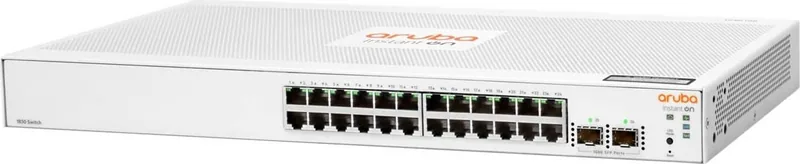
HPE Aruba Instant On 1830 Manual
PDF manual · 43 Pages
English



Quick check
Incorrect answer, please try again.
Chat with your HPE Aruba Instant On 1830 manual using AI
Get instant AI answers from your HPE Aruba Instant On 1830 manual
Ask anything about the HPE Aruba Instant On 1830. Answers come from this manual, with the pages they are based on.
Ask a Question
Do you recommend Instant On 1830?
Yes NoFrequently Asked Questions
You can manage the switch using the Aruba Instant On mobile app for iOS and Android, the cloud portal accessed via a web browser, or the built-in local web GUI. This flexibility allows administrators to choose the method that best fits their workflow.
Is this answer helpful?
Yes, select models in the 1830 series support IEEE 802.3at PoE+ standards. They can deliver up to 30 watts per port to powered devices such as IP phones, wireless access points, and cameras, simplifying cabling and power distribution.
Is this answer helpful?
Yes, the switch supports hot-swapping SFP transceivers. You can install or remove them without powering off the device, provided you disconnect the network cables first. Wait a few seconds for initialization before connecting new cables.
Is this answer helpful?
If the switch fails to acquire an IP address from a DHCP server after 120 seconds, it defaults to the static IP address 192.168.1.1. You can force this mode by unplugging and replugging the power supply if necessary.
Is this answer helpful?
The switch only supports approved Aruba SFP transceivers. Using non-Aruba transceivers is done at your own risk and may void your warranty and support eligibility. Always verify compatibility before purchasing third-party optics.
Is this answer helpful?
Press and hold the recessed Reset button on the front panel for more than five seconds until the UID LED begins flashing. This action restores all configurations to factory defaults, clearing passwords and resetting the IP address.
Is this answer helpful?
Advantages and Disadvantages
Advantages

- Supports flexible management via mobile app, cloud portal, or local web GUI
- Includes PoE+ capability for powering devices like APs and phones
- Fan-free designs ensure quiet operation in office environments
- Auto-MDIX ports simplify cabling by eliminating crossover needs
- Easy installation with multiple mounting options including rack and wall
Disadvantages

- Some models require external AC adapters which adds to desk clutter
- Fanless units may run warmer than traditional switched fans
- Non-Aruba SFP transceivers are not supported and void warranties
- Limited to indoor use only with specific environmental constraints
- Initial cloud onboarding requires internet connectivity
Product Specification
Function
Switch
Type
Standalone, Rackmount (via mounting bracket)
Network Connections
24x RJ-45, 2x SFP
Speeds
24x RJ-45 (10/100/1000Base-T), 2x SFP (1Gb/s)
PoE
N/A
Backplane
52 Gb/s, 38.68 Mpps, 9 KB Jumbo frames, 1.5 MB packet buffer, 16k MAC addresses
Officially Supported Standards
802.1AB, 802.1AX, 802.1D, 802.1Q, 802.1p, 802.1w, 802.3, 802.3ab, 802.3ac, 802.3az, 802.3u, 802.3x, 802.3z
Configuration
Web interface, Configuration software, via Cloud
Cooling
Passive
Dimensions (WxDxH)
17.44 x 1.73 x 8.5 inches, 1U
Weight
5.49 lbs
Color
White
Features
Metal case, removable mounting brackets, firmware updates possible
Manufacturer Warranty
Lifetime (10 years in AT/DE)
Note
For this device, link aggregation was officially specified with the obsolete standard IEEE802.3ad. The function has not been managed by the IEEE Working Group 3 (IEEE 802.3, CSMA/CD - Ethernet) since 2008, but is instead managed by Working Group 1 (IEEE 802.1, High Level Interface - Internetworking) and technically unchanged defined via IEEE 802.1AX.
Product Description
HPE Aruba Instant On 1830 Rackmount Gigabit Smart Switch Overview
The HPE Aruba Instant On 1830 Rackmount Gigabit Smart Switch series represents a significant leap forward for small business networking, offering robust performance without the complexity of enterprise-grade hardware. Designed specifically for growing networks, this switch family delivers reliable connectivity with features like Power over Ethernet (PoE) and SFP uplinks to support diverse device requirements. Whether you are managing a small office or expanding a branch location, the 1830 series provides the flexibility needed to scale efficiently.
Key Features and Capabilities
This switch series stands out for its ease of management and deployment. Administrators can control the network through an intuitive mobile app available on iOS and Android, a cloud-based portal accessible via web browsers, or a local graphical user interface. The hardware includes auto-sensing 10/100/1000BASE-T ports that eliminate the need for crossover cables, simplifying cabling infrastructure significantly. For models like the 24G 2SFP variant, the inclusion of two SFP slots allows for high-speed fiber optic connections, ensuring long-distance reach and backbone stability.
Power delivery is another critical advantage. Select models in the series support IEEE 802.3at PoE+ standards, capable of delivering up to 30 watts per port. This feature powers IP phones, wireless access points, and security cameras directly through the network cable, reducing clutter and the need for separate power outlets. The switches also feature Energy Efficient Ethernet (EEE) technology to lower power consumption when connected devices are idle.
Installation and Design
Installation is straightforward with options for rack mounting, wall mounting, or under-table placement. Many models boast a fan-free design, making them ideal for noise-sensitive environments like offices and classrooms. The units automatically adjust to various voltage inputs, removing the need for manual configuration during setup. With support for VLANs and link aggregation, these switches enable logical network segmentation and increased bandwidth for critical applications.
Important Notes
- Ensure proper ventilation by leaving at least 3 inches of space around the unit for cooling.
- Use only supported Aruba transceivers for SFP ports to maintain warranty coverage.
- The default IP address is 192.168.1.1 if DHCP is unavailable.
- Factory defaults can be restored using the recessed reset button.
- Some models require specific mounting orientations for optimal reliability.
Search for 67,706 Manuals online


Type-in Brand or Model