
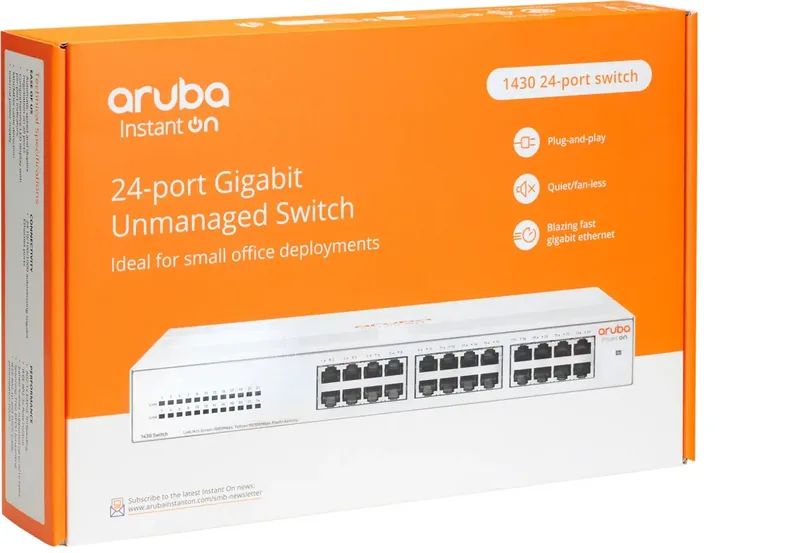
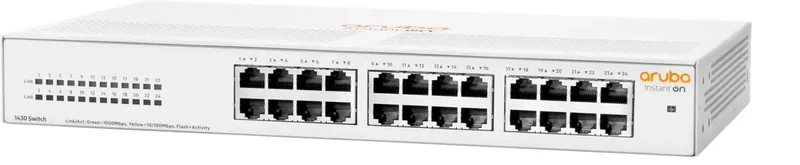

HPE Aruba Instant On 1430 Manual
PDF manual · 35 Pages
English



Quick check
Incorrect answer, please try again.
Chat with your HPE Aruba Instant On 1430 manual using AI
Get instant AI answers from your HPE Aruba Instant On 1430 manual
Ask anything about the HPE Aruba Instant On 1430. Answers come from this manual, with the pages they are based on.
Ask a Question
Do you recommend Instant On 1430?
Yes NoFrequently Asked Questions
No, this specific model lacks Power over Ethernet capabilities and focuses on standard Ethernet connectivity for data transmission.
Is this answer helpful?
Yes, all Aruba Instant On 1430 switches support under-table mounting using provided rubber feet and screws.
Is this answer helpful?
Operating temperature is 0°C to 40°C with humidity up to 95% non-condensing for safe performance.
Is this answer helpful?
No, this specific switch uses an internal power supply that adjusts automatically to AC voltage.
Is this answer helpful?
No power switch exists on the front panel; you must unplug the power cord to reboot the unit.
Is this answer helpful?
Not recommended as unsupported transceivers may void warranty or cause errors in the SFP slots.
Is this answer helpful?
Ports are auto-sensing 10/100/1000BASE-T Ethernet standards providing reliable data transfer rates
Is this answer helpful?
Advantages and Disadvantages
Advantages

- Quiet operation with no fans
- Internal power supply for global voltages
- Auto-sensing 10/100/1000BASE-T ports
- Simple plug-and-play installation
- Compact metal chassis design
Disadvantages

- Non-PoE capabilities on 24G model
- Indoor use only specification
- No operator serviceable parts available
- Requires specific ventilation space
- Proprietary transceivers recommended for SFP variants
Product Specification
Function
Switch
Type
Standalone, Rackmount (via mounting bracket), Wall-mounting (via mounting bracket)
Network ports
24x RJ-45
Speeds
24x RJ-45 (10/100/1000Base-T)
PoE
N/A
Backplane
48Gb/s, 35.71Mpps, 9KB Jumboframes, 2Mb Packet buffer, 8K MAC addresses
Officially supported standards
802.1p, 802.1x, 802.3, 802.3a, 802.3ab, 802.3az, 802.3i, 802.3u, 802.3x, 802.3z
Configuration
unmanaged
Cooling
passive
Dimensions (WxHxD)
13.39 x 1.73 x 8.86 inches, 1U
Weight
4.21 lbs
Color
white
Features
Metal chassis, removable mounting brackets
Manufacturer Warranty
lifetime (10 years in AT/DE)
Note
For this device, "link aggregation" was officially specified with the obsolete standard IEEE 802.3ad. The function is no longer managed by the IEEE Working Group 3 (IEEE 802.3, CSMA/CD - Ethernet) since 2008 but is managed by Working Group 1 (IEEE 802.1, High Level Interface - Internetworking) and is technically unchanged via IEEE 802.1AX defined.
Product Description
Empowering Small Office Networks
Modern businesses rely on stable and fast data connections to succeed daily. The HPE Aruba Instant On 1430 Desktop Gigabit Switch, 24x RJ-45 delivers robust Ethernet performance specifically designed for compact environments. Whether you are expanding an existing office network or managing a small data center floor, this switch offers essential Gigabit speeds without introducing unnecessary complexity to your setup. It provides high availability for critical business processes daily.
Seamless Connectivity Standards
Each of the ports supports auto-sensing 10/100/1000BASE-T speeds efficiently. You do not need crossover cables because the switch handles Auto-MDIX technology automatically. This plug-and-play design ensures devices connect instantly when powered on successfully. The internal power supply adjusts to global voltages ranging from 100 to 240 volts, removing the need for bulky external adapters on many models. It operates silently with no fans, making it suitable for quiet open plan offices. The metal chassis offers durability against dust and debris.
Ease of Installation and Placement
Setting up this hardware is straightforward for most network administrators. You can mount it on a standard wall, rack, or place it on a stable table using provided rubber feet. Proper ventilation requires leaving space around the device to ensure airflow. Always ensure power cords are grounded to prevent electrical hazards effectively. The product is designed for indoor use only and adheres to strict safety standards like IEC 60950-1. It also meets local building codes when mounted securely in place.
Monitoring and Maintenance Tips
Status lights indicate connection health and traffic activity on the front panel. Green lights typically mean a link is established at full speed, while yellow indicates slower connections occur. If issues arise, basic troubleshooting involves checking cabling integrity or power cycling the unit. Refer to the HPE Aruba Instant On 1430 Desktop Gigabit Switch, 24x RJ-45 Manual for detailed diagnostic LED patterns if errors persist. These lights allow for quick visual diagnosis without software tools.
Key Considerations for Buyers
While the series includes PoE options for specific models, this 24-port version focuses on standard Ethernet connectivity without power delivery to devices. It supports Energy Efficient Ethernet to reduce power consumption when clients are idle or disconnected. MAC address learning is handled automatically, simplifying network management tasks significantly. You get high bandwidth for local area connections. This guarantees reliable data transfer rates consistently.
Important Installation Notes
Ensure the site is free from excessive RF interference sources. Do not stack equipment directly above this unit to avoid overheating. Use only supported power cords to maintain warranty validity properly. Regular monitoring keeps performance optimized during high traffic periods. Keep firmware updated for security improvements over time.
Summary
Trust this device for stable network operations always.
Search for 67,706 Manuals online


Type-in Brand or Model