
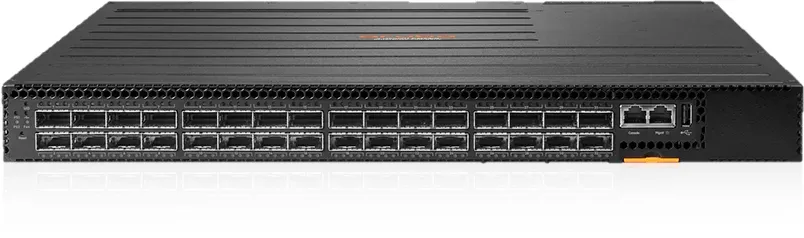

HPE Aruba 8320 32p Manual
PDF manual · 47 Pages
English



Quick check
Incorrect answer, please try again.
Chat with your HPE Aruba 8320 32p manual using AI
Get instant AI answers from your HPE Aruba 8320 32p manual
Ask anything about the HPE Aruba 8320 32p. Answers come from this manual, with the pages they are based on.
Ask a Question
Do you recommend 8320 32p?
Yes NoFrequently Asked Questions
It is designed to provide high-performance switching with strong uplink capability, reliable hardware redundancy, and flexible management for enterprise or campus networks.
Is this answer helpful?
Yes. After basic setup, it can be managed through SSH, a web browser interface, and network management platforms. The management port must be enabled and assigned an IP address.
Is this answer helpful?
Yes. The platform supports dual power supplies, so one unit can continue powering the switch if the other fails or is removed for replacement.
Is this answer helpful?
Yes. Both power supplies and fan trays are hot-swappable, which means they can be replaced while the switch remains in operation.
Is this answer helpful?
Use supported genuine Aruba SFP, SFP+, or QSFP+ transceivers. Unsupported optics may cause faults or unstable operation.
Is this answer helpful?
If you have physical access, pressing and holding the Reset button for more than five seconds restores the factory default configuration, including removing passwords.
Is this answer helpful?
Yes. Its default configuration disables ports and remote access features, which helps reduce exposure until the system is intentionally configured.
Is this answer helpful?
Advantages and Disadvantages
Advantages

- High-speed switching design with low-latency forwarding for demanding enterprise networks.
- Hot-swappable power supplies and fan trays help reduce downtime during maintenance.
- Flexible management through CLI, SSH, web access, and network management platforms.
- Secure default settings give administrators a safer starting point during deployment.
Disadvantages

- Initial setup is more technical and usually requires console-based configuration.
- Only supported Aruba optics and proper cabling should be used, limiting flexibility.
- Rack placement and airflow must be planned carefully to avoid overheating issues.
- Power and cooling demands may be more than smaller offices need for daily use.
Product Specification
Function
Switch
Type
Standalone, Rackmount (via mounting brackets), Bundle
Network ports
32x QSFP+
Speeds
32x QSFP+ (10/40Gb/s)
PoE
N/A
Backplane
2.5Tb/s, 9KB Jumboframes, 16MB packet buffer, 14K Mac addresses
Officially supported standards
802.1AB, 802.1AE, 802.1AX, 802.1D, 802.1Q, 802.1p, 802.1s, 802.1w, 802.3ae, 802.3ba, 802.3x, 802.3z, IGMPv3
Configuration
Web interface, Console, Configuration software, serial (RJ-45, USB-A), Network (RJ-45, dedicated, 10/100/1000Base-T), via Cloud
Cooling
active, 5x fan module (front to back)
Dimensions (WxHxD)
17.24x1.69x20.28in, 1U
Weight
21.38lb
Color
black
Features
Metal housing, removable mounting brackets, firmware updates possible, optional redundant power supply, 2x hot-plug power supply, Bundle (1x Switch, 2x Power Supply (JL480A) - X371 400W, 5x Fan Module (JL481A) - X721 front to back)
Manufacturer's warranty
five years
Product Description
HPE Aruba 8320 for High-Speed, Secure Networking
The HPE Aruba 8320 32p Rackmount Gigabit Managed Switch, 32x QSFP+, Bundle Manual is built for teams that need a dependable switching platform with serious room to grow. Designed for rack environments and modern data traffic, it focuses on low-latency forwarding, flexible management, and the kind of hardware resilience that keeps networks stable during busy periods or maintenance windows.
What stands out first is the balance between performance and control. The Aruba 8320 family is intended for high-speed, store-and-forward networking, making it a strong fit for aggregation layers, campus backbones, and demanding enterprise infrastructures. With QSFP+ connectivity at the center of the bundle, it supports fast uplinks and streamlined traffic flow, while still giving administrators the tools they need to shape, secure, and monitor the network with confidence.
This switch platform is also designed with real-world operations in mind. Dual power support, hot-swappable power supplies, and replaceable fan trays make it easier to maintain uptime without planning a full shutdown. That matters in environments where availability is critical and service interruptions are costly. The secure-by-default approach is another practical touch: ports begin disabled, giving network teams a safer starting point during deployment.
Management options are broad and flexible. Administrators can work through a console CLI, SSH, a browser-based interface, or network management tools such as AirWave and IMC. That makes the system approachable for both hands-on engineers and centralized IT teams. The manual also reflects the importance of careful installation, emphasizing correct rack mounting, supported optics, proper cabling, and safe power practices.
For organizations that want a switch bundle that feels more like a long-term infrastructure investment than a simple hardware purchase, this Aruba solution has the right ingredients. It combines speed, redundancy, and manageable complexity in a form factor that suits professional network builds.
Notes:
- Use only supported Aruba transceivers and compatible cabling.
- Plan rack space and airflow before installation.
- Configure IP access and admin security early for safer remote management.
- Keep spare fan or power modules available for faster service recovery.
Search for 67,706 Manuals online


Type-in Brand or Model