
HPE Aruba 5400R zl2 Manual
PDF manual · 128 Pages
English



Quick check
Incorrect answer, please try again.
Chat with your HPE Aruba 5400R zl2 manual using AI
Get instant AI answers from your HPE Aruba 5400R zl2 manual
Ask anything about the HPE Aruba 5400R zl2. Answers come from this manual, with the pages they are based on.
Ask a Question
Do you recommend 5400R zl2?
Yes NoFrequently Asked Questions
Its main advantage is modular flexibility. You can build the switch around the ports and services you need, then expand or replace modules later without changing the entire chassis.
Is this answer helpful?
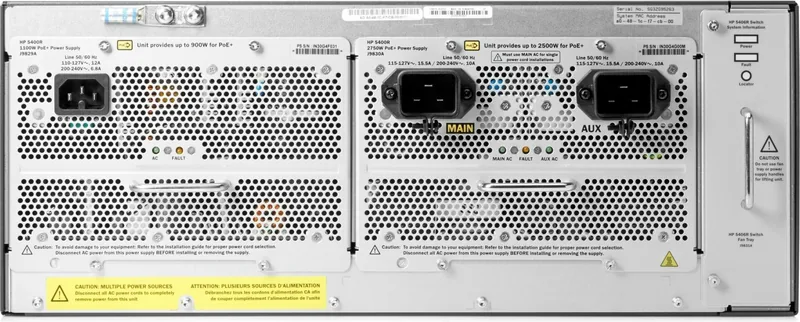
Yes. It supports optional redundant power supplies, which helps maintain operation if one supply or AC source fails. Using separate power sources improves resilience further.
Is this answer helpful?
Many modules and transceivers are hot-swappable, so they can be added or replaced while the switch is powered on. The management module is treated differently and is not hot-swappable.
Is this answer helpful?
Depending on the installed modules, it can support copper, fiber, PoE, 1GbE, and 10GbE connectivity. This makes it suitable for both access and uplink use cases.
Is this answer helpful?
It can be managed through the console, web browser interface, Telnet, or SNMP-based tools. A console connection is especially useful for initial setup and recovery tasks.
Is this answer helpful?
Check rack stability, airflow clearance, grounding, supported modules, and power source planning. These steps help prevent overheating, instability, and configuration issues.
Is this answer helpful?
Advantages and Disadvantages
Advantages

- Modular chassis design supports multiple port and service combinations.
- Hot-swappable components help reduce maintenance-related downtime.
- Strong Layer 3 routing and throughput suit core and aggregation roles.
- Flexible management options make setup and troubleshooting easier.
Disadvantages

- Power supplies are sold separately, adding planning and cost complexity.
- Rack mounting and airflow requirements need careful installation prep.
- Best results depend on using only supported modules and accessories.
Product Specification
Function
Empty Enclosure
Type
Standalone, Rackmount (via mounting brackets), with module slot
Network ports
6x expansion slots
PoE
N/A
Backplane
960Gb/s, 571.4Mp/s, 64k MAC addresses
Officially supported standards
802.1AB, 802.1AE, 802.1AX, 802.1D, 802.1Q, 802.1X, 802.1ad, 802.1ap, 802.1p, 802.1s, 802.1v, 802.1w, 802.3, 802.3x, IGMPv3, MLDv2
Configuration
Console, Web interface, serial (RJ-45, USB), Network (RJ-45, dedicated)
Cooling
active, 1x fan module, 1x preparation for fan module
Dimensions (WxHxD)
17.52x6.89x17.76in, 4U
Weight
24.49lb
Color
black/light gray
Special features
Metal housing, removable mounting brackets, firmware updates possible, 2x power supply hot-plug capable, primary power supply not included, optional redundant power supply (redundant power supply)
Manufacturer's warranty
lifetime (10 years in AT/DE)
Product Description
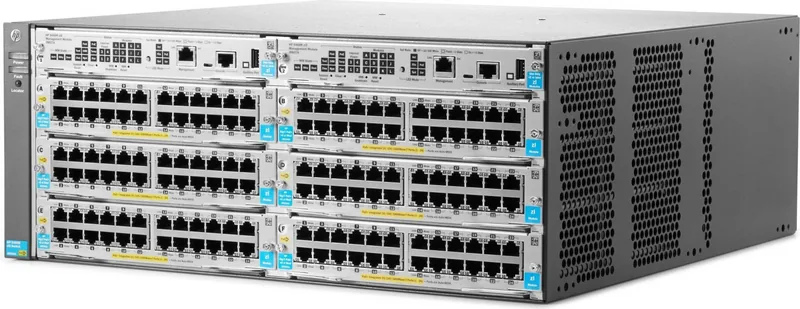
HPE Aruba 5400R zl2 Rackmount Managed Switch Chassis, 6x Module Slots Manual
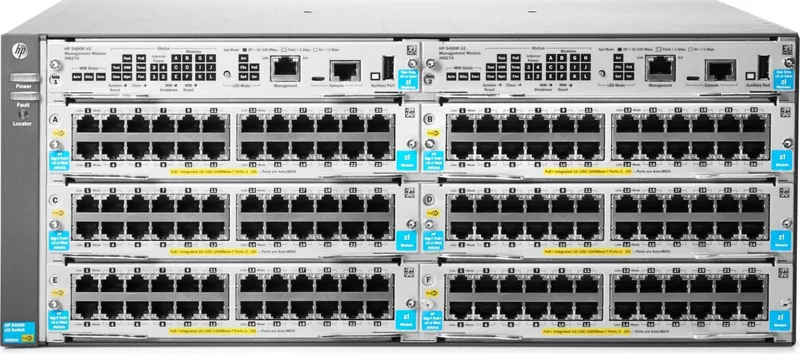
The HPE Aruba 5400R zl2 Rackmount Managed Switch Chassis, 6x Module Slots Manual introduces a modular switching platform built for networks that need flexibility, uptime, and room to grow. At its core, the 5400R zl2 family is designed to support high-speed Layer 3 routing, low-latency forwarding, and a wide mix of uplink and access options. Instead of locking a business into a fixed port layout, the chassis lets teams choose the module combination that best fits the environment.
This 6-slot chassis is a practical choice for organizations that want to balance performance with space efficiency. It supports hot-swappable modules, optional redundant power supplies, and a management module that helps keep operations organized and observable. That makes it well suited for campus cores, wiring closets, and enterprise edge deployments where reliability matters just as much as raw speed.
One of the biggest strengths of the 5400R zl2 platform is its adaptability. Depending on the installed modules, the chassis can support copper, fiber, PoE, and 10GbE connectivity. It also offers multiple ways to manage the switch, including console access, a web interface, Telnet, and network management tools. For administrators, that means easier setup, faster monitoring, and simpler troubleshooting when a port, module, power supply, or fan needs attention.
Installation is straightforward for a chassis of this class, but it still rewards careful planning. Proper rack mounting, grounding, airflow clearance, and power distribution are all emphasized because the system is built to run continuously under demanding conditions. The chassis also supports self-test checks, LED status indicators, and component replacement without full downtime in many cases.
In daily use, the platform stands out for resilience. Redundant power options help maintain service during electrical issues, while the modular architecture allows upgrades without replacing the whole switch. For teams building a long-term network foundation, this is the kind of hardware that can adapt as traffic grows and application needs change.
Key Results
- Flexible 6-slot design lets teams mix ports, uplinks, and services in one chassis.
- Hot-swappable modules and transceivers help reduce downtime during maintenance.
- Layer 3 routing and high throughput support demanding enterprise traffic.
- PoE-capable module options simplify deployment of phones, cameras, and wireless gear.
Notes
- Best results come from using supported modules and matched power supplies.
- Keep airflow, grounding, and rack safety in mind during installation.
- Use the LED indicators and management tools to speed up diagnostics and recovery.
Search for 67,706 Manuals online


Type-in Brand or Model