
HPE Aruba 5400 v2 zl 44G Manual
PDF manual · 135 Pages
English



Quick check
Incorrect answer, please try again.
Chat with your HPE Aruba 5400 v2 zl 44G manual using AI
Get instant AI answers from your HPE Aruba 5400 v2 zl 44G manual
Ask anything about the HPE Aruba 5400 v2 zl 44G. Answers come from this manual, with the pages they are based on.
Ask a Question
Do you recommend 5400 v2 zl 44G?
Yes NoFrequently Asked Questions
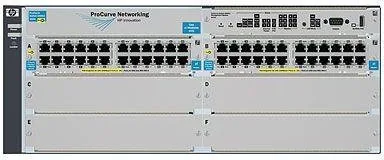
The switch provides 44 RJ-45 Gigabit Ethernet ports for connecting standard network cables to devices like computers or printers.
Is this answer helpful?
Yes, most modules including interface cards can be hot-swapped while the switch remains powered on without interrupting network service.
Is this answer helpful?
Absolutely. You can manage the device using Telnet, a web browser interface, or SNMP using tools like ProCurve Manager for monitoring.
Is this answer helpful?
If configured with redundant power the switch continues operating on the remaining unit while the fault indicator lights up to alert the administrator.
Is this answer helpful?
Yes, it is designed to be mounted in any EIA-standard 19-inch telco rack or on a horizontal surface using the included brackets.
Is this answer helpful?
Fault indicators include specific LED behavior on the chassis and modules blinking orange to signal hardware issues or self-test failures.
Is this answer helpful?
Yes, you can restore factory defaults or clear passwords using the physical Clear button and Reset button combination on the front panel.
Is this answer helpful?
Advantages and Disadvantages
Advantages

- Modular design allows for hot-swappable interface cards without shutting down the system
- Supports Layer 3 routing features for efficient network segmentation and traffic flow
- Power over Ethernet Plus capability powers connected devices without separate power sources
- Redundant power supply options ensure high availability and business continuity
- Flexible management via console, web interface, or SNMP network management tools
Disadvantages

- Requires careful cabling infrastructure planning before initial deployment
- Battery replacement on management module needs special disposal and handling
- LED status interpretation requires training to diagnose faults quickly
- Power supply compatibility must be checked before pairing different wattage models
- Complex setup for beginners without prior experience with enterprise switches
Product Specification
Function
Switch, Empty Chassis
Type
Standalone, Rackmount (via mounting bracket), with module slot, Bundle
Network Connections
44x RJ-45, 4x SFP+, 4x Expansion Slots
Speeds
44x RJ-45 (10/100/1000Base-T), 4x SFP+ (10Gb/s), 4x Expansion Slots (10Gb/s x34)
PoE
44x RJ-45 PoE+
Backplane
379.2 Gb/s, 282.1 Mp/s, 64k MAC Addresses
Officially Supported Standards
802.1AX, 802.1D, 802.1Q, 802.1X, 802.1AB, 802.1ad, 802.1ap, 802.1p, 802.1s, 802.1v, 802.1w, 802.3, 802.3ab, 802.3af, 802.3an, 802.3at, 802.3az, 802.3u, 802.3x, IGMPv3, MLDv2
Configuration
Web interface, Configuration Software, serial (DB9)
Cooling
Active
Dimensions (WxHxD)
17.52x6.89x17.76 in, 4U
Weight
45.59 lbs
Color
black/light gray
Features
Metal enclosure, removable mounting brackets, firmware updates possible, 2x power supply hot-plug capable, optional redundant power supply (redundant power supply), Bundle (1x Empty Chassis, 1x Expansion Module (J9534A) - 24x RJ-45, 1x Expansion Module (J9535A) - 20x RJ-45, 4x SFP+, 1x Power Supply (J9306A) - 1500W)
Manufacturer Warranty
Lifetime (10 years in Austria/Germany)
Product Description
Discover the HPE Aruba 5400 v2 zl Series
The HPE Aruba 5400 v2 zl 44G stands out as a robust solution for modern enterprise networks requiring high reliability and scalability. This rackmount switch delivers exceptional performance with full Layer 3 routing capabilities designed for complex data center environments. It features 44 RJ-45 Gigabit Ethernet ports alongside two SFP+ slots for high-speed 10GbE uplinks. The modular chassis supports additional cards allowing for incredible flexibility in network design and expansion. You can mix and match interfaces to fit specific operational needs as your business grows.
Performance and Power Capabilities
Power over Ethernet Plus support ensures connected devices receive power efficiently without extra cabling reducing installation costs significantly. The v2 modules offer improved bandwidth channels compared to earlier generations with enhanced throughput and lower latency. With a switching capacity reaching 496.8 Gbps for the six-slot chassis data traffic moves rapidly across the fabric. Redundant power supplies keep operations running smoothly even if one unit fails ensuring business continuity during unexpected electrical issues. The system automatically adjusts to different voltage ranges making it suitable for various global locations without manual configuration changes.
Easy Management and Installation
Setup is straightforward using the console interface or a web browser GUI for intuitive navigation. Remote management via Telnet or SNMP ProCurve Manager is available for large deployments allowing for centralized control and monitoring. The switch supports hot-swapping modules without causing downtime to the network improving operational efficiency significantly. Installing it in a standard 19-inch rack or on a horizontal surface is simple for most data centers. Ensure proper cooling by leaving adequate space around the sides and back of the unit. The setup advisors recommend preparing the site before installation ensuring correct cabling infrastructure is ready to support the switch.
Versatility and Security Features
Virtual LAN support allows logical grouping of nodes for better traffic management and isolation of sensitive data streams. Security features include password protection and secure access controls at the console level to prevent unauthorized changes. The device handles Wireless Edge Services modules seamlessly for integrated mobility solutions within the building. Whether used as an edge switch or part of a core backbone it adapts to your topology effectively. This hardware represents a robust choice for growing networks needing reliability speed and advanced configuration options for optimization.
Installation and Maintenance Insights
Verifying the switch passes self-test is crucial before mounting it permanently to avoid later issues. LED behavior indicators show power status faults or normal operation clearly during startup helping technicians diagnose problems quickly. Grounding wires should be attached for safety to prevent damage from electrical surges and protect equipment longevity. You can connect a console directly to modify configurations or use a router for in-band access remotely. Replacing components like power supplies or fan trays is possible while powered by using redundant units for higher availability. This modularity simplifies maintenance procedures significantly for IT teams managing large switch farms in enterprise settings.
Cabling and Connectivity
Network connections depend on the types of modules installed in your switch at any given time. When a device is connected the Link LED should illuminate to confirm activity and port status immediately. Fiber-optic connections require specific transmit and receive port alignment for success and reliable transmission quality. Twisted-pair cables allow for flexible straight-through or crossover usage due to auto MDI/MDI-X features simplifying cabling. Always verify the power source circuits are properly grounded before connecting the main unit to the electrical outlet. This attention to detail ensures long-term stability and protection for your critical infrastructure assets in the network.
Search for 67,706 Manuals online


Type-in Brand or Model