

HPE Aruba 2930F 8G Manual
PDF manual · 76 Pages
English



Quick check
Incorrect answer, please try again.
Chat with your HPE Aruba 2930F 8G manual using AI
Get instant AI answers from your HPE Aruba 2930F 8G manual
Ask anything about the HPE Aruba 2930F 8G. Answers come from this manual, with the pages they are based on.
Ask a Question
Do you recommend 2930F 8G?
Yes NoFrequently Asked Questions
It is designed to provide reliable managed networking for small offices, branch sites, and desktop installations. It combines Gigabit access ports, SFP+ uplinks, and PoE+ support for flexible device connectivity.
Is this answer helpful?
Yes. The PoE+ version can power compatible devices such as IP phones, wireless access points, and cameras directly through the Ethernet cable, reducing the need for separate power adapters.
Is this answer helpful?
It includes two SFP+ slots, which can be used with supported transceivers for fiber or higher-speed uplink connections. This helps extend the network beyond standard copper cabling.
Is this answer helpful?
No. It supports several management methods, including console access, a web interface, and Telnet. The manual also highlights LEDs and basic setup steps to help simplify operation and troubleshooting.
Is this answer helpful?
Yes. The switch supports desktop placement and, depending on the model and accessories, may also support rack, wall, or under-table mounting. Proper ventilation and spacing are important.
Is this answer helpful?
Make sure the site has enough airflow, the correct cabling, a grounded power source, and enough space around the switch. It is also important to verify that the switch passes its self-test before final placement.
Is this answer helpful?
Advantages and Disadvantages
Advantages

- Compact desktop design with managed switch features for flexible deployment.
- 8 Gigabit RJ-45 ports plus 2 SFP+ slots support copper access and fast uplinks.
- PoE+ support can power phones, cameras, and access points over Ethernet.
- Multiple management options make setup, monitoring, and troubleshooting easier.
Disadvantages

- Only eight copper ports may be limiting for larger access-layer deployments.
- Advanced features can require networking knowledge to configure properly.
- PoE and fiber benefits depend on compatible devices and transceivers.
- Physical installation and ventilation space still matter in smaller work areas.
Product Specification
Function
Switch
Type
Standalone, Rackmount (via mounting brackets), Wall mount (via mounting brackets)
Network ports
8x RJ-45, 2x SFP+
Speeds
8x RJ-45 (10/100/1000Base-T), 2x SFP+ (100M/1G/10Gb/s)
PoE
8x RJ-45 PoE+ (8x 30W), total: 125W
Backplane
56Gb/s, 41.7Mp/s, 9KB Jumboframes, 12.38MB packet buffer, 32K Mac addresses
Officially supported standards
802.1AB, 802.1AX, 802.1D, 802.1Q, 802.1X, 802.1ap, 802.1p, 802.1s, 802.1v, 802.1w, 802.3, 802.3ab, 802.3af, 802.3at, 802.3az, 802.3u, 802.3x, IGMPv3, MLDv2
Configuration
Web interface, Console, Configuration software, serial (RJ-45, USB Micro-B), via Cloud
Cooling
passive
Dimensions (WxHxD)
10x1.73x10in, 1U
Weight
4.41 lb
Color
black
Special features
Metal housing, removable mounting brackets, external power supply, Firmware updates possible
Manufacturer warranty
lifetime (10 years in AT/DE)
Product Description
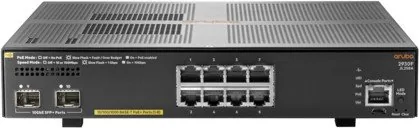
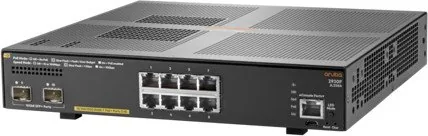
HPE Aruba 2930F 8G Desktop Gigabit Managed Switch
The HPE Aruba 2930F 8G Desktop Gigabit Managed Switch, 8x RJ-45, 2x SFP+, PoE+ Manual highlights a compact but capable networking platform designed for small offices, branch environments, and growing workgroups. It brings together eight Gigabit copper ports and two uplink-ready SFP+ slots, giving teams a practical mix of everyday connectivity and higher-speed expansion. For a desktop-class switch, it delivers the kind of stability and management tools usually expected from larger enterprise equipment.
One of the most valuable strengths of the Aruba 2930F family is its balance between simplicity and control. The switch is built for plug-and-play use, but it also supports full management features, including a console interface, web browser access, and remote administration through Telnet. That makes it useful for both quick deployments and more carefully tuned networks. The manual also emphasizes LED-based status monitoring, which helps with fast troubleshooting and day-to-day visibility.
PoE+ support adds even more flexibility. By delivering power directly over Ethernet, the switch can help run IP phones, wireless access points, cameras, and other powered devices without needing extra adapters at every endpoint. The combination of PoE+ and SFP+ uplinks makes this model especially attractive when a network needs clean cabling, reliable access, and a path for future growth. Features like Auto-MDI/MDI-X, automatic address learning, and support for VLANs and Spanning Tree further strengthen its usefulness in business settings.
Installation is straightforward, with options for desktop placement and, depending on the environment, rack-style deployment. The design includes helpful physical controls such as reset and clear buttons, while the transceiver slots can be used to extend connectivity through fiber. The result is a switch that feels compact on the outside but enterprise-ready in how it handles traffic, power, and manageability.
In practice, the Aruba 2930F 8G is a strong fit for teams that need dependable wired networking without unnecessary complexity. It is especially appealing when you want a managed switch that can support both local devices and uplink connections while keeping setup and maintenance manageable.
Notes
- Best suited for small business and branch networking
- PoE+ can reduce the need for separate device power supplies
- SFP+ uplinks help prepare the network for future expansion
Search for 67,706 Manuals online


Type-in Brand or Model