
HPE Aruba 2920 24G Manual
PDF manual · 114 Pages
English



Quick check
Incorrect answer, please try again.
Chat with your HPE Aruba 2920 24G manual using AI
Get instant AI answers from your HPE Aruba 2920 24G manual
Ask anything about the HPE Aruba 2920 24G. Answers come from this manual, with the pages they are based on.
Ask a Question
Do you recommend 2920 24G?
Yes NoFrequently Asked Questions
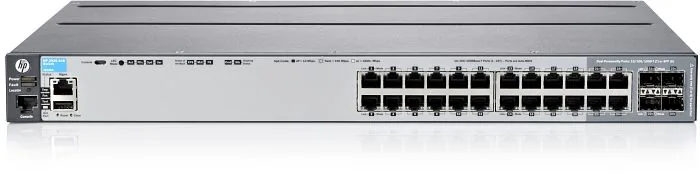
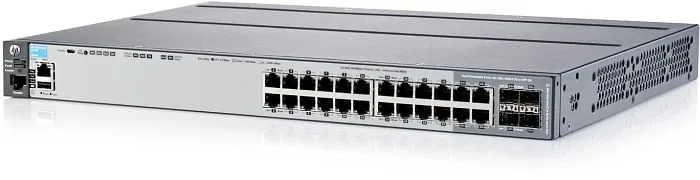
The 2920-24G features 20 fixed 10/100/1000 RJ-45 ports plus four dual-personality ports that operate as either RJ-45 or SFP. Optional 10G expansion modules add two 10G ports via SFP+ or 10GBASE-T modules.
Is this answer helpful?
Yes. With the HP 2920 Stacking Module installed, you can stack up to four HP 2920 switches using supported stacking cables in chain or ring topologies. The recommended topology is ring for resilience; chain is supported but less fault tolerant.
Is this answer helpful?
No. The 10G expansion modules and the stacking module are not hot-swappable. Install or replace these modules only when the switch is powered off; installing while powered on requires a reboot for proper operation.
Is this answer helpful?
PoE/PoE+ models provide IEEE 802.3af/at power on front RJ-45 ports (per-port up to 30W depending on PD). PoE must be enabled in software, and total PoE budget depends on the installed power supply (575W or 1050W options) and any external power shelf used.
Is this answer helpful?
Use the out-of-band console (RJ-45 or USB) to run the Switch Setup, assign an IP address, and set a manager password. After assigning an IP, manage the switch via web GUI, Telnet, or SNMP (HP IMC). By default the switch attempts DHCP if no manual IP is set.
Is this answer helpful?
Observe front-panel LEDs for fault indications, verify power supply and module status LEDs, attempt soft or hard reset per the guide, and consult the troubleshooting chapter for LED diagnostics, hardware tests, and steps to restore factory defaults if needed.
Is this answer helpful?
Yes. When an SFP transceiver is installed in a dual-personality slot, the associated RJ-45 connector is disabled. On PoE models, installing an SFP also disables PoE on that port.
Is this answer helpful?
Advantages and Disadvantages
Advantages

- Flexible port mix: 20x RJ-45 plus 4 dual-personality RJ-45/SFP ports for copper or fiber connectivity.
- Expandable: two 10G expansion slots (SFP+ or 10GBASE-T) and stacking up to 4 units into one virtual switch.
- Robust management: console, USB, web GUI, Telnet, SNMP and HP IMC support for enterprise management.
- PoE/PoE+ options: PoE-capable models supply 802.3af/at power with external power shelf support for redundancy.
- Comprehensive diagnostics: front-panel LEDs, mode button, reset/clear controls and detailed troubleshooting guidance.
Disadvantages

- 10G expansion and stacking modules are not hot-swappable — require powering off for install or replacement.
- PoE power per port and total budget require careful planning; insufficient power disables PDs.
- Some LED modes and stacking behaviors can be confusing when mixing PoE and non-PoE units in a stack.
- USB console requires driver installation on some OS versions; RJ-45 console and USB cannot be used simultaneously.
- SFP insertion disables the paired RJ-45 (and PoE on PoE models), limiting simultaneous port options.
Product Specification
Function
Switch
Type
Standalone, Rackmount (via mounting brackets), with module slot
Network ports
20x RJ-45, 4x RJ-45/SFP, 2x expansion slots (rear)
Speeds
24x RJ-45 (10/100/1000Base-T), 4x SFP (100M/1Gb/s), 2x expansion slots (2x 10Gb/s)
PoE
N/A
Backplane
128Gb/s, 95.2Mp/s, 9KB Jumboframes, 11.25MB packet buffer, 16k MAC addresses, 1x stacking module slot (rear)
Officially supported standards
802.1AB, 802.1AX, 802.1D, 802.1Q, 802.1X, 802.1ap, 802.1p, 802.1s, 802.1v, 802.1w, 802.3, 802.3ab, 802.3az, 802.3u, 802.3x, IGMPv3, MLDv2
Configuration
Web interface, console, configuration software, network (RJ-45, dedicated), serial (RJ-45, USB 1.1), via Cloud
Cooling
active
Dimensions (WxHxD)
17.44x1.77x13.23in, 1U
Weight
11.57lb
Color
dark gray, gray
Special features
removable mounting brackets, optional external redundant power supply, firmware updates possible
Manufacturer warranty
lifetime (10 years in AT/DE)
Product Description
HPE Aruba 2920 24G Rackmount Gigabit Managed Switch, 20x RJ-45, 4x RJ-45/SFP Manual
Overview
The HPE Aruba 2920-24G is a rackmount managed Gigabit Ethernet switch offering 20 fixed 10/100/1000 RJ-45 ports plus four dual-personality ports (RJ-45 or SFP). Designed for enterprise edge and access-layer deployments, the 2920 series delivers low-latency, store-and-forward switching, optional PoE/PoE+ support on PoE models, modular 10G expansion, and stacking capability for simplified management and scalability.
Key Features and Capabilities
The switch family supports field-replaceable power supplies, hot-pluggable SFP transceivers (for front SFP slots), and two rear expansion slots for 10G modules (SFP+ or 10GBASE-T). A dedicated management port, console (RJ-45 and USB) access, and an auxiliary USB port simplify setup and firmware updates. Stacking modules and cables let you combine up to four units into a single virtual switch with chain or ring topologies. Advanced management options include CLI console setup, web GUI, Telnet, SNMP, and integration with HP IMC.
PoE/PoE+ models supply standard-compliant power (802.3af/at) to endpoints and can leverage external HP RPS/EPS power shelves for redundancy and extra PoE capacity. The platform supports spanning tree variants (RSTP, RPVST+), VLANs (up to 256), OpenFlow, CDPv2, traffic management features, and regular software updates from HPE.
Installation and Operation
Installation covers rack or horizontal mounting, power connection (auto-ranging AC), optional module installation (requires power-off for rear modules), and cabling guidance (twisted-pair categories and fiber transceiver recommendations). LEDs and front-panel controls (Mode, Reset, Clear) provide status, diagnostic cues, and LED display modes (activity, speed, duplex, PoE, stack member ID). The guide details safe handling, thermal and clearance requirements, and stepwise procedures for boot verification, module and stacking installs, and minimal console-based IP/password setup.
Management and Troubleshooting
Initial configuration can be done via the out-of-band console to assign IP, set manager password, and enable remote management. Once networked, the switch is manageable via web GUI, Telnet, or SNMP/IMC. Troubleshooting sections describe LED diagnostics, reset options (soft/hard), factory reset procedure, hardware tests, and guidance for replacing power supplies, expansion modules, and stacking modules.
Notes
- Dual-personality ports disable the RJ-45 when an SFP is installed; on PoE models, installing an SFP disables PoE on that port.
- 10G expansion and stacking modules must be installed with the switch powered off (not hot-swappable).
- PoE must be enabled in software on PoE models and requires careful power budgeting for PDs and redundancy.
Search for 67,706 Manuals online


Type-in Brand or Model