
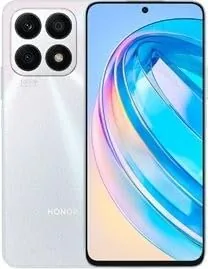
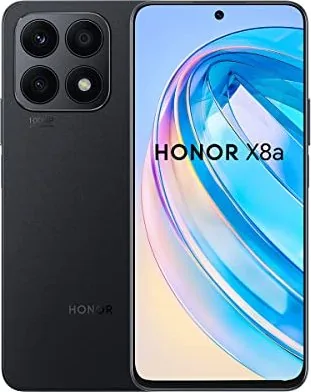
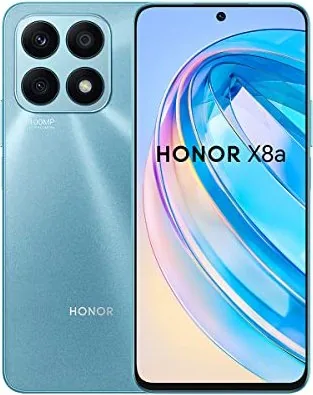
Honor X8a Manual
PDF manual · 101 Pages
English



Quick check
Incorrect answer, please try again.
Chat with your Honor X8a manual using AI
Get instant AI answers from your Honor X8a manual
Ask anything about the Honor X8a. Answers come from this manual, with the pages they are based on.
Ask a Question
Do you recommend X8a?
Yes NoFrequently Asked Questions
Knock twice with a knuckle or three fingers swipe down. You can also use power and volume buttons.
Is this answer helpful?
Yes using Device Clone app on both devices. Scan a code to connect and select data.
Is this answer helpful?
Swipe inward and hold to bring up dock. Drag app icon out of the dock.
Is this answer helpful?
Yes it identifies scenes and optimizes settings automatically. Turn on the icon in camera app.
Is this answer helpful?
Enable feature in accessibility gestures settings first. Flip phone when ringing.
Is this answer helpful?
Yes using Phone Link app and QR code. Both devices need internet access.
Is this answer helpful?
Pre-installed system apps should remain to avoid errors on device stability.
Is this answer helpful?
Advantages and Disadvantages
Advantages

- Intuitive gesture navigation including knuckles for screenshots
- Powerful AI camera with multiple specialized shooting modes
- Convenient Device Clone for seamless data transfer from old phones
- Smart connectivity features like HONOR Share and Phone Link
Disadvantages

- Knuckle gestures may require a screen protector adjustment
- Limited multi-window support varies depending on specific apps
- Charging speed can fluctuate based on battery age and temperature
- Some advanced settings need to be enabled manually in preferences
Product Specification
Operating System
Android 12.0 (Out of the box)
Display
6.7", 2388x1080 Pixels, 16 million colors, IPS/LTPS, capacitive touchscreen, Punch-hole, 60-90Hz Refresh Rate, 391 ppi
Rear Camera
100.0MP, f/1.9, Phase Detection AF, LED Flash, Videos @1080p/30fps (Camera 1); 5.0MP, f/2.2, Depth Sensor, Wide-angle Lens (Camera 2); 2.0MP, f/2.4, Macro Lens (Camera 3)
Front Camera
16.0MP, f/2.45, Videos @1080p/30fps
Connectivity & Ports
USB-C 2.0 (480Mb/s, OTG), Wi-Fi 5 (802.11a/b/g/n/ac), Bluetooth 5.1, NFC
Sensors
Accelerometer, Light Sensor, Compass, Fingerprint Sensor (Side-mounted)
Chipset
MediaTek Helio G88, 64-bit
CPU
2x 2.00GHz Cortex-A75 + 6x 1.80GHz Cortex-A55
GPU
Mali-G52 MC2
RAM
6GB
Storage
128GB
Navigation
A-GPS, GLONASS, BeiDou, Galileo
Modem
GSM (0.2Mbps/0.1Mbps), UMTS (42Mbps/5.76Mbps), LTE
Battery
4500mAh, Non-removable
Fast Charging
22.5W (Honor SuperCharge)
SAR
0.76W/kg Head, 1.14W/kg Body
Form Factor
Bar
Materials
Plastic (Back), Plastic (Frame)
SIM Type
Nano-SIM
Features
Dual-SIM
Dimensions
6.41" x 2.93" x 0.30"
Weight
0.39 lbs
Screen-to-Body Ratio
89.6%
Product Description
Discover the Honor X8a Experience
Using the Honor X8a Manual helps users maximize their device potential. This smartphone offers a seamless integration of smart features designed for modern life. From basic navigation to advanced photography, understanding how to utilize these tools ensures a smooth user journey.
Navigation and Gestures
The interface supports intuitive gestures. Users can swipe inward to return or up to access the home screen. Knuckle gestures allow for quick screenshots by knocking twice. Scrollshots are created by drawing an S shape with a knuckle. Pinch gestures help customize the home screen layout. This simplifies capturing content for social sharing and organization.
Customization and Home Screen
Personalization is key for individual preferences. You can add service cards and widgets directly to the home screen for quicker access. Pinching two fingers enters edit mode where you can organize folders efficiently. Big folders allow quick access to multiple apps without opening them. Setting a wallpaper involves adjusting blur or scrollable effects. Lock screen signatures add a unique touch to the security layer.
Camera Capabilities
The camera system shines with AI Photography modes. Portrait mode separates subjects with blurred backgrounds for a professional look. Night mode enhances details in low light environments. Pro Mode lets users adjust ISO and shutter speed manually. Video recording includes slow-motion and time-lapse options. Dual-view mode captures both front and rear perspectives simultaneously. High-Res mode ensures quality for large screen viewing.
Smart Features
Connectivity options include Device Clone for data transfer from old phones. HONOR Share facilitates wireless file transfer without cables. Linking with Windows PCs allows managing notifications and calls remotely on a desktop. Easy projection lets you wirelessly display your screen on larger displays for presentations. Switching audio channels between devices keeps sound flowing seamlessly.
Battery and Charging
Power management includes safety checks for the USB port automatically. The device wakes up quickly using the power button or raise to wake feature. Charging times vary based on ambient temperature and battery age. Battery health monitoring helps maintain longevity over time. Flipping the phone mutes incoming calls.
Essential Tools
Standard apps cover contacts, calendar, clock, and notepad for organization. Recorder captures audio with editing capabilities for notes. Calculator supports scientific functions. Mirror and Compass tools add utility for daily needs. App Twin supports dual accounts for messaging applications. Security features include face unlock and fingerprint sensors for protection.
Final Note
Mastering these functions enhances daily productivity. Regular updates ensure the system remains optimized for performance. Following setup instructions provides the best performance experience.
Search for 67,706 Manuals online


Type-in Brand or Model