
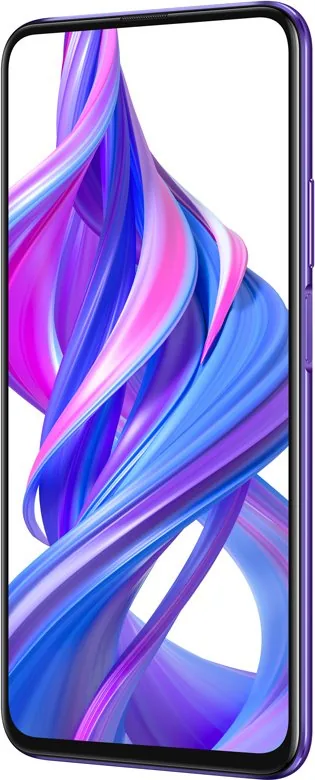
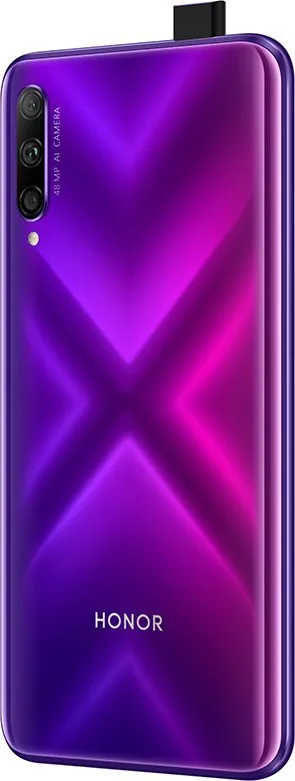

Honor 9X Pro Manual
PDF manual · 79 Pages
English



Quick check
Incorrect answer, please try again.
Chat with your Honor 9X Pro manual using AI
Get instant AI answers from your Honor 9X Pro manual
Ask anything about the Honor 9X Pro. Answers come from this manual, with the pages they are based on.
Ask a Question
Do you recommend 9X Pro?
Yes NoFrequently Asked Questions
Open Camera, go to More > Pro. From Pro Mode you can adjust ISO, shutter speed, EV compensation, AWB, metering (Matrix/Center/Spot), and focus mode (AF-S/AF-C/MF). Use a tripod for long exposures and refer to suggested ISO and shutter settings for different scenes.
Is this answer helpful?
The pop-up front camera physically rises when you switch to the front camera in the Camera app, enabling a full uninterrupted display. It retracts automatically when switching back or exiting Camera and will auto-retract if the phone detects a drop. You can enable or disable the pop-up sound in Sounds > More sound settings.
Is this answer helpful?
Use Huawei Share: enable it from the shortcuts panel (this turns on Wi‑Fi and Bluetooth), select files, tap Share, choose the nearby Huawei device, and confirm. Transfers use Bluetooth for discovery and Wi‑Fi Direct for fast transfer without using mobile data.
Is this answer helpful?
Use Settings > Security & privacy > App lock to protect apps with a password or PIN, and enable Fingerprint ID to unlock the Safe and locked apps. You can enroll up to five fingerprints under Fingerprint ID and toggle App lock per app for added privacy.
Is this answer helpful?
Open Optimizer > Optimize battery usage to see suggestions. Enable Power saving mode or Ultra power saving mode to limit background activity, use Smart resolution to reduce screen resolution automatically, and configure deep clean or background app restrictions in App launch to reduce consumption.
Is this answer helpful?
For scrolling screenshots, swipe down to open the shortcuts panel and tap the screenshot icon, then touch the scroll option within two seconds. For screen recording, use the Screen record shortcut in the notification panel or press Power + Volume up; tap the microphone icon to include ambient audio.
Is this answer helpful?
Yes. Go to Settings > Apps > App twin and enable App twin for supported apps (WeChat, WhatsApp, Facebook, etc.). Two icons will appear on the Home screen, letting you log into separate accounts simultaneously.
Is this answer helpful?
Advantages and Disadvantages
Advantages

- Versatile camera modes (Portrait, Pro, Light Painting, Panorama, Time-Lapse) for creative photography.
- Pop-up front camera enables uninterrupted full-screen display and retracts for protection.
- Dual 4G / Dual VoLTE / Dual VoWiFi support for high-quality calls while using data.
- Comprehensive security: fingerprint unlock, App lock, Safe, and multiple screen-lock options.
- Rich connectivity: Wi‑Fi+, Huawei Share, Wi‑Fi Direct, Bluetooth, and USB transfer modes.
Disadvantages

- Advanced camera modes (long exposures, star trails) often require a tripod for optimal results.
- Carrier or regional limitations may restrict features like VoWiFi, Wi‑Fi calling, or HiVision shopping.
- Pop-up camera mechanism introduces moving parts that could be more vulnerable than fixed cameras.
- Extensive features and background apps may require periodic optimization to avoid slowdowns.
- Some editing and sharing features function best within the Huawei ecosystem and may be limited on other devices.
Product Specification
Operating System
Android 9.0 (factory installed)
Display
6.59", 2340x1080 Pixels, 16M Colors, IPS, capacitive touchscreen, flat, 391ppi
Rear Camera
48.0MP, f/1.8, phase detection AF, LED flash, Videos @1080p/60fps (Camera 1); 8.0MP, f/2.4, wide-angle lens (Camera 2); 2.0MP, f/2.4, depth of field (Camera 3)
Front Camera
16.0MP, f/2.2, Videos @1080p/30fps, retractable
Interfaces
USB-C 2.0 (480Mb/s, OTG), 3.5mm jack, Wi-Fi 5 (WLAN 802.11a/b/g/n/ac), Bluetooth 4.2
Sensors
accelerometer, gyroscope, proximity sensor, light sensor, compass, fingerprint sensor (side-mounted)
SoC
HiSilicon Kirin 810, 64bit
CPU
2x 2.27GHz Cortex-A76+ 6x 1.90GHz Cortex-A55
GPU
Mali-G52 MP6
RAM
6GB
Storage
256GB (UFS 2.1), microSD slot (shared, up to 512GB)
Navigation
A-GPS, GLONASS, BeiDou
Modem
GSM (0.2Mbps/0.1Mbps), UMTS, LTE
Frequency Bands
2G (850/900/1800/1900), 3G (B1/B2/B5/B8), 4G (B1/B3/B7/B8/B20/B38/B40/B41)
Battery
4000mAh, non-removable
Charging Power
10W (USB)
SAR Value
0.79W/kg Head, 1.11W/kg Body
Form Factor
bar
Case Material
Glass (back), Metal (frame)
SIM Form Factor
Nano-SIM (1x shared)
Special Features
Dual-SIM, FM Radio
Dimensions
6.42x3.04x0.35in
Weight
0.45 lb
Screen-to-Body Ratio
84.7%
Note
Google Services not available!
Product Description
Honor 9X Pro Manual — Everything You Need to Know
The Honor 9X Pro is a feature-packed mid-range smartphone designed for mobile photographers, multitaskers, and everyday users who want strong value without compromise. With a capable triple-camera system, a pop-up front camera for uninterrupted full-screen display, dual-SIM support with dual VoLTE/VoWiFi, and a suite of software tools, the device blends hardware and software to support creative photography, secure daily use, and efficient multitasking.
Camera and Imaging
Photography is central to the Honor 9X Pro experience. The rear camera system offers versatile modes—Portrait, Wide Aperture, Panorama, Pro, Light Painting, Time-Lapse, and Moving Picture—so you can capture anything from dramatic night star trails to silky waterfalls and polished portraits. Pro Mode exposes controls for ISO, shutter speed, metering, AWB, and focus modes (AF-S, AF-C, MF), while Light Painting provides specialized long-exposure modes like traffic trails, light graffiti, silky water, and star trails. The motorized pop-up front camera preserves a true edge-to-edge display and retracts automatically for safety.
Performance, Connectivity, and Battery
The Honor 9X Pro supports dual 4G, dual VoLTE, and dual VoWiFi, which lets you make high-quality calls while using data. Wi‑Fi+, Huawei Share, Wi‑Fi Direct, Bluetooth, and USB modes (MTP/PTP/MIDI/charge) cover fast sharing and device connection needs. Power-saving options include Smart resolution, Power saving, and Ultra power saving modes; Optimizer tools help with memory cleanup, background app control, and auto-launch settings to keep the device responsive.
Usability and System Features
A clean, full-screen Home experience is supported by navigation options (three-key, navigation dock, or gestures) and features such as split-screen multitasking, shortcut switches, scrolling screenshots, and screen recording. HiVision and HiTouch offer visual search and shopping assistance. The Calendar, Email, Notepad, Recorder, and Clock apps integrate productivity features like VIP mail, event import, time-lapse creation, and screen-time tracking.
Security and Privacy
Security tools include fingerprint unlocking, App lock, Safe for private files, and multiple screen-lock options (PIN, pattern, password). Location services, permission management, and privacy settings let you control app access and protect personal data.
Personalization and Media
Gallery provides automatic photo categorization, editing tools (crop, filter, color splash, blur, beautify), and album management. Home screen customization includes wallpapers, app drawer, folders, and Simple mode for larger icons and fonts. App Twin enables use of two social accounts simultaneously.
Notes
- Pro/advanced camera settings may require a tripod for best long-exposure or low-light results.
- Some network features (VoLTE, VoWiFi, Wi‑Fi calling, HiVision/HiTouch shopping) depend on carrier or regional support.
- Use Optimizer and Memory Cleanup regularly to maintain performance and free storage.
Search for 67,706 Manuals online


Type-in Brand or Model