

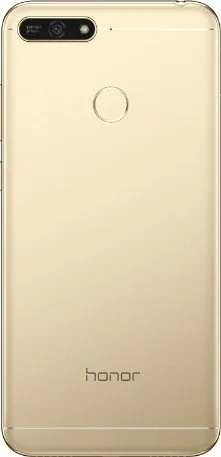

Honor 7A Manual
PDF manual · 82 Pages
English



Quick check
Incorrect answer, please try again.
Chat with your Honor 7A manual using AI
Get instant AI answers from your Honor 7A manual
Ask anything about the Honor 7A. Answers come from this manual, with the pages they are based on.
Ask a Question
Do you recommend 7A?
Yes NoFrequently Asked Questions
It explains how to use the Honor 7A efficiently, covering setup, home screen controls, calls, messages, camera tools, storage cleanup, privacy, backups, and network features. It is focused on practical everyday use.
Is this answer helpful?
Yes. The phone includes shortcut actions, quick toggles, and gesture-based tools that make common tasks faster. You can also place app functions or widgets on the home screen for easier access.
Is this answer helpful?
Yes. The device supports scrollshots, which let you capture an entire page or long conversation in one image. This is useful for articles, chats, and other content that extends beyond one screen.
Is this answer helpful?
It offers power-saving options, smart resolution settings, app-start control, and battery usage monitoring. You can also reduce background activity and turn off mobile data when it is not needed.
Is this answer helpful?
Yes. The phone includes app lock and screen lock options to help secure sensitive apps and personal data. You can also set location permissions and use other privacy controls for better protection.
Is this answer helpful?
The camera supports standard photos, videos, zoom, flash control, panorama, beauty mode, and additional shooting modes. The gallery also adds editing tools for cropping, filtering, watermarking, and organizing media.
Is this answer helpful?
Advantages and Disadvantages
Advantages

- Simple interface with shortcuts, quick switches, and easy home screen customization.
- Useful camera tools for photos, video, panoramas, beauty effects, and editing.
- Strong communication support with contacts sharing, call controls, and spam blocking.
- Built-in optimization, battery saving, virus scanning, and storage cleanup tools.
Disadvantages

- Some features depend on carrier, region, or third-party app support.
- Advanced menus and settings may take time to learn for new users.
- Certain preinstalled system apps cannot be removed.
- Some functions like voicemail or call forwarding may not work with every provider.
Product Specification
Operating System
Android 8.0 (out of the box)
Display
5.7", 1440x720 Pixels, 16 million colors, IPS, capacitive touchscreen, flat, 282ppi
Rear Camera
13.0MP, Contrast AF, LED Flash, Videos @1080p/30fps
Front Camera
8.0MP, f/2.2, LED Flash
Interfaces
USB Micro-B 2.0 (OTG), 3.5mm Jack, Wi-Fi 4 (WLAN 802.11b/g/n), Bluetooth 4.2
Sensors
Accelerometer, Proximity Sensor, Light Sensor, Fingerprint Sensor (rear)
SoC
Qualcomm MSM8937 Snapdragon 430, 64bit
CPU
8x 1.40GHz Cortex-A53
GPU
Adreno 505
Storage
16GB, microSD Slot (dedicated, up to 256GB)
Navigation
A-GPS, GLONASS, BeiDou
Modem
GSM (0.2Mbps/0.1Mbps), UMTS, LTE
Frequency Bands
2G (850/900/1800/1900), 3G (B1/B8), 4G (B1/B3/B7/B8/B20/B40)
Battery
3000mAh, non-removable
SAR Value
0.26W/kg Head, 0.88W/kg Body
Form Factor
Bar
SIM Form Factor
Nano-SIM
Special Features
Dual-SIM, Notification LED
Dimensions
6.00x2.87x0.31in
Screen-to-Body-Ratio
75.4%
Product Description
Honor 7A Manual: Everyday Convenience in a Compact Smartphone
The Honor 7A stands out as a practical entry-level smartphone designed to make daily tasks feel simple and familiar. The content behind the Honor 7A Manual highlights a device that focuses on clean navigation, fast access to tools, and a user experience shaped around essential needs rather than complexity. From the first setup to advanced customization, the phone offers a balanced mix of usability and useful extras.
One of the strongest themes is convenience. Shortcuts, quick switches, and gesture-based actions help users reach common features without digging through menus. Screenshots, scrollshots, and screen recording make it easy to capture content, while the home screen can be adjusted with widgets, folders, an app drawer, and larger icons in simple mode. This makes the Honor 7A appealing to users who prefer a straightforward interface but still want flexibility.
The communication tools are equally notable. Contacts can be imported, exported, merged, grouped, and shared through QR codes, Bluetooth, or third-party accounts. Calling and messaging functions are easy to manage, with options for call forwarding, voicemail, blocked numbers, spam filtering, and quick reply tools. These features make the phone feel organized and responsive for both personal and work life.
Photography is another highlight. The camera supports standard photos, video, portrait-style effects, panorama, beauty enhancements, and customizable shooting modes. Gallery tools continue the creative workflow with editing, albums, hiding private folders, and easy sharing. For users who enjoy casual photography, the Honor 7A delivers a surprising amount of control for a budget-friendly device.
Behind the scenes, the phone also pays attention to speed, storage, battery life, and privacy. The Phone Manager can optimize performance, clean junk files, scan for threats, and manage mobile data use. Battery-saving settings, smart resolution options, app-start controls, app lock, and location permissions help users protect both power and personal information. Backup options add another layer of reassurance, especially when switching devices or preparing for updates.
Notes
- Best suited for users who value simple operation and practical tools.
- Several features depend on carrier, region, or installed software.
- The overall experience is centered on reliability, cleanup, and easy communication.
This Honor 7A Manual shows a phone built for everyday efficiency. It does not try to impress with flashy complexity; instead, it emphasizes the functions people use most often and presents them in a clear, manageable way.
Search for 67,706 Manuals online


Type-in Brand or Model