
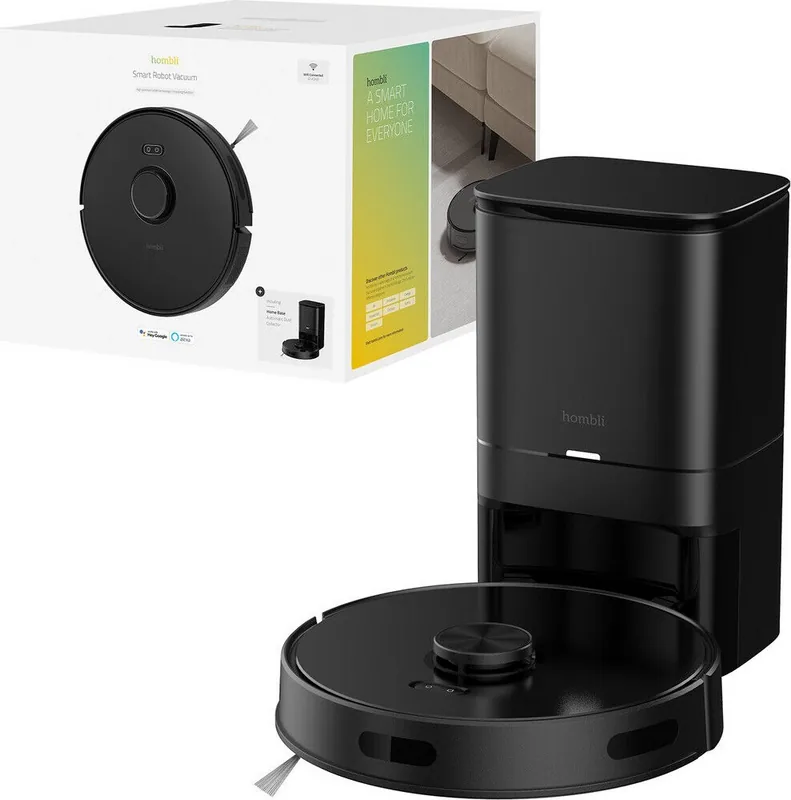
Hombli Smart Robot Vacuum Manual
PDF manual · 36 Pages
English



Quick check
Incorrect answer, please try again.
Chat with your Hombli Smart Robot Vacuum manual using AI
Get instant AI answers from your Hombli Smart Robot Vacuum manual
Ask anything about the Hombli Smart Robot Vacuum. Answers come from this manual, with the pages they are based on.
Ask a Question
Do you recommend Smart Robot Vacuum?
Yes NoFrequently Asked Questions
Download the Hombli app, create an account and family, tap Add Device and select the Smart Robot Vacuum. Choose your Wi‑Fi network, enter the password, press and hold Home + On/Off for 3 seconds until lights flash, then follow the in-app instructions to finish pairing.
Is this answer helpful?
Fully charge the robot (about 4 hours), open all doors of rooms to include, then start the default cleaning mode from the app. The robot scans the floor, returns to the Home Base, and the completed map appears in the app. Edit and save the map and repeat per floor if needed.
Is this answer helpful?
Wet the mop before installation, fill the water tank, attach the mop bracket and reinstall the dustbin. Set the wetness level in cleaning preferences, add no-mop zones for carpets, and always remove and clean the mop after use; do not charge with the mop attached to prevent mold and floor damage.
Is this answer helpful?
There are four modes: default whole-floor cleaning for routine jobs; room cleaning to target specific rooms once or twice; area cleaning for selected map regions; and spot cleaning for a 1.5 m² area. Choose based on coverage needed and frequency.
Is this answer helpful?
In the Map Edit section choose Edit Restricted Areas, then add No-go or No-mop zones. Adjust position, size and rotation to protect carpets, play areas or fragile zones. You can also place virtual walls to block passages.
Is this answer helpful?
Regularly clean brushes, filters, dust bags and the mop; follow app prompts to track part life. Replacement parts, filters and dust bags are available at shop.hombli.com and step-by-step guides are on support.hombli.com.
Is this answer helpful?
Yes. The Smart Robot Vacuum is compatible with Google Assistant and Amazon Alexa. Follow the provided installation guides and videos in the app or on support.hombli.com to link your voice assistant and enable voice commands.
Is this answer helpful?
Advantages and Disadvantages
Advantages

- Automatic dust-collecting Home Base reduces daily maintenance and simplifies disposal.
- Smart mapping with editable room division and per-room cleaning settings for tailored cleaning.
- Multiple cleaning modes (default, room, area, spot) plus adjustable suction and mop wetness.
- App control, scheduling, cleaning history and smart-home integration with Google and Alexa.
- Comes with spare brushes, filters and dust bags; replacement tracking in app and online support.
Disadvantages

- Initial mapping requires tidy rooms and uninterrupted runtime (~4 hours) which may be time-consuming.
- Mop must be removed for charging and cleaned after each use to avoid mold and flooring damage.
- Virtual no-go/no-mop zones required to protect carpets—no automatic carpet-detection for mopping.
- Home Base placement needs a clear area (1.5m front, 0.5m sides) which limits docking locations.
- Some advanced setup steps (Wi‑Fi, voice assistant linking) may be challenging for non-technical users.
Product Specification
Robot vacuum cleaner
Battery
Li-Ion
Color
black
Capacity
300 ml fresh water (10.14 fl oz fresh water)
Cleaning modes
5 cleaning modes, Vacuuming, Vacuuming & Mopping
Navigation
Drop sensor, Dirt sensor, Laser sensor (LiDAR), No-go zones, Obstacle crossing (up to 0.79 in), Stair detection
Filtering
yes
Display
no
Special features
1x floor brush, 1x side brush, programmable cleaning times
Smart Home
App control (Wi-Fi), Voice assistant (Amazon Alexa, Apple Siri, Google Assistant)
Operating time
90 min
Charging system
automatic
Scope of delivery
Station
Station
Station color
black
Station display
no
Station special features
automatic charging function, automatic dust emptying
Station capacity
4 l (dust) (4.23 qt (dust))
Product Description
Hombli Smart Robot Vacuum Saug-/Wischroboter inkl. Absaugstation schwarz Manual
The Hombli Smart Robot Vacuum in black is a versatile autonomous cleaner that vacuums and mops while returning to a Home Base that automatically collects dust. Designed to save time, it pairs with the Hombli app to schedule cleanings, create and edit floor maps, and tune per-room cleaning preferences. With multi-language support and smart-home compatibility, the robot integrates with Google Assistant and Amazon Alexa for voice control and remote commands.
Key features and how it helps
The unit includes a smart docking Home Base with dust bag collection, an installed main brush and side brush (plus spares), filters, mop brackets and spare mops. Setup steps are simple: place the Home Base on a level hard floor, remove protective strips, attach side brushes, power on and charge. The robot learns your floor by scanning and creating an editable map, letting you set no-go and no-mopping zones to protect carpets and fragile areas.
Cleaning modes include default whole-floor cleaning, room cleaning, area cleaning and spot cleaning. You can customize suction power and mop wetness globally or per room. The mopping system uses a detachable water tank and mop bracket; the mop should be wetted before use and removed for charging and after every session to avoid mold. Real-time map updates and automatic repositioning help maintain navigation accuracy even when furniture moves.
App and smart home integration
The Hombli app guides Wi‑Fi setup, account creation, device addition, map saving, and per-room settings. Features include scheduled cleanings, cleaning history, locating the robot if lost, different voice options, and remote-control mode for stuck situations. Optional integration with Google Assistant and Alexa enables voice commands and smart-home routines.
Maintenance and safety
Regular maintenance is recommended: clean filters, brushes, mop and dust components, and track replacement part life in settings. Spare parts and dust bags are available from Hombli’s shop. Safety notes stress using only the Hombli Home Base for charging, unplugging before maintenance, keeping children supervised, and following waste-disposal rules. Online guides and troubleshooting resources are on support.hombli.com.
Notes:
- Charge the robot fully (about 4 hours) before mapping.
- Avoid moving the robot during mapping to prevent creating a new map.
- Remove and clean the mop after each use to prevent mold.
Search for 67,732 Manuals online


Type-in Brand or Model