
Hikvision DS-2CE56D5T-IRM Manual
PDF manual · 2 Pages
English



Quick check
Incorrect answer, please try again.
Chat with your Hikvision DS-2CE56D5T-IRM manual using AI
Get instant AI answers from your Hikvision DS-2CE56D5T-IRM manual
Ask anything about the Hikvision DS-2CE56D5T-IRM. Answers come from this manual, with the pages they are based on.
Ask a Question
Do you recommend DS-2CE56D5T-IRM?
Yes NoFrequently Asked Questions
It is best for general CCTV monitoring in places like entrances, hallways, shops, and indoor security points. Its wide-angle fixed lens and image controls make it practical for everyday surveillance.
Is this answer helpful?
Yes. The model uses a fixed 2.8mm lens, which is designed to provide a broad viewing area without manual zoom adjustment. It is a simple choice for stable coverage.
Is this answer helpful?
Yes. The camera supports on-screen menu adjustments for exposure, white balance, day/night behavior, brightness, sharpness, noise reduction, and other image options. A coaxial controller is needed to change these settings.
Is this answer helpful?
Yes. The camera includes low-light support, SMART IR, and exposure controls that help it perform better when lighting drops. These features are useful for night monitoring and dim indoor areas.
Is this answer helpful?
Check the power supply, cable routing, mounting surface strength, and overall installation environment before fitting the camera. The manual also advises confirming that the wall can support the camera and mounting base safely.
Is this answer helpful?
Yes. Motion detection can highlight movement in selected areas, and privacy masking can hide zones that should not be visible. These tools help make surveillance more precise and flexible.
Is this answer helpful?
Advantages and Disadvantages
Advantages

- 2.8mm fixed lens offers a wide, practical viewing angle for general surveillance.
- 3-axis adjustment makes positioning easier on ceilings and walls.
- SMART IR, exposure, and day/night controls help the camera handle changing light.
- BLC, HSBLC, and noise reduction improve image clarity in difficult scenes.
- Motion detection and privacy masking add useful monitoring control.
Disadvantages

- Advanced menu setup needs a separate coaxial controller, which adds extra hardware.
- The fixed lens design limits zoom and framing flexibility.
- Analog TVI systems may feel less modern than IP-based camera setups.
- Installation requires careful mounting, cabling, and power checks.
Product Specification
Type
Dome
Image Sensor
CMOS 2.0 MP
Resolution
1920x1080 Pixels (25fps)
Lens
0.11 in
Light Sensitivity
0.014 Lux (Color), 0 Lux (IR)
Viewing Angle
103.5° (horizontal)
Pan
0° to 360°
Tilt
0° to 75°
Connectors
1x BNC
Illumination
IR Illumination (65.62 ft)
Protection Class
IP66
Housing
suitable for outdoor use
Zone & Analysis Functions
Motion Detection, Privacy Zones, IR Filter
Manufacturer's Warranty
3 Years
Product Description
Hikvision DS-2CE56D5T-IRM 2.8mm Manual
Compact surveillance with flexible setup
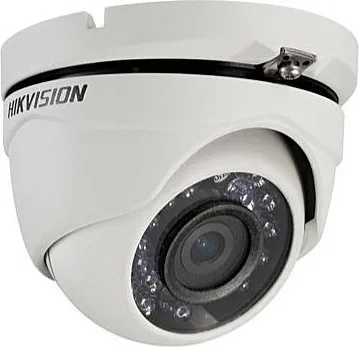
The Hikvision DS-2CE56D5T-IRM 2.8mm is a turret-style dome camera built for dependable everyday monitoring. With a fixed 2.8mm lens and a high-sensitivity sensor, it is designed to deliver clear video with low noise and controlled distortion, making it a strong fit for entrances, corridors, retail spaces, and other areas that need broad coverage.
One of the most practical details in the Hikvision DS-2CE56D5T-IRM 2.8mm Manual is the camera's 3-axis adjustment structure. This makes installation easier because the camera can be aligned on ceilings or walls without major repositioning. For installers and users who want a clean viewing angle and a stable setup, that flexibility is a real advantage. Its analog TVI output also keeps it compatible with traditional CCTV systems.
Image tuning for changing lighting
The camera includes an on-screen display menu that lets users fine-tune how the image looks in different environments. Exposure options, white balance presets, day and night modes, and brightness control all help the camera adapt to real-world lighting changes. SMART IR support is especially useful after dark, when infrared lighting needs to be balanced to avoid washed-out subjects.
Backlight tools such as BLC and HSBLC add another layer of control when bright windows, doors, or headlights appear in the frame. Noise reduction settings, sharpness adjustment, and defog options further improve the final image. These details matter most in places where lighting is not constant and security footage must stay readable throughout the day.
A practical camera for real installations
Beyond image quality, the model focuses on everyday usability. Motion detection helps identify movement in key zones, while privacy masking can hide sensitive areas that should not be recorded visibly. PAL and NTSC support, scene presets, and menu language options make the device easier to adapt to different installation needs.
The installation guidance also highlights careful planning: checking power compatibility, routing cables properly, and confirming that the mounting surface is strong enough. That approach reflects the camera's purpose as a reliable part of a larger surveillance system rather than a quick consumer gadget. When installed correctly, it can provide consistent performance in a wide range of indoor monitoring situations.
Notes
- Best suited for coaxial CCTV setups.
- A compatible coaxial controller is needed for menu adjustments.
- Proper mounting and angle setup can improve both night vision and backlight handling.
- The fixed lens keeps the design simple, but it does not offer zoom flexibility.
Search for 67,706 Manuals online


Type-in Brand or Model