

HighPoint SSD7000 Series Manual
PDF manual · 71 Pages
English



Quick check
Incorrect answer, please try again.
Chat with your HighPoint SSD7000 Series manual using AI
Get instant AI answers from your HighPoint SSD7000 Series manual
Ask anything about the HighPoint SSD7000 Series. Answers come from this manual, with the pages they are based on.
Ask a Question
Do you recommend SSD7000 Series?
Yes NoFrequently Asked Questions
Available RAID levels depend on the controller. SSD7202 supports RAID 0 and RAID 1. Many other listed HighPoint NVMe models also support RAID 10. RAID 0 prioritizes performance, RAID 1 provides mirroring, and RAID 10 combines striping with mirrored protection.
Is this answer helpful?
Management is available through a browser-based WebGUI and a command-line interface. The WebGUI provides visual status information and guided configuration, while the CLI supports detailed queries, array creation, rebuilds, verification, scheduled tasks, event management, and mail configuration.
Is this answer helpful?
Yes. The Storage Health Inspector uses SMART information to present drive health details. It can report NVMe temperature and total bytes written, and it supports scheduled health checks. The documented temperature warning threshold is 60 degrees C.
Is this answer helpful?
A critical array remains accessible but no longer has full fault tolerance. Reinsert the original drive or add a replacement drive, then rebuild the array as soon as possible. A configured spare disk can automatically replace a failed member and reduce exposure time.
Is this answer helpful?
Yes. SMTP settings allow event notifications to multiple recipients. Recipients can be configured for information, warning, and error events. A test email option helps verify the configuration before relying on alerts.
Is this answer helpful?
Foreground initialization gives the task higher priority and the array is unavailable until it finishes. Background initialization takes longer but keeps the array accessible. Both methods prepare redundant arrays, but foreground initialization is generally the safer recommended approach.
Is this answer helpful?
Advantages and Disadvantages
Advantages

- PCIe 4.0 x16 connectivity supports high-bandwidth multi-NVMe storage configurations.
- WebGUI provides guided array creation and status monitoring for less experienced users.
- CLI offers cross-platform automation and detailed administrative control.
- Supports RAID 0, RAID 1, and, on select models, RAID 10 for varied performance and redundancy goals.
- SMART monitoring, scheduled verification, spare disks, event logs, and email alerts support proactive maintenance.
Disadvantages

- RAID level support and features such as Cross-Sync vary by controller model.
- RAID 0 delivers speed but has no fault tolerance if a drive fails.
- RAID 1 and RAID 10 reduce usable capacity in exchange for data redundancy.
- Creating, initializing, or deleting arrays can erase data if settings are chosen incorrectly.
- Email alerts may require SMTP configuration and account security adjustments.
Product Specification
Connection
PCIe 4.0 x16
Interfaces
4x M.2 (PCIe/NVMe)
Internal
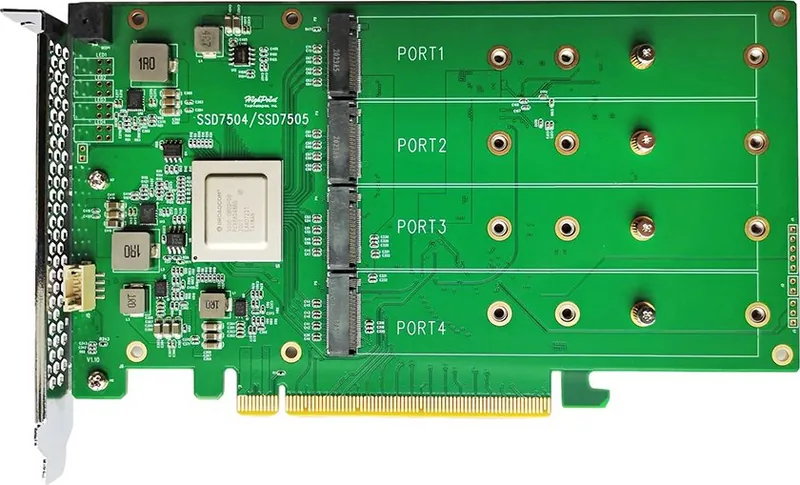
4x M.2/M-Key (PCIe 3.0 x4, 22110/2280/2260/2242, female)
External
N/A
RAID Levels
0/1/10/Single Disk
Cache
N/A
Special Features
Bootable
Product Description
HighPoint NVMe RAID Controller, PCIe 4.0 x16 - Read, Download & Print Free
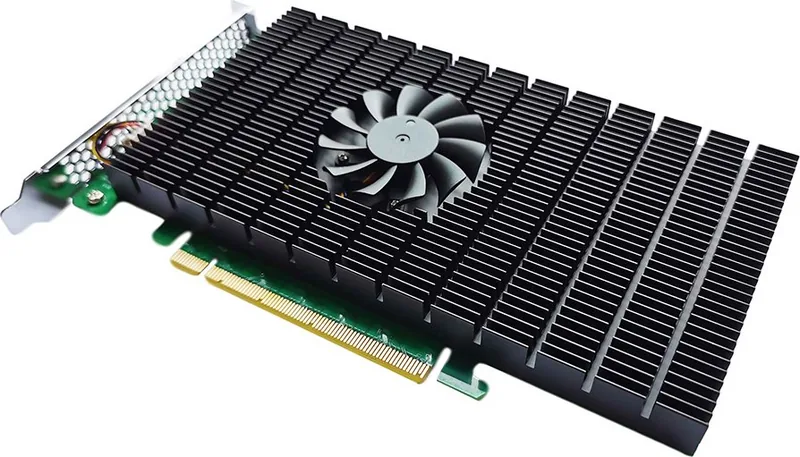
The HighPoint NVMe RAID Controller, PCIe 4.0 x16 is designed for workstations and servers that need to combine multiple NVMe SSDs into fast, manageable storage arrays. It gives performance-focused users a practical way to scale capacity, improve throughput, and add redundancy without relying on a single drive. Support for PCIe 4.0 x16 provides a high-bandwidth connection for demanding workloads such as content creation, database operations, virtualization, and high-speed application storage.
Flexible RAID Management
HighPoint management software offers both a browser-based WebGUI and a command-line interface. The WebGUI is suited to users who want clear status displays and guided configuration, while the CLI provides detailed control for experienced administrators. Both approaches support local or remote management across major operating systems, making the controller easier to integrate into mixed environments.
Users can review controller condition, configured arrays, and physical NVMe SSD details from a central view. The interface reports drive model, capacity, serial information, PCIe link details, free space, and current device status. This visibility helps administrators identify changes quickly and maintain a clearer picture of the storage environment.
RAID Choices for Speed and Protection
Supported configurations vary by controller model, but the product family supports RAID 0, RAID 1, and RAID 10 options. RAID 0 focuses on speed by striping data across drives. RAID 1 mirrors data for redundancy, while RAID 10 combines striping and mirroring for a balance of performance and protection. Array settings also include capacity selection, block-size tuning, and initialization methods.
Initialization can be performed in foreground or background modes. Foreground initialization prioritizes completion, while background initialization keeps the array accessible during the process. Users should choose carefully, because array creation, initialization, and deletion can affect existing data.
Monitoring and Maintenance Tools
The controller includes storage health features based on SMART data, including NVMe temperature and total bytes written monitoring. Scheduled health checks, array verification tasks, automatic rebuilding, spare-drive pools, event logs, and email notifications help support proactive maintenance. When a redundant array enters a critical state, a spare or replacement drive can be used to restore protection through rebuilding.
Note: Confirm SSD and motherboard compatibility before deployment. Use redundant RAID levels for availability, but maintain independent backups for important data.
HighPoint NVMe RAID Controller, PCIe 4.0 x16 - Read, Download & Print Free is a strong choice for users who need centralized NVMe storage control, configurable RAID options, and ongoing health monitoring in a high-performance PCIe environment.
Search for 67,706 Manuals online


Type-in Brand or Model