

HighPoint RocketStor RS641 Manual
PDF manual · 77 Pages
English



Quick check
Incorrect answer, please try again.
Chat with your HighPoint RocketStor RS641 manual using AI
Get instant AI answers from your HighPoint RocketStor RS641 manual
Ask anything about the HighPoint RocketStor RS641. Answers come from this manual, with the pages they are based on.
RocketStor RS641 Maintenance Schedule
Use the Health Inspector Scheduler to periodically check disks and arrays for optimal function by selecting a monthly schedule.
Identify the faulty disk via LED or WebGUI, remove it, and replace with a new drive to trigger automatic rebuild.
Free maintenance reminders
Timed to your purchase date. Always free, unsubscribe anytime.
Ask a Question
Do you recommend RocketStor RS641?
Yes NoFrequently Asked Questions
The system supports up to four SAS or SATA drives. It accepts 3.5-inch hard drives and 2.5-inch SSDs using the included trays and mounting hardware. For RAID use, validated or RAID-oriented drives are recommended.
Is this answer helpful?
Supported configurations include JBOD, RAID 0, RAID 1, RAID 5, RAID 6, and RAID 10. The best choice depends on whether your priority is speed, usable capacity, or protection against one or more drive failures.
Is this answer helpful?
HighPoint RAID Management is a browser-based utility used to create, monitor, maintain, and recover arrays. It also provides firmware updates, event logs, email notifications, spare-pool controls, and SMART health information.
Is this answer helpful?
Yes. Online Capacity Expansion and Online RAID Level Migration allow supported arrays to add capacity or change RAID level. HighPoint recommends verifying or rebuilding the array before starting, and the operation must be resumed if stopped.
Is this answer helpful?
In a redundant array, the status may become critical while data remains accessible. Replace or reseat the affected drive, then rebuild the array. A configured hot spare can automatically join supported RAID 1, 5, 6, and 10 arrays.
Is this answer helpful?
Yes. When localhost-only access is disabled, systems on the same local network can access the management interface using the host computer IP address and configured WebGUI port. Email alerts can also report selected events.
Is this answer helpful?
Advantages and Disadvantages
Advantages

- Supports RAID 0, 1, 5, 6, 10, and JBOD for performance, capacity, or redundancy needs.
- Four-bay enclosure accepts SAS and SATA drives in both 3.5-inch and 2.5-inch formats.
- Web-based management includes alerts, SMART monitoring, scheduled verification, hot spares, and event logs.
- Supports online capacity expansion, RAID migration, and array roaming with compatible HighPoint controllers.
- ECC-protected cache and optional battery backup support improved write performance and cache protection.
Disadvantages

- Maximum capacity is limited to four installed drives and up to 32TB in the stated specifications.
- The RocketRAID 4522 requires an available PCIe x8-compatible slot in the host computer.
- Write-back caching can risk unwritten cached data during power loss without the optional battery backup unit.
- RAID 5 and RAID 6 are less suitable for workloads with frequent, heavy write activity.
- Setup requires driver installation, WebGUI configuration, and operating system volume initialization.
Product Specification
Form factor
3.5 in
Color
black
USB write mode
Link
Product Description
HighPoint RocketStor RS641 - Read, Download & Print Free
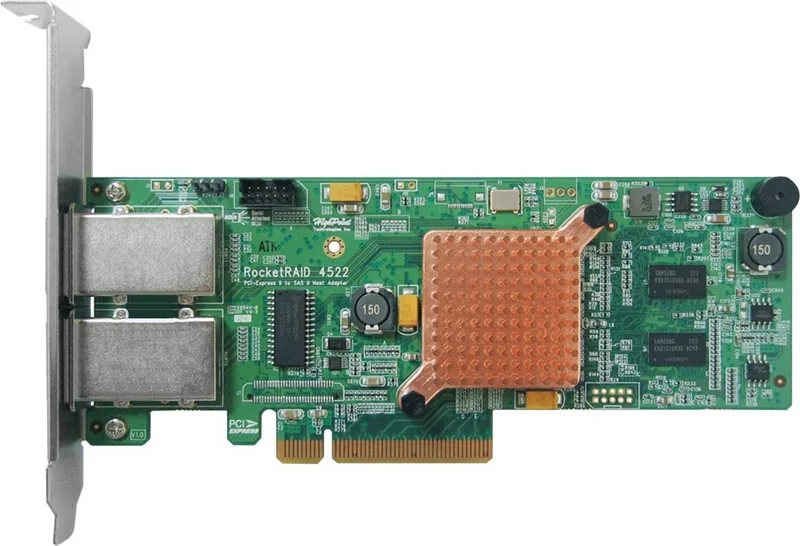
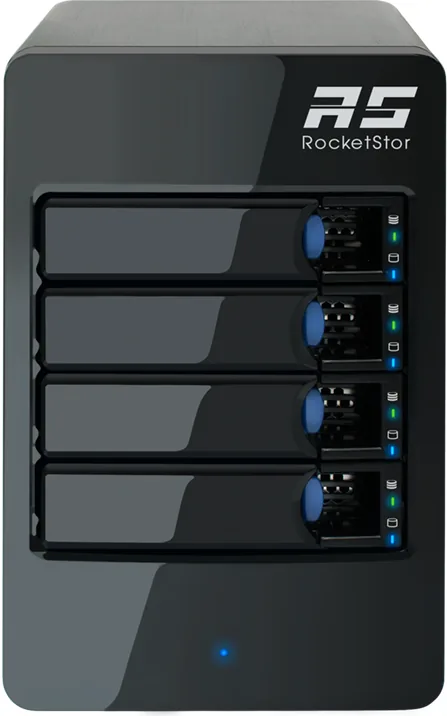
The HighPoint RocketStor RS641 is an external RAID storage solution designed for users who need flexible, high-capacity disk management with hardware-level protection. The bundle combines a four-bay aluminum enclosure with a HighPoint RocketRAID 4522 PCIe host adapter, allowing up to four SAS or SATA hard drives and SSDs to be managed as a single storage system.
Built for expandable RAID storage
With support for RAID 0, 1, 5, 6, 10, and JBOD, the RocketStor RS641 can be configured for performance, redundancy, or a balance of both. RAID 0 favors speed, while RAID 1 mirrors data for simple protection. RAID 5 and RAID 6 add parity-based fault tolerance, making them useful for archives and important shared data. The system supports up to 32TB of capacity and accepts both 3.5-inch hard drives and 2.5-inch SSDs.
The enclosure connects to the included controller through a Mini-SAS SFF-8088 connection. The RocketRAID 4522 uses a PCIe 2.0 x8 interface and includes 512MB of ECC-protected DDR3 cache. Its write-back cache can improve write performance, while write-through mode prioritizes data safety. An optional battery backup unit helps protect cached data during a power interruption.
Monitoring and management tools
HighPoint RAID Management provides browser-based controls for creating arrays, checking drive status, updating firmware, and reviewing event logs. Users can configure email alerts, schedule integrity verification tasks, manage hot spares, and monitor SMART information through the Storage Health Inspector. These tools help identify overheating disks, sector errors, and other issues before they become critical.
The RocketStor RS641 also supports online capacity expansion and RAID level migration, allowing compatible arrays to grow or change without rebuilding storage from scratch. Array metadata is stored on the disks, supporting online array roaming between compatible HighPoint RAID controllers.
Practical design details
The brushed aluminum enclosure has individual drive trays, disk presence and activity LEDs, a power indicator, and an alarm mute button for fan or temperature warnings. It operates in temperatures from 5C to 45C and supports Windows, Linux, FreeBSD, and macOS environments. This makes it a practical option for creative workstations, small servers, backup storage, and media-focused workflows.
Note: Back up important data before changing RAID settings, replacing drives, updating firmware, or beginning an array migration. Use RAID-oriented, validated drives for dependable operation.
Search for 67,706 Manuals online


Type-in Brand or Model