
HighPoint RocketRAID 622 Manual
PDF manual · 22 Pages
English



Quick check
Incorrect answer, please try again.
Chat with your HighPoint RocketRAID 622 manual using AI
Get instant AI answers from your HighPoint RocketRAID 622 manual
Ask anything about the HighPoint RocketRAID 622. Answers come from this manual, with the pages they are based on.
Ask a Question
Do you recommend RocketRAID 622?
Yes NoFrequently Asked Questions
The controller supports RAID 0, 1, 5, 10, 50 and JBOD configurations suitable for various storage needs.
Is this answer helpful?
Access the BIOS management utility by pressing the Control plus H key combination during system boot.
Is this answer helpful?
Yes, it is compatible with Windows 8, 7, Vista and Windows Server editions including 2012 and 2008.
Is this answer helpful?
Yes, it supports major Linux distributions and FreeBSD operating systems.
Is this answer helpful?
Drivers are installed via Windows Device Manager or by following specific package instructions for Linux.
Is this answer helpful?
Yes, the system supports drive sizes larger than two terabytes for expanded storage capacity.
Is this answer helpful?
You can connect up to four direct drives, or up to twenty with port multiplier capable enclosures.
Is this answer helpful?
Advantages and Disadvantages
Advantages

- Supports RAID 0, 1, 5, 10, 50 and JBOD configurations for flexible storage management.
- Fully backwards compatible with SATA 3Gb/s devices and older PCI Express motherboards.
- Includes SMTP email notifications and LED indicators for drive failure reporting.
- Provides Web based management software interface for easy configuration across operating systems.
- Supports drives larger than two TB with bootable RAID array functionality.
Disadvantages

- May require manual driver installation if Windows does not locate controller automatically.
- BIOS mode selection requires careful configuration to enable bootable storage options.
- Power must be fully disconnected during physical hardware installation and setup.
- Port multiplier support may require specific enclosure hardware to function correctly.
- Some RAID initialization options carry risk of data loss if not executed carefully.
Product Specification
Connection
PCIe 2.0 x1
Interfaces
2x SATA 6Gb/s
Internal
N/A
External
2x eSATA 6Gb/s
RAID Level
0/1
Chipset
Marvell 88SE9128
Product Description
Overview
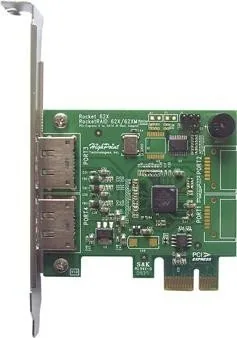
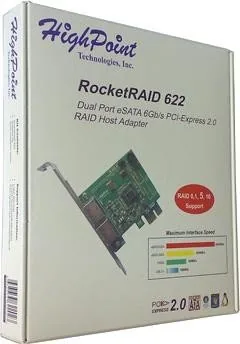
When analyzing storage requirements, the HighPoint RocketRAID 622 PCIe 2.0 x1 Manual provides details on adapters. This product represents second generation SATA technology from HighPoint Technologies. It is designed specifically for desktop PC and workstation environments. The hardware is positioned as an affordable solution for reliable data storage management. This adapter ensures stability for critical workloads.
Specifications
The card utilizes a PCI Express 2.0 host bus interface. It connects four SATA ports directly for local drive attachment. Users can expand capacity using port multiplier chassis which supports up to twenty devices. This flexibility ensures small home servers scale into larger NAS implementations. Each port supports standard SATA and eSATA connectors. Port multipliers maximize storage capacity significantly.
RAID Features
Supported RAID configurations include levels zero and one. Levels five and ten are also available. Redundancy is achieved through spare drive configurations. The system supports large drive sizes over two terabytes. Bootable RAID array support allows OS installation on the controller. This is vital for system stability. Write back cache settings are configurable for performance tuning.
Drivers
Management tools are central to the user experience. A Web based management software interface is provided for Windows and Linux. Installation involves downloading drivers for Device Manager. Drivers must be updated manually if Windows does not find them automatically. Linux installation requires specific package references.
BIOS
Configuration is handled through a BIOS setting utility. Accessible via the Ctrl plus H hotkey during boot. There are two BIOS modes for flexibility. Bootable BIOS allows the system to start from the card. Non Bootable is for data storage only. Settings include disk spin down and array names. Initialization commands prepare disks before array creation. These steps ensure data integrity throughout usage.
Alerts
Maintenance is streamlined with LED indicators. They show hard drive activity and failure states. SMTP email notification sends alerts for errors. An alarm buzzer can indicate drive array issues. This proactive approach helps prevent data loss. The utility displays device status and array details. Online support portals are available for firmware updates.
Conclusion
This product stands out for its compatibility. It works with Windows 8, 7, Vista and major Linux distributions. Drivers are available for easy deployment. Whether you need simple storage or complex array redundancy, this HBA fits the needs.
Search for 67,706 Manuals online


Type-in Brand or Model