
HighPoint RocketRAID 4520 Manual
PDF manual · 86 Pages
English



Quick check
Incorrect answer, please try again.
Chat with your HighPoint RocketRAID 4520 manual using AI
Get instant AI answers from your HighPoint RocketRAID 4520 manual
Ask anything about the HighPoint RocketRAID 4520. Answers come from this manual, with the pages they are based on.
RocketRAID 4520 Maintenance Schedule
Use the Health Inspector Scheduler to set a monthly schedule for verifying array integrity.
Log into WebGUI and check the charge status under Extended Information in the Physical tab.
It is recommended to verify or rebuild your array before expanding or migrating capacity.
Free maintenance reminders
Timed to your purchase date. Always free, unsubscribe anytime.
Ask a Question
Do you recommend RocketRAID 4520?
Yes NoFrequently Asked Questions
The controller supports Windows 7, 8, 10, and Server versions, as well as major Linux distributions like RHEL, CentOS, and Ubuntu. FreeBSD and Mac OS X versions are also supported for various RAID and tape features.
Is this answer helpful?
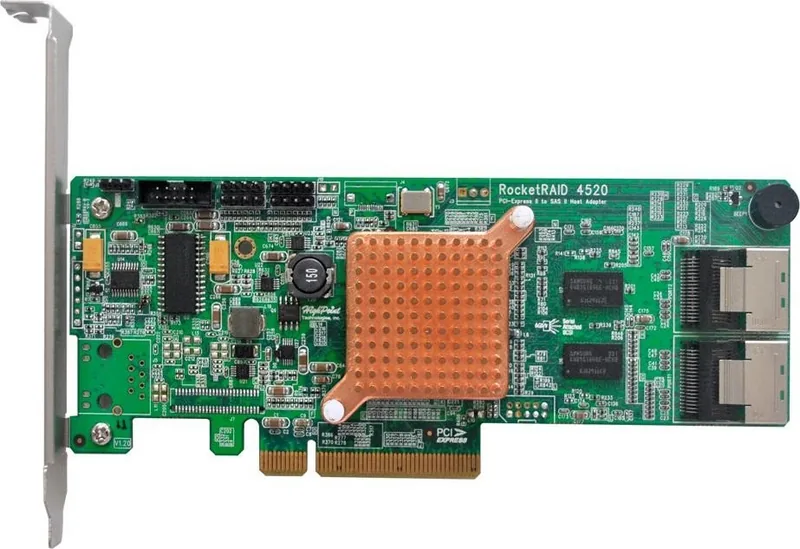
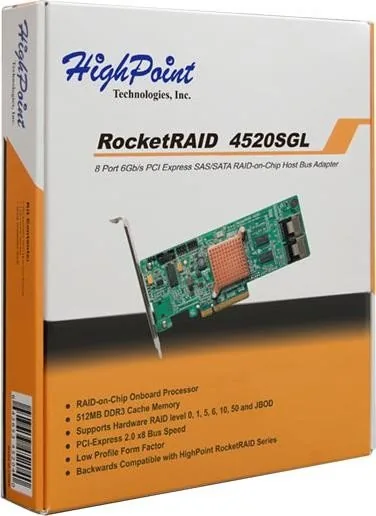
The card provides eight native 6Gb/s SAS/SATA ports organized into two dual Mini-SAS connectors. This allows for up to 128 drives when connected with compatible SAS expanders.
Is this answer helpful?
Yes, the controller supports bootable RAID arrays. You can install an operating system directly onto a RAID volume created by the card. Specific driver loading steps are required during OS installation.
Is this answer helpful?
Each port supports data transfer rates up to 6Gb/s, which is the standard for SATA III and SAS II interfaces. This ensures consistent performance across all connected devices.
Is this answer helpful?
Yes, this adapter is fully compatible with SAS Expanders. This feature enables the connection of a large number of drives beyond the physical port limits of the card itself.
Is this answer helpful?
You can use the Storage Health Inspector within the WebGUI or CLI tools to monitor SMART attributes. Email notifications can be configured to alert you of any potential drive failures.
Is this answer helpful?
No, the Battery Backup Unit is sold separately. It is required to enable write-back cache features safely to protect data during power outages.
Is this answer helpful?
Advantages and Disadvantages
Advantages

- Eight high-speed SAS and SATA ports support up to 6Gb/s per channel for excellent throughput
- Comprehensive RAID support including 0, 1, 5, 6, 10, and 50 levels for flexible data protection
- Cross-platform compatibility with Windows, Linux, FreeBSD, and Mac operating systems
- Supports Online Capacity Expansion to grow storage without downtime or data migration
- Integrated management tools including WebGUI, CLI, and BIOS for easy configuration
Disadvantages

- Battery Backup Unit is sold separately which adds extra cost for write cache reliability
- Only includes a low profile bracket standard in the package without full height option
- WebGUI remote access requires specific firewall port configuration to function externally
- Firmware updates via USB require specific boot procedures that may disrupt normal operation
- PCIe 2.0 x8 interface may not fully utilize newer PCIe 3.0 or 4.0 motherboard capabilities
Product Specification
Connection
PCIe 2.0 x8
Interfaces
8x SAS/SATA 6Gb/s
Internal
2x SFF-8087
External
N/A
RAID Level
0/1/5/6/10/50/JBOD
Chipset
Marvell 88RC9580
Cache
512MB ECC DDR3
Features
low profile PCB
Warranty
3 years
Product Description
Elevate Your Data Storage Capabilities
Unlocking Peak Performance with the HighPoint RocketRAID 4520
In the modern computing landscape, data availability and speed are paramount for maintaining business continuity. Professionals and organizations require robust solutions to manage increasing storage demands without compromising system integrity or performance. This PCIe 2.0 x8 card stands out as a premier choice for enterprise environments seeking flexible RAID configurations to suit diverse workloads. The architecture supports eight high-speed SAS and SATA ports, enabling rapid data transfer rates up to 6Gb/s per channel. This ensures that large files and heavy I/O workloads are handled with ease and minimal latency.
Flexible RAID Configurations for Critical Data
Data protection is non-negotiable for businesses and enthusiasts alike when dealing with sensitive information. Users can implement multiple RAID levels including RAID 0, 1, 5, 6, 10, and 50 depending on their specific risk tolerance and performance needs. Whether you prioritize raw throughput or significant redundancy, there is a specific configuration that fits your operational model. The controller features intelligent 512MB DDR3 caching and supports optional Battery Backup Units to prevent data corruption during unexpected power events. Additionally, the system allows for Online Capacity Expansion, meaning you can add drives and grow storage without downtime or requiring complex data migration procedures.
Comprehensive Management Across Operating Systems
Managing complex storage arrays does not have to be difficult or burdensome for the administrator. The solution offers a user-friendly WebGUI for browser-based control on Windows and Mac systems locally or remotely. Linux and FreeBSD users benefit from a robust Command Line Interface for scripting, automation, and remote management tasks. BIOS level configuration is also available for quick setup directly during system boot without operating system dependencies. Compatibility spans major operating systems, ensuring seamless integration into existing IT infrastructures without requiring expensive third-party middleware. The software suite provides detailed health inspection features and email notification capabilities for proactive maintenance.
Scalability and Expansion Options
As your infrastructure grows rapidly, your storage backend must evolve to match the demand. This adapter supports SAS Expanders, allowing connectivity to hundreds of drives through a single host connection efficiently. It also handles external tape drive modules for archival purposes and comprehensive backup strategies. Staggered spin-up capabilities reduce initial power draw significantly, protecting your power supply units and reducing heat during boot cycles. Reliable thermal monitoring and status LEDs keep administrators fully informed of hardware health at all times. Bootable RAID support ensures you can install the operating system directly onto protected volumes for enhanced security and speed.
Note: Always ensure drivers are updated to the latest version for optimal stability and compatibility with new hardware components before deployment.
Search for 67,706 Manuals online


Type-in Brand or Model