
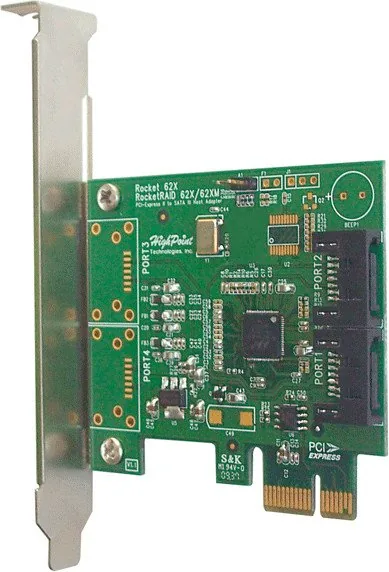
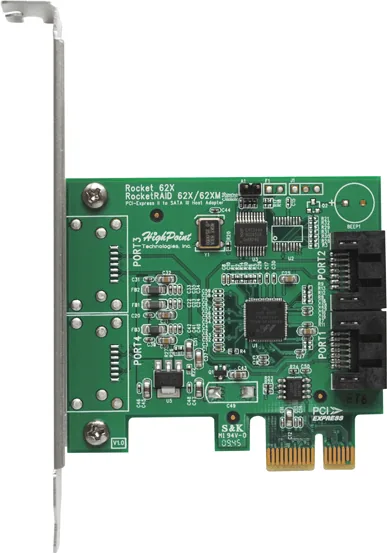
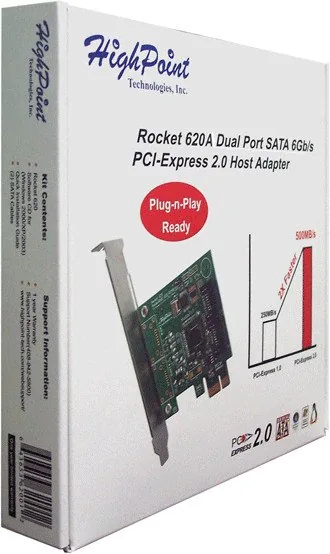
HighPoint Rocket 620 Manual
PDF manual · 8 Pages
English



Quick check
Incorrect answer, please try again.
Chat with your HighPoint Rocket 620 manual using AI
Get instant AI answers from your HighPoint Rocket 620 manual
Ask anything about the HighPoint Rocket 620. Answers come from this manual, with the pages they are based on.
Ask a Question
Do you recommend Rocket 620?
Yes NoFrequently Asked Questions
The adapter delivers 500MB/s throughput per port. It supports eSATA 3.0 with a 6Gb/s interface for external devices.
Is this answer helpful?
It supports Windows 2000, XP, and 2003, Linux, and Macintosh Intel based Mac Pro platforms with Mac OS X 10.6.
Is this answer helpful?
Yes, the system features Hot Plug capability for convenient external connectivity without restarting the computer.
Is this answer helpful?
Use the Software CD provided for Windows 2000, XP, and 2003 platforms. Windows systems will pop up the new Hardware install Wizard.
Is this answer helpful?
It uses a PCI-Express 2.0 x1 slot. It is fully compatible with PCI-Express 1.0 standards as well.
Is this answer helpful?
Yes, the adapter is compatible with SATA HDD, Optical Drives, SSDs, and other standard storage devices.
Is this answer helpful?
Contact [email protected] or visit www.highpoint-tech.com/websupport for assistance with firmware or issues.
Is this answer helpful?
Advantages and Disadvantages
Advantages

- PCI-Express 2.0 x1 compatible with version 1.0 and delivers 500MB/s throughput per port for high speed data transfer.
- Supports eSATA 3.0 with 6Gb/s interface connecting SATA HDDs, Optical Drives, and SSDs reliably and efficiently.
- AHCI compliant and Hot Plug ready providing plug-n-play functionality across Windows, Linux, and Mac OSX platforms.
- Power efficient green technology features reduce energy consumption supporting cost savings during long term usage operation.
Disadvantages

- Legacy Windows support requires driver installation from software CD for Windows 2000, XP, and 2003 platforms specifically.
- Limited to PCI-Express x1 slot which may reduce available bandwidth compared to higher lane options in some cases.
- FCC modifications not approved by manufacturer void user authority to operate equipment under Part 15 Rules.
- System detection requires specific driver verification on Windows 2000/XP/2003 using Hardware install Wizard for configuration.
Product Specification
Bus Interface
PCIe x1
Interfaces
2x SATA 6Gb/s
Internal
2x SATA 6Gb/s
External
N/A
RAID Level
N/A
Chipset
Marvell 88SE9120
Cache
N/A
Features
Low Profile PCB
Product Description
Revolutionize Your Storage Capacity with HighPoint Solutions
Why Choose the Rocket 620?
Modern computing requires robust data handling capabilities. The HighPoint Rocket 620, PCIe x1 Manual specifications indicate a powerful controller designed for efficiency. Storage expansion is often the bottleneck in performance systems. This adapter solves that problem by adding independent SATA connections. It is ideal for those who need fast, efficient and reliable storage for their PC or Mac system. The architecture supports high speed data transfer enhancing overall system responsiveness during large file operations.
Speed and Interface Specifications
This host adapter delivers 500MB/s throughput per port effectively managing data streams. It supports eSATA 3.0 for external devices up to 6Gb/s theoretical maximum speed. You can connect SATA HDDs, Optical Drives, and SSDs seamlessly via the onboard ports. The interface is PCI-Express 2.0 x1 yet compatible with version 1.0 hardware. This ensures you can use it in older systems too. Power efficiency features help save green by reducing energy consumption during operation for long term cost benefits.
Operating System Compatibility
Out-of-the-box ready support exists for multiple environments ensuring versatility. Windows 2000, XP, and 2003 platforms are supported with driver software on CD included. Macintosh Intel based Mac Pro platforms with Mac OS X 10.6 are verified working. Linux platforms are generally AHCI compliant for broad compatibility across distributions. The device ID is listed as 0x9123 for easy identification in system menus during configuration. Drivers ensure reliable communication between storage devices and main processor unit.
Installation and Hardware Setup
Hardware installation procedure is straightforward for most enthusiasts performing upgrades. Ensure system is powered-off before installing to prevent damage. Locate an unused PCI-Express 2.0 or 1.0 slot within the chassis. Remove bracket cover and insert host adapter gently into the slot path. Secure bracket to system chassis using screws. Attach devices using required data cable. System will pop up the new Hardware install Wizard for Windows drivers on first boot if needed.
Reliability and Support
Safety certifications include FCC Part 15 Class B Radio Frequency Interference statement. Equipment is tested to comply with limits for Class B digital devices. European Union compliance covers standard EN55022 and EN55024 directives. Customer Support is available via email at [email protected]. Visit www.highpoint-tech.com/websupport for more details regarding firmware. Modifications not expressly approved could void user authority under FCC rules.
Final Product Notes
This product emphasizes plug-n-play ready features for deployment scenarios. Hot plug capability adds convenience for external connectivity without restarting. It is industry standard AHCI compliant for data integrity. Users should check AHCI detail OS support list. Green technology saves money and power over equipment lifespan.
Search for 67,706 Manuals online


Type-in Brand or Model