Manual.ly Logo

HiFiMAN TWS600 Manual

0.0 · 0 Ratings

PDF manual · 1 Pages

English

M: QW-35-FL
page

/ 1

Loading...
1453f7a8b97b6b0b0d2156782b5348006e2e page 1
TWS 600
1 2 3 4 5 6 7 9 10 11 128
Owner’s Guide
Owner’s Guide
Accessories
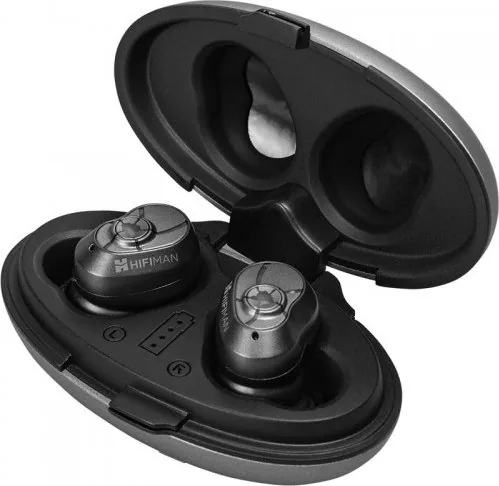
TWS 600
Charging Case
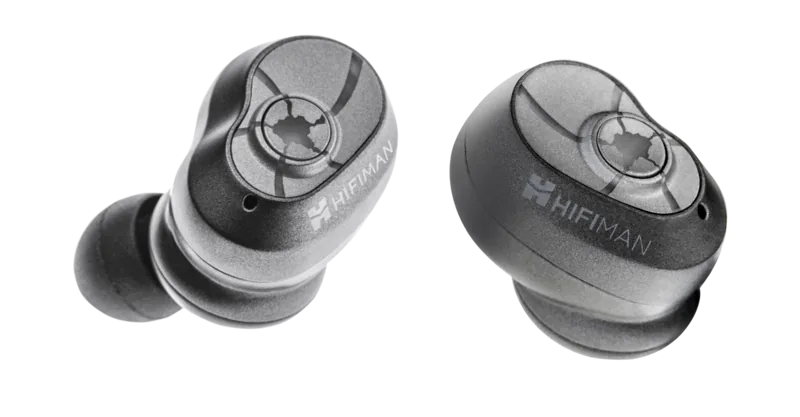
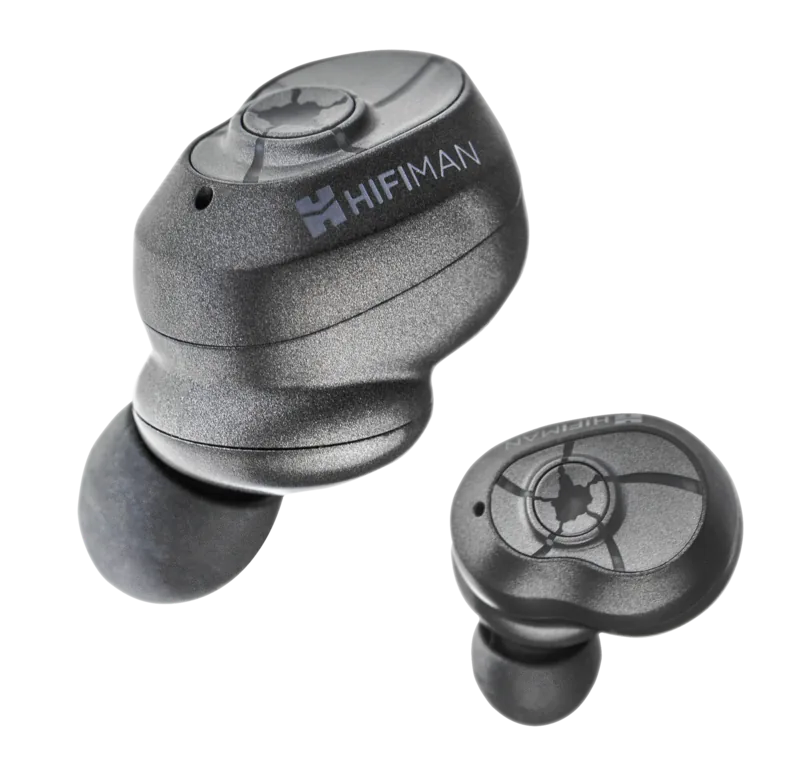
Eartips (8 pairs) True Wireless Earbuds
Charging Cable
1
2
3
Music & Call Button
Microphone
Indicator Light
Power on / off
The earbuds will power on automatically when removed
from the charging case.
The earbuds will turn off and begin recharging automatically
when you place them back in the charging case.
Overview
Tips:
The left earbud connects to your device only.
The right earbud will connect the left one.
The left and right earbuds can be used as single channel headphones.
Bluetooth Pairing
Insert earbuds with the eartips to your ear directly. Twist
gently until they fit your ear perfectlly and feel comfortable.
Tips:
More than one eartips' size may fit you. Please choose the
best one for your ear to get the best experience. You may
need different size eartips for left ear and right ear.
Wear
Try all the eartips to find the best fit (To help you get for
means you ought to get a complete seal, feel comfortable
and can enjoy the best sound quality at once.).
Music & Calls
Calls
Music
Music Control Button
(Pause / play / volume up and down)
※ Press once to pause, press again to resume play.
※ Double-press the left earbud to reduce volume,
double-press the right earbud to increase volume.
※ Triple-press the left earbud to turn to the next track,
triple-press the right earbud to turn to previous track.
Calls are initiated and answered with either the left or
right earbud.
Call Control Button
(Answer / Reject)
※ Press once to accept an incoming call, or press and hold
2 seconds to reject.
※ Press once to end the call.
※ When you are talking on the phone and receive another
incoming call:Press once to end the first call and answer
new coming call.
*
Press and hold two seconds to activate the phone's voice control.
Charging
Insert a Type-C USB cable into the socket to charge the
battery case and earbuds. One-to-four LED lights will
appear, indicating the case and earbuds. Up to four will be
visible: One light indicates minimal power remains, and four
buds indicate charging is complete.
When the battery power is low or entirely drained, the
words "Battery Low" will be heard every 20 seconds.
Charge the Charging Case
Charge Level
Earbuds Status Light
Charging Case Status Light
Charging Light keeps steady red
Pairing Blinking blue and red
Charging
Full charged
One-to-four lights are visible while charging
Steady light
Note:
Please do not remove or replace the internal battery ,
doing so will void your warranty automatically.
Place the earbuds in the charging case and close the lid.
The red light will turn on when charging,
and a blue light will appear when finished.
Note: Some eartips may not fit properly in the case.
Oversized tips may need to be removed before placing
the earbuds in the charging case.
Charge the Earbuds
User Guide User Guide User Guide HIFIMAN Limited Warranty HIFIMAN Limited Warranty
Press the both earbuds for 6 seconds to power off.
Press the both earbuds for about 12 seconds.
A pink-blue flashing appears twice and then turn off.
Press the both earbuds for 2 seconds to restart.
The two earbuds will paired with each other
automatically when they're close to each other.
Please try to pair with your Bluetooth equipment again.
The Right and Left Earbud Pairing Guide ( only use
When the earbud can not be automatically paired)
Basic Specification of Earbud
SNR
5.9g
55mAH x 2
1H
3.3V~4.2V
110H
5-6H
4-5H
Bluetooth 5.0
Class 2
2.40GHz~2.48GHz
>10m,up to 50m
(depending on the environment)
CVSD、mSBC、SBC、ACC
>95dB
Length: 25mm
Width: 17.4mm Height: 26mm
Earbud size
Single head weight
Battery capacity
Work voltage
Music time
Call time
Bluetooth version
RF transmission power
Transmission range (Hz)
Transmission distance
Audio coding format
Earbud charging time
Standby time of
Earbud
Specification of Charging Case
Safety Information
Size
Charging port
44 x 80 x 33mm
Type-C USB
6 times
Charging time
1.5 H
Base charging (full)
provide power to earbud
HIFIMAN warrants this product to be free of defects in material
or workmanship for a period of one year from the date of
original retail purchase. If your product is found to be defective
during the warranty period, HIFIMAN will, at its sole option,
either repair the product or replace the product with a new or
factory reconditioned or substantially equivalent model. This
limited warranty does not apply to any defects attributable to
damage beyond the reasonable control of HIFIMAN including
damage caused by abuse, misuse, misapplication or
modifications performed by anyone other than HIFIMAN.
If your product is under warranty and problem appears, please
contact HIFIMAN customer service or your authorized dealer.
If necessary, and at our discretion, we will provide a warranty
repair or replacement of your product.
Caution: do not disassemble or modify the product in any way.
Tampering with or modifying your HIFIMAN product will void its
warranty.
This Limited Warranty does not apply to :
1. Defective or discolored parts if the damages are caused by
fluids, dirt, missing keys, broken plastic parts or improper use.
2. Damage caused by misuse with another product.
3. Use of the product for other than its normal intended use,
including, with out limitation, failure to use the product in
accordance with the supplied “Owner’s Guide”
For any further information or questions, please contact your
authorized HIFIMAN dealer, or email us directly at
customerservice@HIFIMAN.com.
4. Damage caused by accident, abuse, neglect or misuse.
5. If you do not have a valid dated receipt showing proof of
purchase.
6. Damage caused by services/repairs or other modifications to
the system carried out by anyone other than HIFIMAN or an
authorized HIFIMAN distributor or dealer.
7. Damage caused by self-repair or if the unit has been
disassembled or modified in any way.
HIFIMAN greatly desires your satisfaction and will do everything
reasonable to achieve that. If you have any questions or concerns
with your product, simply contact your authorized dealer or
HIFIMAN directly (if purchased from us) and explain the issue in
detail. Should a return be required, a RMA# will be issued. Return
shipping to HIFIMAN or authorized service facility will be at the
owner’s expense.
The warranty applies to the first purchaser and is not transferable.
Attention: When you first use the product, please allow
the case and earbuds inside to fully charge, up to 1.5 hours.
Weight
55g
Please keep the right earbud in the charging case. The left one
will enter one-sided mode automatically to return to stereo
simply remove the right earbud from the charging case.
Remove the right earbud from the case, press the button until
you hear power off. Continue to press you will first hear
power on, until you heard pairing. Then you can connect with
the right earbud only.When you wish to return to stereo
mode, put both earbuds in the charging case, then bring the
left earbud out first. After it connects to your device then
simply return to stereo by bringing the right earbud out.
Use Left Earbud Only
Use Right Earbud Only
On removing the earbuds from the charging case the right
side will automatically connect to the left. The earbuds will
enter pairing mode and the LED will flash red and blue.
Tips:
You have 3 minutes to connect the earbuds to your device,
otherwise the earbuds will exit and power off automatically.
You can re-enter pairing mode by replacing in the case and
then extracting once more.
Open the Bluetooth function menu on your device, select:
HIFIMAN TWS600. Once paired, you will hear "Connected".
The red and blue LED’s will stop flashing.
Avoid high listening volume to prevent hearing loss.
Do not use the TWS600 when driving a car, cycling, near
traffic or in any dangerous environment requires full
attention.
To maximize battery life, disconnect the USB cable
after charging.Permanently on charge may shorten
battery life.
HIFIMAN recommends using the original Type-C USB
charging cable.The maximum input should be 5V/1.5A.
An unsupported third-party cable may damage the case
or earbuds. If you are using an unsupported charger it
may cause damage.
Please note that If using TWS600 to watch videos or for
gaming, the audio will be slightly delayed. This is
unavoidabledue to the latency of Bluetooth transmis-
sions.
1. This device complies with Part 15 of the FCC Rules.
Operation is subject to the following two conditions:
(1) This device may not cause harmful interference, and
(2) This device must accept any interference received,
including interference that may cause undesired operation.
2. Changes or modifications not expressly approved by the
party responsible for compliance could void the user’s
authority to operate the equipment.
The device has been evaluated to meet general RF exposure
requirement.
The device can be used in portable exposure condition
without RF striction.
NOTE: This equipment has been tested and found to comply
with the limits for a Class B digital, pursuant to Part 15 or the
FCC Rules. These limits are designed to provide reasonable
protection against harmful interference in a residential
installation. This equipment generates, uses and can radiate
radio frequency energy and, if not installed and used in
accordance with the instructions, may casue harmful
interference to radio communications, However, there is no
guarantee that interference will not occur in a particular
installation. If the equipment does cause harmful interference
to radio or television reception, which can be determined by
turning the equipment off and on, the user is encouraged to
try to correct the interference by one or more of the
following measures:
--- Reorient or relocate the receiving antenna.
--- Increase the separation between the equipment and
receiver.
--- Connect the equipment into an outlet on a circuit different
from that to which the receiver is connected.
--- Consult the dealer or an experienced radio/ TV technician
for help.
Owner’s
Guide
2.
1.
1.
2.
3.
4.
FCC STATE MENT
FCC Radiation Exposure Statement:

Chat with your HiFiMAN TWS600 manual using AI

Get instant AI answers from your HiFiMAN TWS600 manual

Ask anything about the HiFiMAN TWS600. Answers come from this manual, with the pages they are based on.

Ask a Question

0/1000

Do you recommend TWS600?

Yes No

Frequently Asked Questions

A

Turn on Bluetooth on your device. Remove earbuds from the case to enter pairing mode. Select HIFIMAN TWS600 from the list. Wait for the confirmation sound and LED stop flashing to indicate successful connection.

Is this answer helpful?

A

Each earbud contains 55mAh. The case supports full charging in about 1.5 hours. Earbuds charge fully in 4 to 5 hours. Standby time is approximately 110 hours.

Is this answer helpful?

A

Press once to play or pause. Double press left to decrease volume or right to increase. Triple press left for next track or right for previous track.

Is this answer helpful?

A

Yes, the left earbud connects independently. The right earbud can connect to the left one for mono mode. You can use a single earbud for calls or music.

Is this answer helpful?

A

The package contains the TWS 600 charging case, earbuds, charging cable, and eight pairs of ear tips in various sizes to ensure a comfortable fit.

Is this answer helpful?

A

No, the limited warranty covers material defects for one year. It does not cover abuse, misuse, fluid damage, or unauthorized modifications to the product.

Is this answer helpful?

A

Yes, there may be slight audio latency when watching videos or gaming due to Bluetooth transmission. This is unavoidable and inherent to the technology used.

Is this answer helpful?

M: QW-35-FL

Advantages and Disadvantages

Advantages

  • Bluetooth 5.0 Technology for stable connectivity
  • Multiple Eartip Sizes Included for better fit
  • Type-C USB Charging for modern compatibility
  • Mono mode supports single earbud usage
  • LED Indicators show battery and charging status
VS

Disadvantages

  • Bluetooth latency issues during video gaming
  • No explicit water resistance rating provided
  • Warranty voided by unauthorized modifications
  • Large eartips may interfere with case fit
  • Audio may delay slightly on low bandwidth
M: QW-35-FL

Product Specification

Type

Headphones (In-Ear)

Form Factor

True Wireless, No Ear Hooks

Acoustic Design

Closed-back

Microphone

Integrated

Wireless

Bluetooth 5.0

Controls

1-button remote

Battery Life

5.5h, 38.5h (with charging case), 110h (standby)

Battery

USB-C charging port, charging case, 1h charge time

Frequency Response

20Hz-20kHz

Device Features

Water-resistant (IPX4)

Software Features

Voice Assistant

Color

Black

Weight

0.42 oz

M: QW-35-FL

Product Description

Introducing the HiFiMAN TWS600 Wireless Experience

Audio enthusiasts searching for reliable wireless performance often look to the HiFiMAN TWS600. This product offers a robust set of features aimed at delivering high fidelity sound without the hassle of wires. The design prioritizes user convenience while maintaining a compact profile suitable for daily commuting and exercise. It represents a significant step forward for portable audio consumers who want quality without compromise. Always charge fully before first use for best life.

Key Connectivity Features

The device utilizes Bluetooth 5.0 technology to establish links with smartphones and tablets. Transmission ranges are impressive, supporting distances up to fifty meters under ideal conditions. This ensures that users can move freely around their home without dropouts during music sessions or video calls. Supported audio coding formats include SBC and AAC, which helps maintain audio integrity across different devices. The RF transmission power is compliant with industry standards for safety.

Battery and Charging Systems

Power management is handled through a dedicated Type-C USB charging case. Users can charge both the earbuds and the case simultaneously when placed correctly. LED indicators provide visual feedback on charging status, ranging from low power alerts to full charge signals. The standby time is substantial, allowing the device to be ready for use after long periods of inactivity. Safety warnings advise against leaving the unit permanently on charge to protect battery longevity. Up to four lights are visible while charging to show percentage. The maximum input should be 5V/1.5A. Unsupported cables may damage.

Control and Usage

Operational controls are simplified within the earbuds themselves. A single press plays or pauses music, while double presses adjust volume. Triple presses skip tracks easily. Call management is equally straightforward, with single presses to answer and holding to reject. The system supports mono mode, allowing users to rely on a single earbud if desired. This is useful for maintaining situational awareness or ensuring the other ear is free. Pairing happens automatically when removed from the case. Weight is 5.9g per earbud.

Comfort and Accessories

A significant aspect of the user experience involves a proper fit. The package includes eight pairs of eartips to accommodate various ear shapes. Finding the right seal is crucial for sound quality and isolation. The manufacturer suggests twisting gently to achieve the perfect fit. Some eartips may not fit properly in the case. Note is given regarding oversized tips potentially interfering with the case fit, requiring removal for charging. The included accessories also consist of a charging cable for the base unit.

Safety and Warranty Details

HIFIMAN provides a one-year limited warranty against material defects. Modifications or unauthorized repairs will void this coverage immediately. Warranty covers defects, not fluids or misuse. Users are cautioned against using the device while driving or in hazardous environments requiring full attention. The device complies with FCC rules regarding radio frequency exposure. Video gaming may introduce slight audio latency which is unavoidable due to transmission protocols. Return shipping to service facilities will be at the owners expense.

M: QW-35-FL

© Copyright 2026 Manual.ly