
Hasselblad H6D-100c Manual
PDF manual · 192 Pages
English



Quick check
Incorrect answer, please try again.
Chat with your Hasselblad H6D-100c manual using AI
Get instant AI answers from your Hasselblad H6D-100c manual
Ask anything about the Hasselblad H6D-100c. Answers come from this manual, with the pages they are based on.
H6D-100c Maintenance Schedule
Leave camera on until Replace battery warning appears, then recharge for 6 hours to improve accuracy.
Always replace the protective CMOS/filter cover before connecting the sensor unit after storage.
If leaving the camera unused for a long period, remove the batteries to prevent damage.
Remove dust with a blower brush or soft brush. Clean smears with high quality lens solution on tissue.
Carefully clean outside surface of IR filter using clean compressed air or an E-wipe.
Free maintenance reminders
Timed to your purchase date. Always free, unsubscribe anytime.
Ask a Question
Do you recommend H6D-100c?
Yes NoFrequently Asked Questions
It uses a much larger medium format sensor, delivering higher resolution, deeper tonal range, and a more refined look. It is aimed at professional work where detail and color accuracy matter most.
Is this answer helpful?
Yes. The camera supports full manual exposure control, manual focus options, and customizable buttons. The manual workflow is one of its strengths, especially for controlled studio or landscape work.
Is this answer helpful?
Yes. It can connect to a computer via USB 3.0 and work with Phocus software. This allows remote control, live view, file transfer, and a smoother studio workflow.
Is this answer helpful?
The H6D-100c supports both CFast and SD cards. Cards should be formatted in the camera before first use to ensure proper performance and compatibility.
Is this answer helpful?
Yes. The camera supports video recording alongside still photography. It offers flexibility for creators who want one body for both imaging needs.
Is this answer helpful?
It is best for professional photographers who need very high resolution, precise control, and a reliable studio-oriented system. It is especially appealing for portrait, fashion, commercial, and fine-art photography.
Is this answer helpful?
Advantages and Disadvantages
Advantages

- 100MP medium format sensor delivers exceptional detail and print-ready files.
- 16-bit color and 15-stop dynamic range support rich tonal control.
- Modular H system design allows interchangeable viewfinders and lenses.
- Touchscreen, grip controls, and Phocus support streamline pro workflows.
Disadvantages

- Large files demand fast cards, strong storage, and capable computers.
- The system is heavy compared with smaller digital cameras.
- Learning the controls takes time for photographers new to medium format.
- Best results often depend on careful setup and disciplined handling.
Product Specification
Type
SLR
Effective Megapixels
100.1 Megapixels
Sensor
Medium format, CMOS 2.10x1.57in, 4.60µm pixel size
Autofocus
Phase detection, 1 fields (1 cross-type sensors)
Resolutions
max. 11600x8700(4:3) pixels (JPEG/RAW), 16bit
Lens mount
Hasselblad H
Image stabilizer
no
Display
3.0" LCD, Live View, Touchscreen, 0.92 million pixels
Flash
Hot shoe
Video function
H.264, 3840x2160@30p (16:9), 1920x1080@30p (16:9)
Light sensitivity (ISO)
100-12800
Shutter speed
1/2000-3600s
Continuous shooting
max. 1.5 frames/sec.
Removable storage
SD/SDHC/SDXC, CFast
Connections
USB 3.0, HDMI, Headphones, Accessory shoe
Wireless
Wi-Fi 4 (WLAN 802.11a/b/g/n)
Power supply
Li-ion battery, continuous power optional
Color
black
Product Description
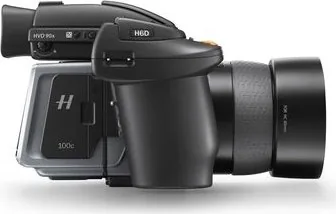
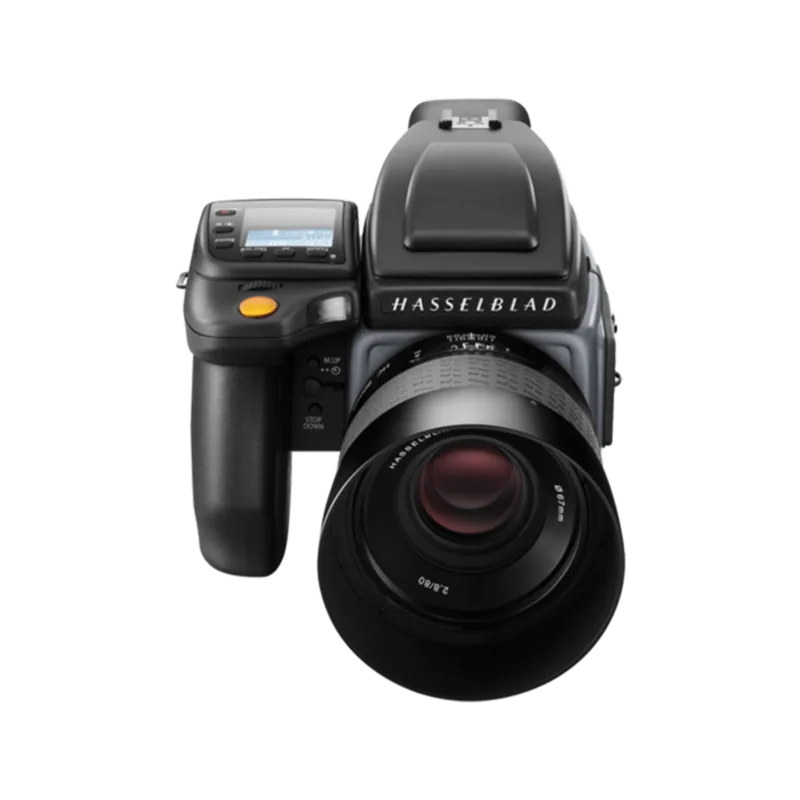
Hasselblad H6D-100c Body Black: a studio-grade medium format powerhouse
The Hasselblad H6D-100c Body black Manual highlights a camera built for photographers who want uncompromising detail, rich color, and a tactile shooting experience. Designed as a medium format digital SLR, the H6D-100c combines a 100-megapixel CMOS sensor with Hasselblad’s natural color rendering, making it a compelling choice for commercial, portrait, fashion, and fine-art work.
At the heart of the camera is a large 53.4 × 40.0 mm sensor that captures extraordinary resolution and a wide 15-stop dynamic range. That means deep tonal separation, smooth gradients, and enough latitude for demanding post-production workflows. With support for RAW capture, UHD video, and tethered operation, the H6D-100c fits seamlessly into both studio and location setups.
The body itself feels engineered for serious use. Its stainless-steel shell and die-cast aluminum structure give it a solid, professional build, while the modular design supports interchangeable viewfinders and Hasselblad H system lenses. The camera also includes a responsive touchscreen, dedicated grip controls, and customizable buttons that make common actions like focus, exposure compensation, and drive mode fast to access.
Practical features add real value in day-to-day shooting. Dual storage support for CFast and SD cards helps manage large files efficiently, and USB 3.0 tethering makes it easy to connect to a computer for controlled studio sessions. The camera also works with Phocus software, where color management, live view, remote control, and file handling become part of a smooth workflow.
For photographers who rely on precision, the H6D-100c offers manual controls alongside advanced automatic modes, true exposure options, flash sync across all shutter speeds, and reliable autofocus with manual override. It is a camera designed not just to capture images, but to give the photographer full control over the image-making process.
Notes
- Best suited for professionals who value resolution and color depth.
- Manual handling and careful setup reward users with highly refined results.
- Tethered shooting and Phocus support make it especially strong in studio environments.
- The black body finish adds a clean, understated professional look.
Search for 67,706 Manuals online


Type-in Brand or Model