
Hardkernel ODROID-XU4 Manual
PDF manual · 92 Pages
English



Quick check
Incorrect answer, please try again.
Chat with your Hardkernel ODROID-XU4 manual using AI
Get instant AI answers from your Hardkernel ODROID-XU4 manual
Ask anything about the Hardkernel ODROID-XU4. Answers come from this manual, with the pages they are based on.
Ask a Question
Do you recommend ODROID-XU4?
Yes NoFrequently Asked Questions
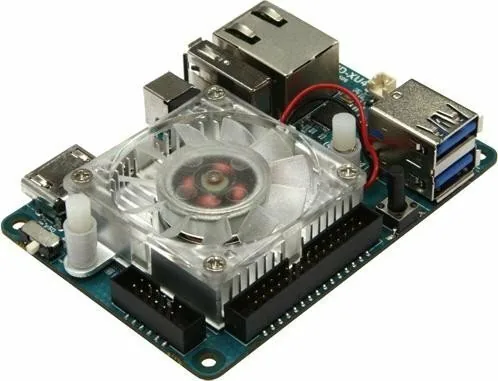
It helps remove heat from the processor using a heat sink and fan. This keeps temperatures lower during demanding tasks and can reduce performance loss caused by thermal throttling.
Is this answer helpful?
Use it when the board runs heavy workloads for long periods, such as media playback, compiling code, gaming, or continuous server-style use. It is also helpful in warm environments.
Is this answer helpful?
Yes, cooler hardware is usually more stable under load. By controlling temperature, the board can maintain more consistent behavior during extended use.
Is this answer helpful?
Not usually, but it should be installed carefully. The board must be powered off, and the heat sink and fan should be mounted securely so they make proper contact and airflow.
Is this answer helpful?
No, because a fan can still make some noise. However, many users find the sound modest compared with the benefit of better thermal control and smoother performance.
Is this answer helpful?
Yes. Active cooling works best with open airflow around the board. A fan helps a lot, but a cramped or dusty space can reduce its effectiveness.
Is this answer helpful?
Advantages and Disadvantages
Advantages

- Helps the XU4 stay cooler during heavy workloads and long sessions.
- Reduces the chance of thermal throttling and performance drops.
- Supports smoother use in media, development, and multitasking setups.
- Works as a practical companion to the board’s compact high-performance design.
Disadvantages

- Adds an extra moving part that may produce a little fan noise.
- Requires careful installation and a powered-off board before mounting.
- Needs clean airflow; cramped enclosures can limit its cooling benefit.
- It improves thermal behavior, but it cannot replace proper power and ventilation.
Product Specification
Platform
ODROID-XU
Manufacturer
Hardkernel
Type
Bundle
SoC
Samsung Exynos5422, 4x 2.00GHz + 4x 1.40GHz (ARM Cortex-A15/A7)
Memory
2GB DDR3 RAM
Power Supply
1x 2.5mm barrel jack, 5.0V/0.5-4.0A
GPU
ARM Mali-T628 MP6
Video Outputs
1x HDMI 1.4a
Video Inputs
N/A
Audio
N/A
External Ports
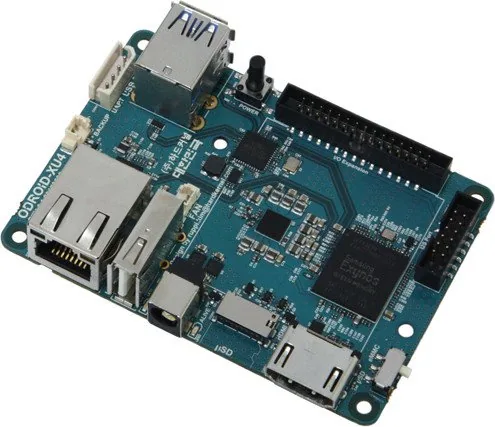
2x USB-A 3.0, 1x USB-A 2.0, 1x Card reader (microSDXC)
Internal Ports
N/A
GPIO
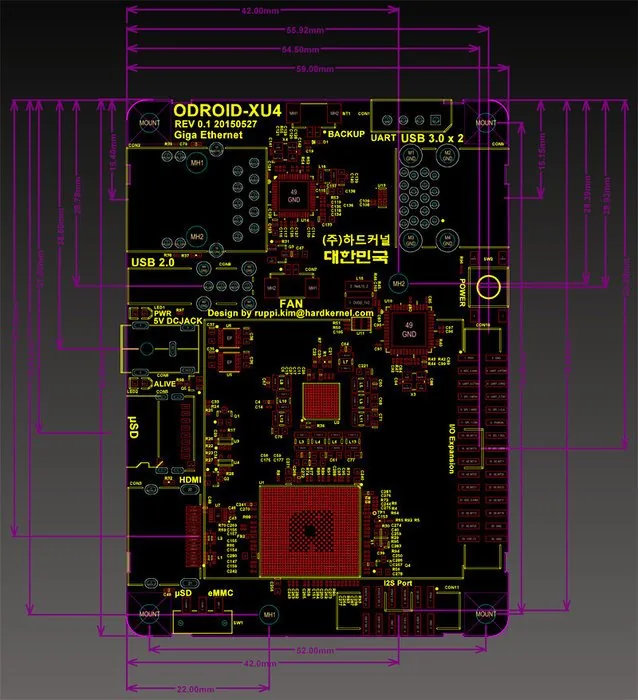
42-Pin digital I/O
GPIO Standards
UART, I2C, I2S, SPI, ADC
Wireless
N/A
LAN
1x Gb LAN (RTL8153-CG)
Other Interfaces
eMMC Module Socket, PWM Fan Connector
Additional Microcontroller
N/A
Dimensions
3.27x0.87x2.32in (WxHxD)
Special Features
Diagnostic LED, RTC Backup Battery Connector, Power Button, active cooling
Package Contents
1x Mainboard, 1x Power Adapter
Product Description
Hardkernel ODROID XU4 Active Cooling Manual
The ODROID-XU4 is already a compact powerhouse, but its real strength shows when it is pushed hard for long periods. That is where Hardkernel ODROID XU4 active cooling Manual becomes especially useful: it helps the board stay responsive while running media centers, desktop Linux, Android apps, coding tools, or hobby projects that demand steady performance.
The XU4’s octa-core Exynos 5422 and Mali GPU can handle a lot, but like any high-density SBC, heat builds up quickly. An active cooling setup combines a heat sink with a fan to move warm air away from the processor instead of letting it linger around the board. The result is simple: lower temperatures, less throttling, and a smoother experience when the system is under sustained load.
For bloggers and makers, this accessory is one of those small upgrades that makes a big difference. It is especially helpful when the ODROID-XU4 is used as a Kodi media box, a lightweight workstation, a home automation hub, or a development board for Linux and Android testing. When the board stays cooler, boot behavior remains more consistent, applications feel snappier, and long sessions become more reliable.
The cooling approach also fits the broader ODROID ecosystem nicely. The XU4 pairs well with official power supplies, HDMI displays, USB peripherals, Wi-Fi or Bluetooth modules, and serial debugging tools. Active cooling supports that ecosystem by keeping the board stable while other accessories draw power and while the CPU works harder than usual. That makes it a practical addition for users who value uptime, repeatable results, and less heat stress over time.
Installation is best handled carefully, with the board powered off and placed on a safe surface. Once mounted correctly, the fan can provide automatic, temperature-aware airflow that adapts to demand. For everyday use, it remains a quiet safeguard; for demanding workloads, it becomes a performance helper.
Notes
- Use active cooling when the XU4 runs near full load for long periods.
- Keep the board in a ventilated area for best results.
- Check that the fan and heat sink are mounted securely.
- Regular dust removal helps maintain cooling efficiency.
Search for 67,706 Manuals online


Type-in Brand or Model