

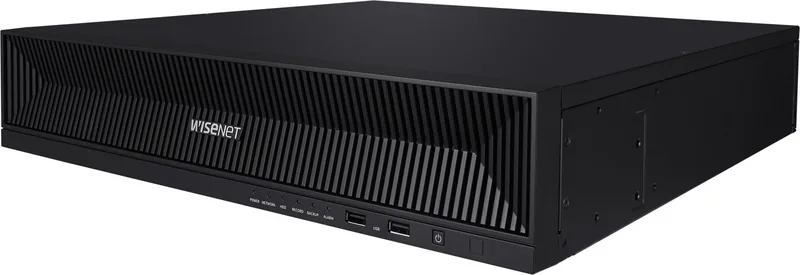
Hanwha XRN-1620B2 Manual
PDF manual · 123 Pages
English



Quick check
Incorrect answer, please try again.
Chat with your Hanwha XRN-1620B2 manual using AI
Get instant AI answers from your Hanwha XRN-1620B2 manual
Ask anything about the Hanwha XRN-1620B2. Answers come from this manual, with the pages they are based on.
Ask a Question
Do you recommend XRN-1620B2?
Yes NoFrequently Asked Questions
It is a 16-channel network video recorder used to centralize IP camera monitoring, recording, playback, event handling, and video export for a surveillance system.
Is this answer helpful?
Yes. The live interface supports multiple split-screen arrangements, custom layouts, automatic layout sequences, and full-screen viewing for a selected camera.
Is this answer helpful?
Users can search recordings by time, events, text data, favorites, and supported intelligent categories. Playback timelines help narrow the review period and export selected results.
Is this answer helpful?
PTZ controls are available when a connected camera supports PTZ functions and the logged-in user has the required permissions. Available controls may include movement, zoom, presets, tours, and digital PTZ.
Is this answer helpful?
Initial setup includes language, network settings, administrator password, camera credentials, date and time, display resolution, camera registration, and channel placement.
Is this answer helpful?
Status indicators can alert operators to conditions such as missing or full storage, disk problems, network load, recording issues, firmware updates, and supported fan or power faults.
Is this answer helpful?
Advantages and Disadvantages
Advantages

- Supports centralized monitoring and management for up to 16 network camera channels.
- Offers time, event, text, favorite, and AI-based search workflows for faster investigations.
- Provides configurable live layouts, automatic sequences, full-screen viewing, and PTZ tools.
- Includes recording schedules, event rules, exports, user permissions, logs, and system status alerts.
Disadvantages

- Some functions depend on compatible cameras, available hardware options, firmware, and user permissions.
- Network overload or high camera data rates may reduce live-view performance.
- Proper storage setup and health monitoring are essential for dependable recording and playback.
- Initial configuration requires careful handling of passwords, IP addressing, camera credentials, and time settings.
Product Specification
Channels
16
Compression
H.265, H.264, MJPEG
Hard drive
8x 3.5 in SATA 6 Gb/s (max. 80 TB, up to 10 TB per HDD)
Drive
N/A
Interfaces
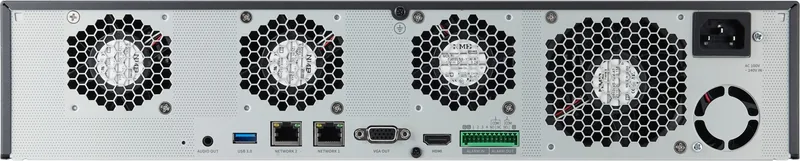
2x LAN, 1x VGA, 1x HDMI, 4x alarm input, 2x alarm output, 1x USB 3.0, 2x USB 2.0, 1x audio out (jack)
Special features
Multistreaming, ONVIF (Profile S), IPv6, app control (Android, iOS)
Product Description
Hanwha XRN-1620B2 16-Channel Network Video Recorder Manual
The Hanwha XRN-1620B2 16-Channel Network Video Recorder is designed to provide a centralized foundation for professional IP video surveillance. Built for environments that need to observe, organize, and review multiple camera streams, it brings live monitoring, recording controls, event awareness, and playback tools into one practical platform. The Hanwha XRN-1620B2 16-Channel Network Video Recorder Manual keyword is especially relevant for installers and operators seeking a clearer view of its daily workflow and configuration options.
Centralized Live Monitoring
The recorder supports a flexible live-view workspace where operators can check registered cameras, review connection status, and select display arrangements that fit the task at hand. Split-screen options help users prioritize one important scene or observe several locations at once. Custom layouts and automatic sequences can make routine monitoring more efficient, while full-screen viewing provides a focused look at a selected channel.
Live controls extend beyond simple viewing. Depending on camera capability and user permissions, the interface can provide snapshot capture, instant playback, digital zoom, audio functions, text display, and PTZ control. This makes the recorder well suited to security desks that require quick reactions without repeatedly switching between separate applications.
Search, Playback, and Evidence Handling
Recorded footage can be located through time, event, text, favorites, and intelligent search tools. The platform also includes AI-oriented search categories for people, faces, vehicles, license plates, and license plate recognition results where compatible functions and connected cameras are available. These options can shorten investigations by helping users move from broad archives to relevant footage more quickly.
Playback uses a timeline-based approach for reviewing results, and selected recordings can be exported for retention or sharing. The recorder also offers event lists and log access, allowing operators to trace alarms, camera activity, and system conditions alongside recorded video.
Setup and Security Management
Initial setup guides users through language, network, administrator credentials, camera credentials, date and time, display settings, camera registration, and channel arrangement. Network settings can use manual addressing or DHCP, while supported PoE workflows can assist with camera discovery and registration.
Administrative controls cover user permissions, password management, camera settings, recording schedules, event rules, storage, network services, and system logs. System status indicators help surface issues involving storage, network load, recording, firmware, fans, or other supported hardware conditions.
Notes
- Set a strong administrator password during first login and update it regularly.
- Verify storage health and recording status before relying on the system for critical coverage.
- Feature availability can vary with connected cameras, user permissions, firmware, and hardware configuration.
Search for 67,706 Manuals online


Type-in Brand or Model