
Hanwha XNV-6010 Manual
PDF manual · 74 Pages
English



Quick check
Incorrect answer, please try again.
Chat with your Hanwha XNV-6010 manual using AI
Get instant AI answers from your Hanwha XNV-6010 manual
Ask anything about the Hanwha XNV-6010. Answers come from this manual, with the pages they are based on.
Ask a Question
Do you recommend XNV-6010?
Yes NoFrequently Asked Questions
It is best suited for outdoor or semi-outdoor surveillance where weather resistance, flexible recording, and smart detection features are important. It works well for entrances, commercial spaces, and perimeter monitoring.
Is this answer helpful?
Yes. The camera is designed for outdoor use and offers dustproof and waterproof protection. The manual also recommends careful sealing of exposed cable connections to prevent water ingress.
Is this answer helpful?
The camera supports Micro SD storage and NAS recording. This gives users local backup options in addition to network-based storage, which is helpful for event recording and redundancy.
Is this answer helpful?
Yes. It supports web browser-based monitoring, and newer browsers can use the plug-in-free viewer. Some playback or advanced features may still work best with compatible plugins or viewers.
Is this answer helpful?
Set a strong administrator password immediately after the first login. The manual recommends changing passwords regularly and avoiding weak or reused credentials to protect the camera and recorded data.
Is this answer helpful?
Yes. It includes several intelligent detection features such as motion detection, audio detection, tampering detection, defocus detection, fog detection, and face detection.
Is this answer helpful?
Yes. The camera supports PoE, which can simplify installation by delivering power and network connectivity through a single Ethernet cable, assuming the network equipment is compatible.
Is this answer helpful?
Advantages and Disadvantages
Advantages

- Outdoor-ready dome design with IP66/IP67 protection for harsh environments.
- 2MP video, multi-streaming, and browser-based monitoring for flexible viewing.
- Wide event detection support, including motion, audio, tampering, and fog.
- Micro SD and NAS recording options provide useful backup storage choices.
Disadvantages

- Initial setup can be technical, especially for network and port configuration.
- Outdoor cabling must be sealed carefully to maintain weather resistance.
- Some advanced features may require browser plugins or compatible viewers.
Product Specification
Type
Dome
Image Sensor
1/2.8" CMOS
Resolution
1920x1080 Pixels (60fps)
Lens
0.09in (F2.0)
Light Sensitivity
0.055 Lux (Color), 0.0055 Lux (B/W)
Viewing Angle
139° (horizontal), 73° (vertical), 167° (diagonal)
Pan
0° to 354° (manual)
Tilt
0° to 67° (manual)
Zoom Function
24x digital
Compression/Codecs
MJPEG, H.264, H.265
Multistreaming
supported
Alarm
1x Alarm Input, 1x Alarm Output
Connections
1x Audio Input, 1x Audio Output, 1x USB 2.0 Micro-B (480Mb/s), 1x BNC, 1x RJ-45 100Mb LAN
Data Storage
2x SD Card Slot
Power Supply
PoE (Type 1)
Protection Class
IP67, IK10
Housing
suitable for outdoor use
System Compatibility
ONVIF (Profile G, S), IPv6
Zone & Analysis Functions
Motion Detection, Sound Detection, Privacy Zones, IR Filter
Product Description
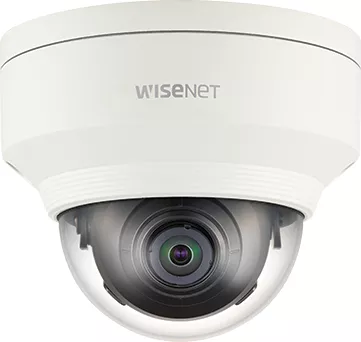
Hanwha Techwin XNV-6010: Smart Outdoor Surveillance with Flexible Setup
The Hanwha Techwin XNV-6010 stands out as a practical network camera for users who want dependable security, clear image quality, and flexible deployment options. Built with outdoor use in mind, this model combines a compact dome-style design with weather-resistant protection, making it a strong choice for entryways, parking areas, storefronts, and other demanding locations. The Hanwha Techwin XNV-6010 Manual highlights how much attention the camera gives to both installation safety and everyday usability, which is especially helpful for installers and system administrators.
One of the most appealing aspects of the XNV-6010 is its balance between simplicity and advanced functionality. It supports 2MP video, multi-streaming, browser-based monitoring, and event-driven alerts, so users can tailor the camera to different recording and live-view needs. The manual also points to support for micro SD storage and NAS recording, giving teams backup options when network conditions are less than ideal. That flexibility makes the camera suitable for both standalone setups and larger surveillance systems.
The camera is also designed with smart detection in mind. Features such as motion detection, audio detection, tampering detection, defocus detection, fog detection, face detection, and intelligent video analysis help the device respond to real-world situations more effectively. For users who need more than basic recording, these functions can add meaningful value by reducing manual review time and improving event awareness.
Installation guidance is another strong point. The manual explains how to mount the camera properly, connect power and network cables, and protect outdoor wiring with waterproof sealing. It also covers browser access, password setup, IP configuration, and profile tuning, which makes the device easier to integrate into modern security environments. Support for PoE, DC 12V power, and ONVIF compliance further improves compatibility with common security infrastructure.
For administrators, the camera offers useful controls for video rotation, privacy zones, white balance, exposure, day/night switching, and digital PTZ. These settings help adapt the camera to changing lighting and scene conditions without requiring complicated hardware changes. In short, the XNV-6010 is not just a camera; it is a configurable surveillance tool built for reliable operation.
Notes
- Change the default administrator password immediately after first login.
- Use proper waterproofing for outdoor cable connections.
- Match storage and network settings to the environment before deployment.
- Review image settings after installation for the best results.
Search for 67,706 Manuals online


Type-in Brand or Model