
Hanwha XNO-9082R Manual
PDF manual · 56 Pages
English



Quick check
Incorrect answer, please try again.
Chat with your Hanwha XNO-9082R manual using AI
Get instant AI answers from your Hanwha XNO-9082R manual
Ask anything about the Hanwha XNO-9082R. Answers come from this manual, with the pages they are based on.
Ask a Question
Do you recommend XNO-9082R?
Yes NoFrequently Asked Questions
The XNO-9082R is an outdoor bullet network camera intended for professional video surveillance. Its IP67-rated camera body, adjustable mounting arrangement, and sunshield make it suitable for locations such as exterior walls, entrances, perimeters, and parking areas.
Is this answer helpful?
The camera supports IEEE 802.3af PoE, DC 12 V, and AC 24 V power. PoE can simplify installation by delivering power and network data through Ethernet. When PoE and external power are supplied together, the external DC or AC source takes priority.
Is this answer helpful?
Yes. It supports Micro SD, SDHC, and SDXC cards. Recommended cards are high-endurance MLC models with capacities from 16 GB to 256 GB. Disable storage and turn off the camera before removing a card to reduce the risk of lost or damaged recordings.
Is this answer helpful?
Yes. The camera includes audio input and output connections for compatible microphones, speakers, or amplifiers. Its alarm ports can be configured through the web viewer as alarm inputs or outputs for devices such as sensors, warning lamps, and sirens.
Is this answer helpful?
Use Hanwha Device Manager to locate the camera and configure static or DHCP network addressing. The browser-based web viewer provides settings for video, audio, network, event, analytics, and system functions. Remote access may require port forwarding or DDNS configuration.
Is this answer helpful?
Install on a surface that can support at least five times the camera weight. Ensure screws are firmly fastened, route cables carefully, and waterproof the cable jacket and connection area with overlapping butyl rubber tape where moisture could enter. Do not force bracket adjustments while screws are tight.
Is this answer helpful?
Advantages and Disadvantages
Advantages

- IP67-rated outdoor bullet design with a sunshield for exposed surveillance locations.
- Supports PoE, DC 12 V, and AC 24 V power options for installation flexibility.
- Includes Micro SD storage support, audio connections, and configurable alarm I/O.
- Provides setup aids including zoom/focus controls, test monitor output, and WiFi-assisted alignment.
- Supports local network access, DDNS options, and browser-based configuration.
Disadvantages

- External cable connections require careful waterproofing because connected jacks are not weatherproof.
- Micro SD card removal without disabling storage and powering down can damage or lose data.
- Remote viewing may require router port forwarding, DDNS setup, and network administrator support.
- Installation requires a surface able to hold at least five times the camera weight.
- Supported browser functions may vary despite use of recommended browsers.
Product Specification
Type
Bullet
Image sensor
1/2.8 in. CMOS
Resolution
3,840 x 2,160 pixels (30 fps)
Lens
2.8-8.4 mm (F1.2-F2.8)
Light sensitivity
0.05 lux (color), 0 lux (IR)
Viewing angle
40.2-114 degrees (horizontal), 22.5-62 degrees (vertical), 46.3-133 degrees (diagonal)
Zoom function
3x optical, 24x digital
Compression/codecs
MJPEG, H.264, H.265, G.711, G.726, AAC-LC
Multi-streaming
supported
Alarm
2x alarm input/output
Connections
1x audio input, 1x audio output, 1x BNC, 1x RJ-45 1Gb LAN
Data storage
2x microSD slot (max. 512 GB)
Illumination
IR illumination (131.23 ft)
Power supply
Mains power (12-24 V), PoE (Type 1) (10.5 W)
Protection rating
IP66/IP67, IK10, NEMA 4X
Housing
Aluminum, gray, suitable for outdoor use
Mounting
Wall mount
Dimensions
3.58 x 3.58 x 14.51 in.
Weight
4.85 lb
System compatibility
ONVIF (Profiles G, S, T), IPv6
Zone and analysis functions
Motion detection, tamper detection, sound detection, face detection, person detection, people counting, shock detection, zone monitoring (line crossing, zone entry, zone exit), privacy zones, IR filter, DORI (Detect 688.65 ft, Observe 275.26 ft, Recognize 137.8 ft, Identify 68.9 ft)
Product Description
Hanwha Techwin XNO-9082R - Read, Download & Print Free
Outdoor Network Surveillance Built for Flexible Deployment
The Hanwha Techwin XNO-9082R is an outdoor bullet network camera designed for professional monitoring applications where durable installation, dependable connectivity, and flexible device integration matter. Its bullet-style housing includes a sunshield and is rated to IP67, helping support use in exposed outdoor locations when cables and connection points are correctly protected. It is well suited to perimeter coverage, entrances, parking areas, building exteriors, and other security-focused environments.
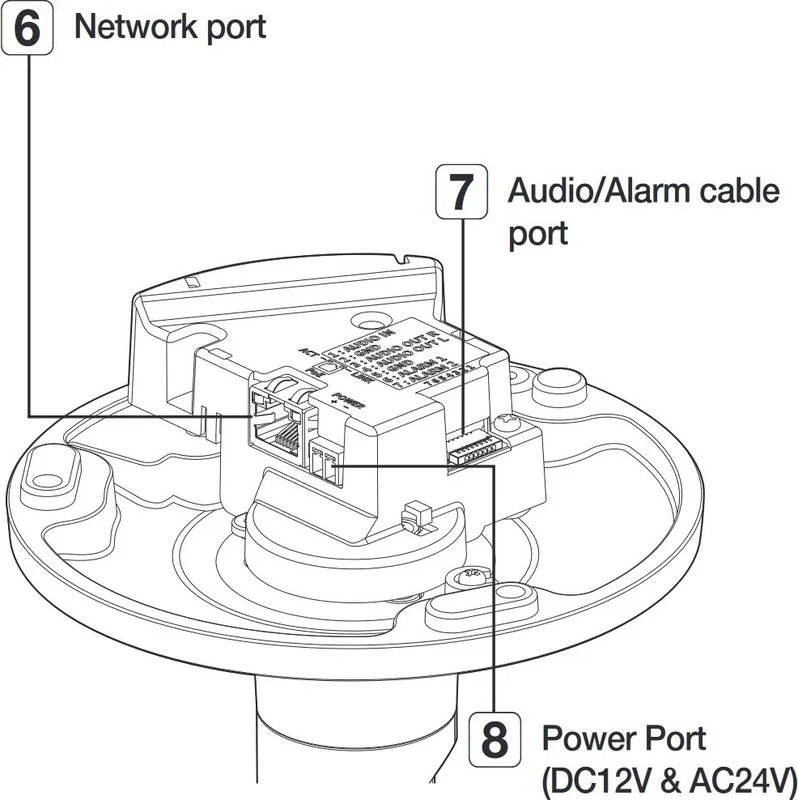
The camera supports Ethernet networking and IEEE 802.3af PoE, allowing network data and power to be delivered through a compatible Ethernet connection. It also accepts DC 12 V or AC 24 V power, giving installers alternatives for sites with existing power infrastructure. For reliable connections, Category 6 cable is recommended, with Ethernet runs of up to 100 meters.
Installation and Monitoring Controls
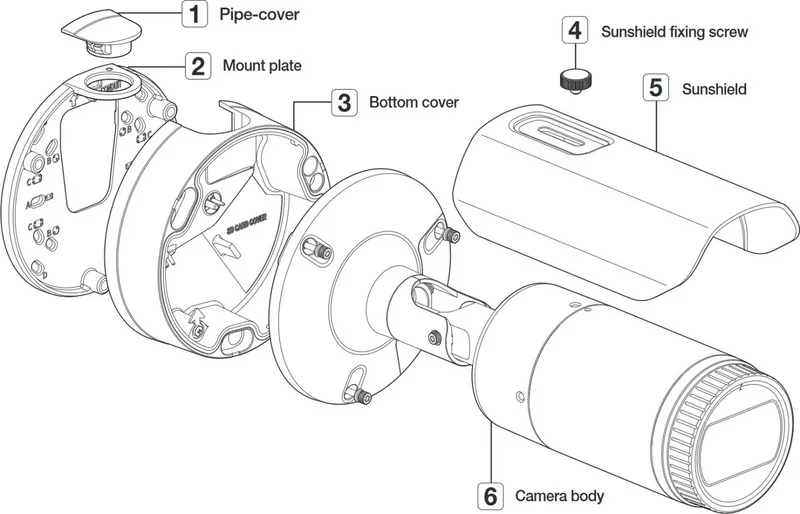
The XNO-9082R includes a mount plate and bottom cover arrangement for wall, ceiling, or pipe-based installation. A safety cable helps support the camera body during fitting, while the adjustable bracket lets installers aim the unit toward the intended scene. The supplied sunshield can help reduce direct light exposure around the camera body. Careful tightening and waterproofing of outdoor cable connections are essential to maintain weather protection.
For setup and service work, the camera provides a test monitor output, Micro USB port, reset button, and zoom/focus controls. These features can simplify alignment during installation. A compatible WiFi dongle and the Wisenet Installation application can also assist with viewing the scene on a smartphone while adjusting the camera angle.
Storage, Audio, and Alarm Integration
Local recording can be supported with a high-endurance MLC Micro SD, SDHC, or SDXC card in capacities from 16 GB to 256 GB. The camera also supports NAS-based storage, with QNAP and Synology products identified as recommended options. To avoid data loss, storage should be disabled and camera power turned off before removing the memory card.
Audio and alarm connections expand the XNO-9082R beyond basic video monitoring. Its audio input and output can be used with compatible microphones, speakers, or amplifiers. Alarm ports can be configured as inputs or outputs through the web viewer, allowing connection to sensors, warning lights, or sirens using the appropriate wiring method.
Network Access and Security
Initial network setup can be completed with Hanwha Device Manager, which can search for cameras and configure static or DHCP addressing. The web viewer supports configuration of basic settings, video, audio, network, events, analytics, and system options. Remote access requires correctly configured port forwarding or compatible DDNS settings.
Note: Set a strong administrator password at first login, change it regularly, and avoid exposing unprotected cable connections to weather. Do not stare directly into the operating IR illumination.
Search for 67,706 Manuals online


Type-in Brand or Model