

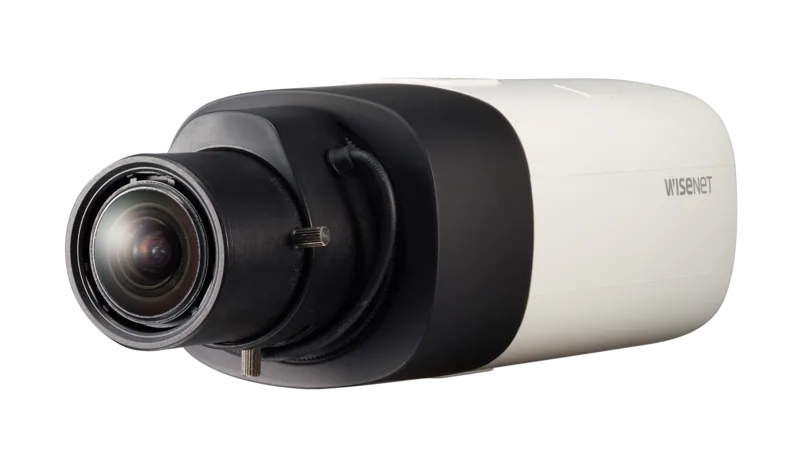

Hanwha SNB-6005 Manual
PDF manual · 158 Pages
English



Quick check
Incorrect answer, please try again.
Chat with your Hanwha SNB-6005 manual using AI
Get instant AI answers from your Hanwha SNB-6005 manual
Ask anything about the Hanwha SNB-6005. Answers come from this manual, with the pages they are based on.
Ask a Question
Do you recommend SNB-6005?
Yes NoFrequently Asked Questions
It is designed for professional network surveillance where clear video, remote access, and flexible alarm or storage options are important. It suits offices, entrances, retail spaces, and monitored facilities.
Is this answer helpful?
Yes. It can be accessed through a web browser, DDNS, UPnP, or direct IP connection. Remote viewing works best when network ports are configured correctly and security settings are enabled.
Is this answer helpful?
The camera supports Micro SD recording and NAS storage. It can also send event clips or images by email or FTP, depending on the configured event actions.
Is this answer helpful?
Key features include Full HD output, multi-streaming, smart codec support, motion detection, face detection, audio detection, and tampering detection. These help improve monitoring efficiency.
Is this answer helpful?
Yes. It offers tools like WDR, BLC, SSDR, white balance adjustment, exposure control, and defog mode. These options help improve visibility in bright, dark, or uneven scenes.
Is this answer helpful?
Set a new administrator password immediately, confirm network settings, and test live viewing and recording. It is also wise to verify storage, audio, and alarm connections before final deployment.
Is this answer helpful?
Advantages and Disadvantages
Advantages

- Full HD video and multi-streaming help balance quality with bandwidth needs.
- Supports Micro SD and NAS recording for local and network-based storage.
- Rich event detection includes motion, face, audio, and tampering alerts.
- Browser-based access plus DDNS and UPnP improve remote monitoring flexibility.
Disadvantages

- Initial setup can be technical, especially for IP, port, and DDNS configuration.
- Some browser and plugin requirements may limit ease of use on newer systems.
- Advanced features need careful tuning to get the best image and alert performance.
- Storage and recording reliability depend on using compatible cards and correct formatting.
Product Specification
Image Sensor
1/1.9" CMOS
Resolution
1920x1080 Pixel (60fps)
Lens
N/A
Light Sensitivity
0.015 Lux (Color), 0.0015 Lux (B/W)
Compression/Codecs
MJPEG, H.264, G.711, G.726
Multistreaming
supported
Alarm
1x Alarm input, 1x Alarm output
Ports
1x Audio input, 1x Audio output, 1x USB 2.0 Micro-B (480Mb/s), 1x BNC, 1x RJ-45 100Mb LAN, 1x serial (RS-485)
Data Storage
1x SD Card-Slot
Power Supply
PoE (Type 1)
Protection Class
N/A
System Compatibility
ONVIF (Profile S), IPv6
Zone & Analysis Functions
Motion detection, Sound detection, Privacy zones
Product Description
Hanwha Techwin SNB-6005 Manual: A Practical Look at a Versatile Network Camera
The Hanwha Techwin SNB-6005 is built for users who need reliable surveillance with strong image quality and flexible deployment options. This network camera focuses on clear Full HD monitoring, remote access through a web browser, and a wide set of security and automation tools that make it suitable for business sites, facilities, and multi-camera environments. For anyone searching for the Hanwha Techwin SNB-6005 Manual, the standout theme is ease of setup paired with advanced control.
One of the biggest strengths of the SNB-6005 is its balance between professional video performance and practical everyday operation. It supports multi-streaming, allowing different video profiles to be used for live viewing, recording, email alerts, or FTP transmission. That makes it easier to match bandwidth limits without sacrificing the quality needed for critical areas. The camera also includes intelligent features such as motion detection, face detection, tampering detection, and audio detection, helping it respond to real-world events instead of simply recording footage.
Storage and connectivity are also a major part of its appeal. The camera can record to a Micro SD card or NAS, and it supports remote access through DDNS, UPnP, and browser-based monitoring. That means users can view footage from a local PC or from across the internet after the right network settings are in place. For installations that need more control, the camera offers alarm I/O, RS-485 support for PTZ integration, and configurable network security options like SSL, IP filtering, 802.1x, and SNMP.
In daily use, the SNB-6005 offers image tuning tools that matter: white balance, exposure, WDR, BLC, defog, privacy zones, and crop encoding. These settings help the camera adapt to changing light and scene conditions, whether it is installed indoors, near windows, or in more demanding environments. It is a strong option for users who want a camera that can be tuned carefully rather than left on a basic preset.
Notes
- Change the default admin password immediately.
- Use recommended memory cards and proper network settings for stable recording.
- Keep firmware, browser support, and port forwarding settings in mind for remote viewing.
- Match lens, power, and mounting choices to the installation environment.
Search for 67,706 Manuals online


Type-in Brand or Model