
Hanwha QNV-8010R Manual
PDF manual · 48 Pages
English



Quick check
Incorrect answer, please try again.
Chat with your Hanwha QNV-8010R manual using AI
Get instant AI answers from your Hanwha QNV-8010R manual
Ask anything about the Hanwha QNV-8010R. Answers come from this manual, with the pages they are based on.
Ask a Question
Do you recommend QNV-8010R?
Yes NoFrequently Asked Questions
The administrator ID is fixed as "admin". On first login, set the password when prompted. Change it regularly (the guidance suggests every three months) to reduce the risk of unauthorized access and protect personal information.
Is this answer helpful?
Connect the camera to a PoE-enabled device using an IEEE 802.3af compatible PoE connector. Use Cat5e-rated Ethernet cabling, and keep the PoE setup within typical 100m limits supported by the installation environment.
Is this answer helpful?
Confirm network settings and that cables are connected correctly. If using DHCP, verify the camera received a dynamic IP address. If using a router, ensure port forwarding is configured. Also check profile limits, since too many stream profiles can lead to disconnects.
Is this answer helpful?
Use high endurance Micro SD/SDHC/SDXC cards. The guidance recommends 16GB to 128GB (MLC type) and suggests manufacturers such as SanDisk and Transcend. Compatibility can vary by brand and card type, so formatting in the camera storage menu is recommended.
Is this answer helpful?
Yes. Event triggers can save recordings to NAS. The guidance recommends NAS capacity around 200GB to 2TB, and indicates that one NAS can handle up to 16 simultaneous camera accesses. Make sure NAS IP, ID, password, and SMB/CIFS options are correctly configured.
Is this answer helpful?
Use the reset function to restore factory defaults. After reset, network settings are adjusted so DHCP can be enabled. If your network does not provide DHCP, use IP Installer to update basic network parameters such as IP address, subnet mask, and gateway.
Is this answer helpful?
The documentation classifies the IR as Risk Group 1 and warns not to stare at the operating lamp. Use standard installation practices and avoid direct eye exposure to the IR source during testing.
Is this answer helpful?
Advantages and Disadvantages
Advantages

- IP66 dustproof and waterproof housing for outdoor installation and rain exposure
- 5MP imaging with H.265/H.264 compression and multi-stream support
- IR mode with illumination sensor helps identify objects at near distances (up to 20m for QNV-8010R)
- Event triggers support email, FTP, Micro SD, NAS, and alarm output signaling
- Analytics and protections include motion detection, tampering detection, and defocus detection
Disadvantages

- Connected cable jack is not IP66, so exposed sections must be installed under eaves and waterproofed
- Micro SD insertion/removal requires power-off safety steps and is not recommended during rain or high humidity
- Remote access can require correct port forwarding and DDNS configuration
- Multi-profile streaming is limited (using too many profiles may cause connection loss)
Product Specification
Type
Dome
Image Sensor
1/2.8" CMOS 5.0 MP
Resolution
2592x1944 Pixels (30fps)
Lens
0.11 in (F2.0)
Light Sensitivity
0.15 Lux (Color), 0 Lux (IR)
Viewing Angle
104.7 deg (horizontal), 76.5 deg (vertical), 136 deg (diagonal)
Pan
350 deg
Tilt
67 deg
Compression/Codecs
MJPEG, H.264, H.265
Multistreaming
supported
Alarm
1x Alarm Input, 1x Alarm Output
Connectors
1x RCA Composite Out, 1x RJ-45 100Mb LAN
Data Storage
1x microSD-Slot (max. 128GB)
Illumination
IR Illumination (65.62 ft)
Power Supply
PoE (Type 1)
Protection Class
IP66, IK10
Housing
suitable for outdoor use
System Compatibility
ONVIF (Profile G, S, T), IPv6
Zone & Analysis Functions
Motion Detection, Tamper Detection, Zone Monitoring (Line Crossing, Zone Entrance, Zone Exit), Privacy Zones, IR Filter
Product Description
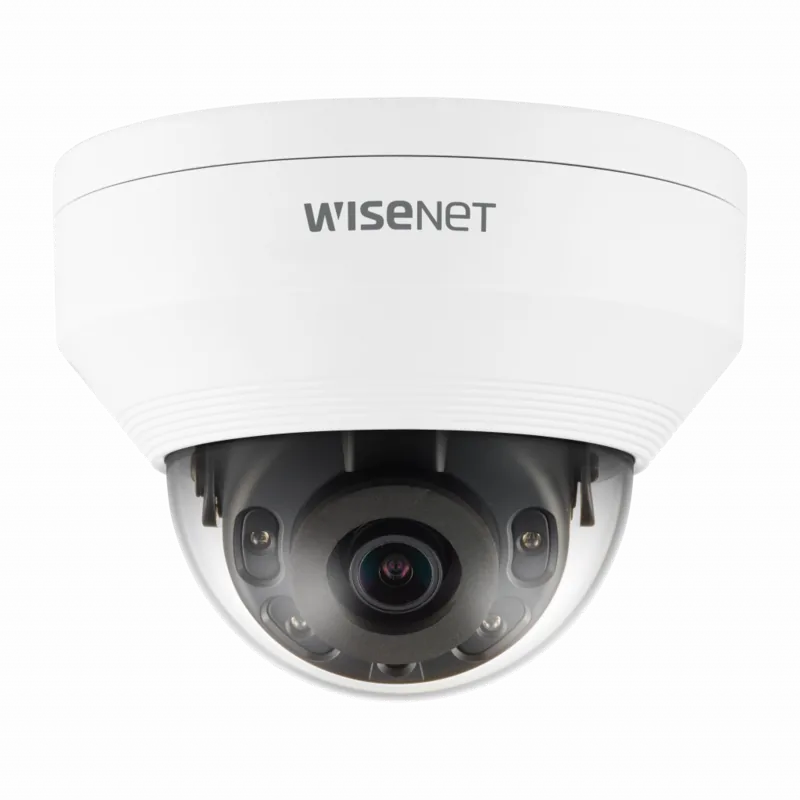
Hanwha Techwin QNV-8010R 2.8mm Manual: Outdoor 5MP Network Security in a Dustproof, Weather-Ready Design
If you are building a reliable surveillance system for outdoor areas, the Hanwha Techwin QNV-8010R 2.8mm Manual style setup philosophy makes sense: start with correct mounting and safe wiring, then rely on strong day and night imaging features for everyday monitoring. This 5MP network camera is built for real-world conditions, combining an IP66 dustproof and waterproof body with integrated IR capability for near-distance visibility when light drops.
With a fixed 2.8mm focal lens on the QNV-8010R, the camera delivers a wide field of view that suits storefronts, parking edges, building perimeters, and other spaces where coverage matters. The camera uses a 1/2.8-inch 5MP CMOS sensor and offers smooth streaming with modern compression options such as H.265 and H.264. Multi-stream support also helps you serve different resolutions and qualities at the same time, depending on your monitoring and recording needs.
Night performance is handled by IR mode. When the illumination sensor detects low light, the camera switches to IR operation to help identify objects at close range. For the QNV-8010R, the IR viewable length is up to 20m, with a practical emphasis on clear near-distance detection.
For recording and event workflows, the camera supports multiple event actions, including alerts via email or FTP, and saving clips to a Micro SD card or NAS. To reduce false positives and improve operational confidence, it includes analytics such as motion detection, tampering detection, and defocus detection. If the network drops, it can detect disconnection before triggering an event, supporting more dependable incident logging.
Setup is designed around network-first use. You can access monitoring through a web browser, use IP Installer for finding and configuring the camera, and benefit from ONVIF Profile S and G compatibility for broader integrations. Power is delivered through PoE (IEEE 802.3af), simplifying installation with a single Ethernet cable.
Notes for a smooth installation
- The camera housing is IP66, but the connected cable jack is not, so consider mounting under eaves and waterproofing exposed sections.
- For Micro SD insertion and removal, disconnect power and avoid doing it in heavy rain or high humidity.
- The default administrator ID is "admin" and you must set a password at first login.
Key results you can expect
- IP66-rated outdoor-ready housing with IR night operation up to 20m (QNV-8010R).
- 5MP imaging with H.265/H.264 support and multi-stream options for flexible monitoring.
- Event-driven recording and notifications to email, FTP, Micro SD, or NAS.
- Analytics features such as motion detection, tampering detection, and defocus detection.
Pros and cons
- Pros: durable weather resistance, wide-angle 2.8mm coverage, multi-stream video, event recording options, and ONVIF compatibility.
- Cons: exposed cable connections require careful waterproofing, Micro SD handling needs power-off safety steps, and streaming behavior can depend on the number of profiles used.
Search for 67,706 Manuals online


Type-in Brand or Model