
Hanwha QND-6011 Manual
PDF manual · 33 Pages
English



Quick check
Incorrect answer, please try again.
Chat with your Hanwha QND-6011 manual using AI
Get instant AI answers from your Hanwha QND-6011 manual
Ask anything about the Hanwha QND-6011. Answers come from this manual, with the pages they are based on.
QND-6011 Maintenance Schedule
Change the default password every three months to protect personal data and prevent theft.
Clean contaminated areas with a soft dry or damp cloth. Do not use alcohol, solvents, or oils.
Free maintenance reminders
Timed to your purchase date. Always free, unsubscribe anytime.
Ask a Question
Do you recommend QND-6011?
Yes NoFrequently Asked Questions
It combines 2MP imaging with a fixed 2.8mm wide-angle lens, multi-streaming, and event-driven recording. It also includes tampering detection and defocus detection to help maintain useful video during real-world conditions.
Is this answer helpful?
The camera uses PoE (Power over Ethernet) compliant with IEEE 802.3af, Class 2. Use Ethernet (RJ-45) cabling such as Cat5e rated wiring, with a typical maximum distance of about 100m depending on conditions.
Is this answer helpful?
Yes. It supports Micro SD/SDHC/SDXC (recommended high endurance, 16GB to 128GB) and NAS recording for event triggers. NAS access depends on your NAS model, capacity, and network configuration for reliable simultaneous access.
Is this answer helpful?
The camera can trigger actions on motion detection and analytics events, including tampering detection and defocus detection. When events occur, it can send email, upload to FTP, and record to Micro SD or NAS based on your setup.
Is this answer helpful?
Yes. The camera includes people counting analytics that let you review the number of people entering a specified area. This is designed for applications like lobbies, retail spaces, and controlled entry points.
Is this answer helpful?
Use DDNS (dynamic DNS) so the camera can be reached using a stable URL even when the public IP changes. The setup involves configuring DDNS in the network settings and ensuring port forwarding is correct on your router.
Is this answer helpful?
On first login, the administrator ID is admin and the password must be set when you log in. Update it for security and follow a regular change schedule (the guidance recommends changing it every three months).
Is this answer helpful?
Advantages and Disadvantages
Advantages

- IP42 dust and droplet protection for typical monitoring environments
- 2MP video with multi-streaming for flexible viewing and bandwidth control
- Event alerts and recordings via email, FTP, Micro SD, or NAS
- Analytics support including motion detection, tampering detection, defocus detection, and people counting
- ONVIF Profile S and G compliance for easier integration
Disadvantages

- Fixed 2.8mm lens means field-of-view cannot be adjusted by zoom
- Best results depend on correct IP, port, and DDNS setup for remote access
- Micro SD and NAS recording require proper formatting, compatible media, and stable networking
- Supports a limited number of streaming profiles at once
Product Specification
Type
Dome
Image Sensor
1/2.8" CMOS
Resolution
1920x1080 Pixel (30fps)
Lens
0.11 in (F2.0)
Light Sensitivity
0.1 Lux (Color), 0 Lux (IR)
Viewing Angle
113.7° (horizontal), 61.5° (vertical), 134.4° (diagonal)
Pan
350° (motorized)
Tilt
69° (motorized)
Compression/Codecs
MJPEG, H.264, H.265
Multistreaming
supported
Connections
1x RJ-45 100Mb LAN
Data Storage
1x microSD-Slot (max. 128GB)
Power Supply
PoE (Type 1)
Protection Class
IP42, IK08
Housing
suitable for outdoor use
System Compatibility
ONVIF (Profile G, S, T), IPv6
Zone & Analysis Functions
Motion detection, Tampering detection, Privacy zones
Product Description
Hanwha Techwin QND-6011 2.8mm Manual
Overview
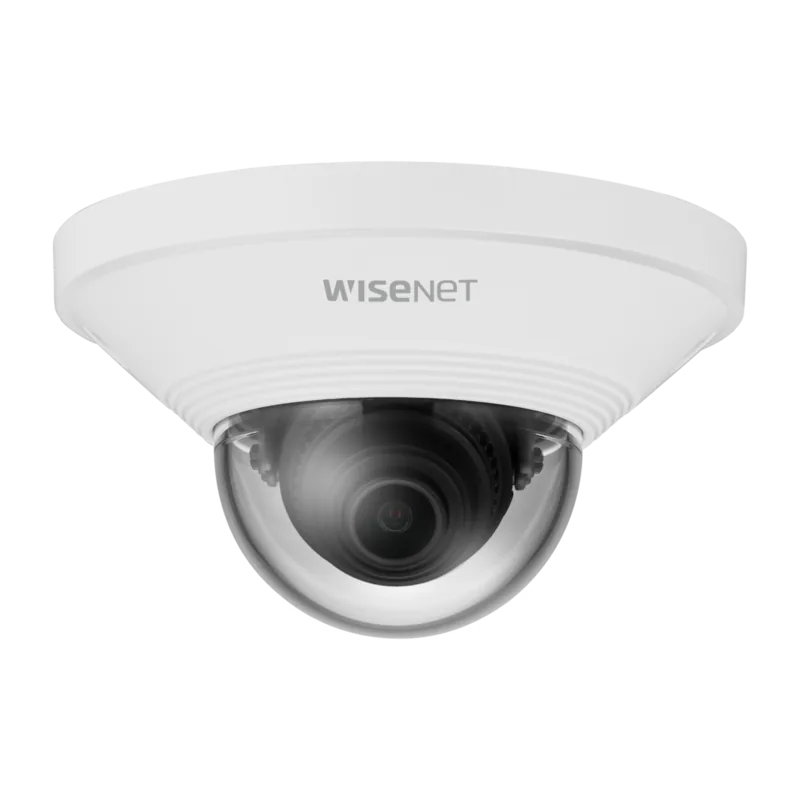
The Hanwha Techwin QND-6011 2.8mm is a 2 megapixel network dome camera built for day-to-day monitoring where clarity and reliable detection matter. With a fixed 2.8mm lens, it delivers a wide field of view, helping you cover more area with fewer cameras. It is designed for IP42 environments, offering protection against dust and household-level liquid droplets for typical indoor and light outdoor use.
Smart monitoring and storage options
This camera supports multi-streaming, so you can view different resolutions and qualities at the same time. Live viewing is browser-based, making it convenient for local LAN access and remote checks when network settings are configured.
Event capabilities go beyond basic recording. When motion, analytics events, or tampering attempts occur, the system can trigger actions such as emailing notifications, uploading to FTP, or saving footage to a Micro SD card or NAS. The QND-6011 also includes tampering detection, defocus detection (to identify lens focus issues), and motion detection with configurable zones.
People counting statistics add another layer of insight. You can review estimated counts for people entering a specified area using built-in video analysis, which is useful for retail, lobby monitoring, or flow tracking.
For recording, the camera supports a Micro SD/SDHC/SDXC slot (recommended 16GB to 128GB, high endurance), plus NAS recording for centralized storage. NAS access is designed to support up to 16 simultaneous camera connections, depending on your NAS setup.
Power, setup, and security notes
The QND-6011 is powered through PoE (IEEE 802.3af, Class 2), simplifying installation by using a single Ethernet cable. Pan, tilt, and lens rotation ranges are included for flexible positioning once mounted.
Security is essential. The initial administrator ID is admin, and you should set and change the password during first login, then update it regularly (every three months) to reduce the risk of account compromise.
Pros and cons
-
Pros
- IP42 dust and droplet protection for everyday reliability
- 2MP resolution with multi-streaming for flexible viewing and recording
- Event triggers via email, FTP, Micro SD, or NAS
- Built-in analytics such as tampering, defocus detection, and people counting
- ONVIF Profile S and G compliance for broader ecosystem compatibility
-
Cons
- Recommended lens is fixed; changing coverage requires choosing a different model
- NAS performance depends on device capacity and correct networking configuration
- Micro SD insertion and removal should follow safe procedures to prevent data loss
Key results (most important takeaways)
- Wide coverage with the fixed 2.8mm lens and 2MP imaging for clear area monitoring
- Multiple streaming profiles let you balance view quality and bandwidth
- Analytics events can trigger email, FTP, and storage recording for faster response
- PoE power reduces wiring complexity for ceiling and wall installations
- Tampering and defocus detection help maintain usable footage over time
Notes
- Use PoE (IEEE 802.3af) and quality Cat5e cabling to support up to 100m runs.
- Always verify network settings (IP, ports, and DDNS if needed) before going live.
- If you ever reset the camera, you may need to re-apply network settings (for example, enabling DHCP).
Search for 67,706 Manuals online


Type-in Brand or Model