
Hama Wireless Charging Mouse Pad Manual
PDF manual · 75 Pages
English



Quick check
Incorrect answer, please try again.
Chat with your Hama Wireless Charging Mouse Pad manual using AI
Get instant AI answers from your Hama Wireless Charging Mouse Pad manual
Ask anything about the Hama Wireless Charging Mouse Pad. Answers come from this manual, with the pages they are based on.
Ask a Question
Do you recommend Wireless Charging Mouse Pad?
Yes NoFrequently Asked Questions
No, the smartphone must be compatible with inductive charging technology to function correctly.
Is this answer helpful?
Yes, but cases may interfere. Direct contact is best for charging efficiency.
Is this answer helpful?
Yes, charging stops automatically once the smartphone battery is fully charged.
Is this answer helpful?
Use a lint-free cloth slightly dampened with water. Do not use aggressive cleaners.
Is this answer helpful?
Input 5.0V DC/2.0A. Output is 5W. Use a charger with at least 2000 mA.
Is this answer helpful?
No. Magnetic cards may be damaged or wiped by the inductive charging field.
Is this answer helpful?
The product is covered by warranty if used properly. Improper use voids it.
Is this answer helpful?
Advantages and Disadvantages
Advantages

- Convenient wireless charging capability for compatible smartphones reduces cable clutter on desks.
- Dark grey color blends well with various professional and home office aesthetics effectively.
- Compact dimensions of 30.5 by 0.5 by 20.5 cm fit most workspace layouts efficiently.
- Automatic charging stop protects the battery once the smartphone reaches full capacity.
- Includes a Micro-USB cable for easy power connection to standard USB adapters.
Disadvantages

- Limited to 5W output power which is slower than some dedicated fast chargers available.
- Smartphone cases may interfere with induction which might require removal for reliable charging.
- Metal objects on the back of the phone can overheat and potentially damage the device.
- Intended for private non-commercial use only which restricts certain business environments.
- Users cannot open or repair it themselves as modifications void the warranty completely.
Product Specification
Dimensions
12.01x8.07 inches
Thickness
0.20 inches
Material
Faux leather
Shape
Rectangular
Design
Solid (dark gray)
Construction
Two-layer
Features
Inductive charging (Qi)
Product Description
The Ultimate Desk Companion for Modern Users
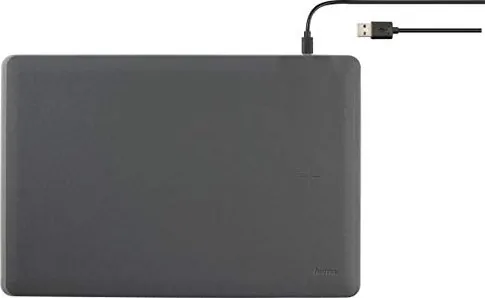
Welcome to a revolutionary change in how you interact with your workspace. The Hama Wireless Charging Mousepad, dark grey is designed to elevate your daily routine by merging functionality with minimalism. This innovative accessory allows you to charge compatible smartphones directly while you work, eliminating cable clutter on your desk. The dark grey aesthetic ensures it blends seamlessly into any professional or home office environment. Read the Hama Wireless Charging Mousepad, dark grey Manual for safety instructions.
Getting started is straightforward. Simply connect the included Micro-USB cable to a suitable USB charger capable of at least 2000 mA output. Place the rear of your smartphone onto the designated charging surface. Inductive technology handles the rest automatically. You will know it is working when your phone displays the charging status. The system stops charging once the battery is full to protect the device. This efficiency saves energy and preserves battery health over time.
While versatile, the device requires careful handling according to the provided instructions. Ensure no metal parts, like magnetic plate holders, are on the back of your phone. Metal can heat up significantly in the field and cause damage. Keep the product out of reach of children and away from direct sunlight or heaters. Do not use damaged cables. If the unit becomes damaged, stop using it immediately. Cleaning should only be done with a lint-free cloth slightly dampened with water. Never use aggressive cleaning agents that might harm the surface.
This product is intended for private non-commercial use only. You may remove cases between the mouse pad and phone to improve charging efficiency if interference occurs. Protect the product from moisture and dirt. Do not attempt to open or repair the unit yourself. Leave service work to qualified experts to maintain safety standards. The product dimensions are 30.5 by 0.5 by 20.5 cm, making it compact for small desks. Always disconnect from power before long storage periods. Enjoy a cleaner workspace today.
Modern desks often suffer from tangled wires. This device solves that by integrating charging capacity into a mouse pad surface. It supports inductive charging technology. By removing the need for multiple cables, you keep your workspace tidy and professional. The surface is designed to be durable yet gentle enough to not scratch your device.
Users must be aware of specific safety restrictions to prevent accidents. Do not dispose of this electronic device in household waste due to environmental regulations. It must be recycled at appropriate collection points. Never operate the product outside specified power limits. Avoid placing bank cards or magnetic objects on the pad to prevent data loss. These cards contain magnetic strips that could be damaged by the charging field. Overheating can occur if the unit is covered by textiles or metal objects.
Hama assumes no liability for damages from improper use. Modifications by the user void the warranty completely. For any questions, contact the product consulting hotline. Support information is available on the official website. The frequency band operates between 108.49 kHz and 175.64 kHz. Radio frequency power is transmitted within safe limits. This ensures compliance with safety standards for consumer electronics across the region.
Investing in quality accessories improves your daily workflow. This mouse pad offers a practical way to keep your phone powered without searching for outlets. It is a smart addition for anyone valuing a tidy workspace. Remember to follow all instructions for long-term reliability. Enjoy the convenience of wireless interaction with your mobile phone while working efficiently.
Search for 67,732 Manuals online


Type-in Brand or Model