
Hama WiFi Power Strip 176574 Manual
PDF manual · 38 Pages
English



Quick check
Incorrect answer, please try again.
Chat with your Hama WiFi Power Strip 176574 manual using AI
Get instant AI answers from your Hama WiFi Power Strip 176574 manual
Ask anything about the Hama WiFi Power Strip 176574. Answers come from this manual, with the pages they are based on.
Ask a Question
Do you recommend WiFi Power Strip 176574?
Yes NoDo you recommend WiFi Power Strip 176574?
Yes No
Ellie Hall
6 months ago
Does this smart power strip support voice control with Alexa or Google Home?
Frequently Asked Questions
The strip has a maximum connection power of 10 A and 2300 W. Ensure the total power consumption of all connected devices does not exceed this limit to avoid tripping hazards or damage.
Is this answer helpful?
Yes, the Hama WLAN Socket Strip is compatible with both Apple iOS and Google Android devices. You need to download the free Hama Smart Solution app from the respective app store to get started.
Is this answer helpful?
No, this product is designed exclusively for indoor use in dry environments. Do not expose it to moisture, rain, or direct sunlight as this poses a risk of electric shock and voids the warranty.
Is this answer helpful?
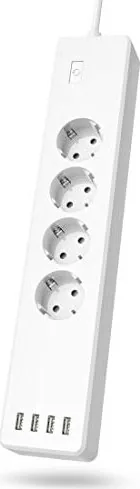
The Hama WLAN Socket Strip features four built-in USB-A ports. These allow you to charge multiple mobile devices simultaneously without needing separate wall adapters.
Is this answer helpful?
Yes, provided it is used according to instructions. However, if you will not be using the product for a prolonged period, it is recommended to disconnect it from the mains power supply.
Is this answer helpful?
No, the strip connects directly to your existing 2.4 GHz Wi-Fi network. No additional hub or bridge is required for operation, simplifying your smart home setup.
Is this answer helpful?
If the device, AC adapter, or cables are damaged, do not open it or continue operating it. Disconnect immediately and seek assistance from qualified experts. Self-repair attempts will void the warranty.
Is this answer helpful?
Advantages and Disadvantages
Advantages

- Four high-power sockets support up to 2300W total load
- Integrated 4x USB-A ports for convenient device charging
- Remote control via Hama Smart Solution app for iOS and Android
- Easy setup process with clear LED status indicators
- Complies with strict EU safety and RF exposure regulations
Disadvantages

- Requires 2.4 GHz Wi-Fi network which may have limited range
- Not suitable for commercial or industrial applications
- Cannot be stacked or daisy-chained with other units
- USB ports do not support fast charging protocols like PD
- Must be kept 20 cm away from the human body for RF compliance
Product Specification
Type
Actor
Standard
WLAN
Function
Switch socket (on/off), Charging function (4x USB-A)
Dimensions
13.78x2.76x1.70 inches
Features
Controllable via app (Android, iOS), Voice assistant (Amazon Alexa, Google Assistant)
Product Description
Transform Your Home with the Hama WLAN Socket Strip
The Hama WLAN Socket Strip 4-way, 2300W, 4x USB-A represents a significant leap in smart home automation. This versatile power strip combines traditional electrical outlets with modern connectivity, allowing you to control your devices remotely via a smartphone app. Whether you are managing lamps, chargers, or small appliances, this strip offers the flexibility and convenience needed for a connected lifestyle.
Designed for safety and efficiency, the unit supports a maximum load of 2300 watts across four standard sockets. It also features four integrated USB-A ports, making it an ideal charging station for multiple smartphones and tablets simultaneously. The device operates on the 2.4 GHz frequency band, ensuring stable communication with your home Wi-Fi network. Setup is straightforward; simply download the Hama Smart Solution app, create an account, and follow the guided steps to connect the strip to your router. Once paired, you can turn devices on or off from anywhere, set schedules, and monitor energy usage.
Safety is paramount with this product. The unit includes protective covers for unused sockets and requires the main switch to be closed during operation to prevent accidental contact. It is intended strictly for private, non-commercial use in dry environments. Users must avoid placing the strip near heat sources or in direct sunlight to prevent overheating. The device complies with EU regulations regarding electromagnetic field exposure when used at least 20 cm away from the body.
Maintaining the Hama WLAN Socket Strip is simple. Always disconnect it from the mains before cleaning. Use a slightly damp, lint-free cloth and avoid aggressive chemicals that could damage the casing. Regular maintenance ensures longevity and continued safe operation. By integrating this smart socket strip into your home, you gain greater control over your energy consumption and daily routines without compromising on power capacity or safety standards.
Search for 67,732 Manuals online


Type-in Brand or Model
Zechariah Grady
7 months ago
How difficult is the initial setup and connection process for this smart power strip?
Manual.ly
7 months ago
The setup process varies by user experience. While many customers report a quick installation lasting under a minute via the Hama Home app, some users have noted that connecting the power strip itself can be challenging initially. Once connected, the device integrates easily into home networks and allows individual control of sockets and USB ports through the app or manual buttons.