
Hama WiFi Controller for LED Strips Manual
PDF manual · 56 Pages
English



Quick check
Incorrect answer, please try again.
Chat with your Hama WiFi Controller for LED Strips manual using AI
Get instant AI answers from your Hama WiFi Controller for LED Strips manual
Ask anything about the Hama WiFi Controller for LED Strips. Answers come from this manual, with the pages they are based on.
WiFi Controller for LED Strips Maintenance Schedule
Always disconnect the WiFi controller from the power supply before cleaning it or if it will not be used for a long period of time.
Clean the product only with a slightly damp, lint-free cloth. Do not use aggressive cleaning agents and ensure no water gets into the device.
Ask a Question
Do you recommend WiFi Controller for LED Strips?
Yes No
itaque11
5 months ago
Is it possible to change the light color using voice commands?
Frequently Asked Questions
Yes, it works with most standard RGB and RGBW LED strips that use GRB or BRG connectors, provided they are rated for 12V DC and do not exceed 60W total power.
Is this answer helpful?
No, the controller connects directly to your home Wi-Fi network via the Hama Smart Solution app, eliminating the need for extra hardware or bridges.
Is this answer helpful?
No, the product is not suitable for operation with dimmers, electrical switches, photocells, or timer switches. It requires direct connection to a power supply.
Is this answer helpful?
If the colors appear in the opposite sequence, disconnect the power and insert the supplied adapter cable between the controller and the LED strip to correct the polarity.
Is this answer helpful?
It can only be used outdoors in protected areas where it is shielded from rain, moisture, and direct sunlight. It is not waterproof.
Is this answer helpful?
You can try resetting the connection by unplugging and replugging the power supply three times quickly until the LED strip flashes rapidly again.
Is this answer helpful?
Advantages and Disadvantages
Advantages

- Easy setup with the Hama Smart Solution app for iOS and Android
- Compatible with standard GRB and BRG LED strips
- Supports high load up to 60W at 12V/5A
- No need for additional bridges or hubs
- Reliable 2.4 GHz Wi-Fi connection
Disadvantages

- Not compatible with external dimmer switches or timers
- Requires a separate 12V power supply not included
- Limited to indoor or protected outdoor use only
- Cannot operate with photocells or twilight sensors
- Colors may require adapter cable adjustment if polarity is wrong
Product Specification
Type
Lighting, LED Controller
Consists of
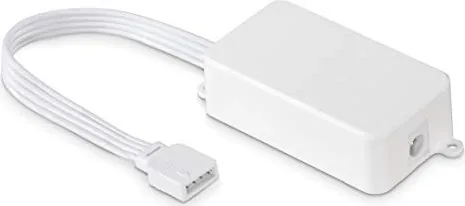
1x Controller, 1x Connection Cable
Connection
WLAN
Connectors
1x 4-Pin RGB (+12V/G/R/B) (LED Controller)
Power Supply
Power supply via 1x Barrel Jack (LED Controller, 12V/5A/60W)
Color
White
Product Description
Transform Your Lighting with the Hama WLAN RGB Controller
Elevate your home ambiance instantly with the Hama WLAN RGB Controller, a versatile solution designed to bring smart lighting to any LED strip. This device acts as the central hub for your color-changing lights, allowing you to control brightness, colors, and dynamic modes directly from your smartphone. Whether you want to set a romantic mood in the living room or energize your gaming setup, this controller offers seamless integration through the Hama Smart Solution app.
The installation process is straightforward and user-friendly. After downloading the app from the App Store or Google Play, you simply connect the controller between your power supply and the LED strip. The device supports standard GRB and BRG connections, making it compatible with a wide range of third-party LED products. Once connected, the LED strip flashes rapidly to indicate pairing mode, after which you can easily link it to your Wi-Fi network via the app interface.
Safety is a top priority with this product. It is designed strictly for private, non-commercial use in dry environments. The unit includes clear warnings regarding electrical safety, ensuring that users do not operate damaged components or expose the device to moisture. The maximum load capacity is 60 watts, powered by a 12-volt DC supply with up to 5 amps of current. This makes it powerful enough for substantial lighting setups while remaining safe for household operation.
Beyond basic on-off functionality, the Hama WLAN RGB Controller allows for deep customization. You can create schedules, adjust color temperatures, and sync lights to music using the intuitive mobile application. The device operates on the reliable 2.4 GHz frequency band, ensuring stable connectivity throughout your home. For maintenance, a simple wipe with a slightly damp cloth is all that is needed to keep the unit looking pristine. Always remember to disconnect the power before cleaning or if the device shows signs of damage.
Key Features and Benefits
This controller represents the perfect blend of simplicity and advanced technology. It eliminates the need for complex wiring or expensive hubs, offering a plug-and-play experience for smart home enthusiasts. By integrating with your existing Wi-Fi, it transforms ordinary LED strips into a dynamic smart lighting system without requiring a dedicated bridge. The compact design fits discreetly behind TVs or inside light fixtures, keeping your space tidy while delivering vibrant illumination.
Important Usage Notes
Please note that this device is not compatible with dimmer switches, photocells, or twilight sensors. It must be used with a suitable 12V power supply and approved LED strips. If the colors appear reversed (blue and green swapped), a simple adapter cable included in the package can correct the polarity. Always ensure the LED strip cools down before touching it, as they can become hot during operation.
Search for 67,732 Manuals online


Type-in Brand or Model
Riley Richards
4 months ago
Can I control the lighting via voice commands and set specific brightness percentages?
Manual.ly
4 months ago
Yes, our product supports Google Voice integration, allowing you to adjust colors and brightness using simple voice commands. You can also set precise brightness levels, such as 45% for your kitchen lights, directly through the app or voice assistant.