G Operating instruction D Bedienungsanleitung B Работна инструкцияF Mode d‘emploi E Instrucciones de uso R Руково по эксплуата ции I Istruzioni per l‘uso
N Gebruiksaanwijzing
E
CZ
F
D
GB
I
P
NL
TR
GR
RO
H
FIN
PL
S
RUS
SK
Operating Instructions
Bedienungsanleitung
Mode d‘emploi
Instrucciones de uso
Руководство по эксплуата ции
Работна инструкция
Istruzioni per l‘uso
Gebruiksaanwijzing
Οδηγίες χρήσης
Instrukcja obsługi
Használati útmutató
Návod kpoužití
Návod na použitie
Manual de instruções
Kullanma kılavuzu
Manual de utilizare
Bruksanvisning
Käyttöohje
BG
Alllistedbrands are tradema rksohe corrnding
companies. Errs andomissions excepted,
andsubject to technical changes. Ourgeneralterms of
deliv eryand paentare applied.
Hama GmbH &C
86652 Monheim/Germany
www
USB-3.1 Ty pe-C-Hub
00
135758
00135758/03.18
USB 3.1 Ty pe-C hub
1. Pa ckage Contents
•USB 3.1 Ty pe-C hub
•These operating instructions
2. Safety Notes
•The product is intended for private, non-commercial use only
•Donot attempt to service or re pair the product yourself.Leave any and
all service work to qualied experts.
•Donot open the device or continue to operate it if it becomes
damaged.
•Donot operate the product outside the power limits given in the
specications.
•Donot modify the product in any way.Doing so voids the warranty
•Keepthis product, as all electrical products, out of the re ach of
children!
Warning
•Find out the maximum output current capacity of the USB port on
your device. To do this, consult the operating instructions or ask
the manufacturer
•Common values are500 mA for USB-A2.0, 900 mA for USB-A3.0,
and up to 3000 mA for USB Ty pe-C.
•Ensurethat the cumulative current draw of all USB devices
connected to the hub/multiport adaptor does not exceed this value.
3. St artup and Operation
•Switch on your computer and boot the system.
•Connect the product to afreeUSB port on your computer
•You donot have to install drivers; the computer will automatically
recognise the product.
•Ifnecessary,follow the instructions for your operating system.
•Inorder to use your USB devices or storage devices, plug them into the
product one after the other.
4. Wa rranty Disclaimer
Hama GmbH &CoKGassumes no liability and provides no warranty for
damage re sulting from improper installation/mounting, improper use of
the product or from failuretbserve the operating instructions and/
or safety notes.
5. Service and Support
Please contact Hama Product Consulting if you have any questions about
this product.
Hotline: +49 9091 502-115 (German/English)
Further support information can be found here:
www
6. Te chnical Data
Operating voltage /
current consumption
5V max. 3A
Compatibility USB-C-port
System requirements
Windows 10 /8/7
Mac OS 10.8 ≥
USB specification USB 3.1 Gen 1
Note
•Ifthereinterference or the product no longer re sponds, unplug
the product, wait afew seconds and then plug it in again.
7. Recycling Information
Note on environmental protection:
After the implementation of the European Directive 2012/19/
EU and 2006/66/EU in the national legal system, the following
applies:
Electric and electronic devices as well as batteries must not
be disposed of with household waste. Consumers areobliged
by law to re turn electrical and electronic devices as well as batteries at
the end of their service lives to the public collecting points set up for this
purpose or point of sale. Details to this aredened by the national law
of the re spective country
This symbol on the product, the instruction manual or the package
indicates that aproduct is subject to these re gulations.
By re cycling, re using the materials or other forms of utilising old devices/
Batteries, you aremaking an important contribution to protecting our
environment.
1. Pa ckungsinhalt
•USB-3.1 Ty pe-C-Hub
•Diese Bedienungsanleitung
2. Sicherheitshinweise
•Das Produkt ist für den privaten, nicht-gewerblichen
Haushaltsgebrauch vorgesehen.
•Versuchen Sie nicht, das Produkt selbst zu warten oder zu re parieren.
Überlassen Sie jegliche Wa rtungsarbeit dem zuständigen Fa chpersonal.
•Öffnen Sie das Produkt nicht und betreiben Sie es bei Beschädigungen
nicht weiter
•Betreiben Sie das Produkt nicht außerhalb seiner in den technischen
Daten angegebenen Leistungsgrenzen.
•Nehmen Sie keine Ve ränderungen am Gerät vor.Dadurch verlieren sie
jegliche Gewährleistungsansprüche.
•Dieses Produkt gehört, wie alle elektrischen Produkte, nicht in
Kinderhände!
Warnung
•Stellen Sie den maximalen Ausgangsstrom der USB-Buchse ihres
Gerätes fest. Sehen Sie dazu in der Bedienungsanleitung nach bzw.
wenden Sie sich an den Hersteller
•Häug betragen die We rte 500 mA (USB-A2.0), 900 mA (USB-A
3.0) oder bis zu 3000 mA (USB Ty pe-C).
•Stellen Sie sicher,dass die gesamte Stro maufnahme aller an
den Hub/Multiport-Adapter angeschlossenen USB-Geräte den
ermittelten We rt nicht überschreitet.
3. Inbetriebnahme und Betrieb
•Starten Sie ihren Computer und fahren Sie ihn komplett hoch.
•Schließen Sie das Produkt an einer freien USB-Buchse Ihres Computers
an.
•Das Produkt wirdautomatisch erkannt, eine Tr eiberinstallation ist
nicht nötig.
•FolgenSie ggf.den Anweisungen Ihres Betriebsystems.
•Stecken Sie nacheinander die USB-Geräte oder Speichergeräte am
Produkt an, um diese nutzen zu können.
4. Haftungsausschluss
Die Hama GmbH &Cbernimmt keinerlei Haftung oder
Gewährleistung für Schäden, die aus unsachgemäßer Installation,
Montage und unsachgemäßem Gebrauch des Produktes oder
einer Nichtbeachtung der Bedienungsanleitung und/oder der
Sicherheitshinweise re sultieren.
5. Service und Support
Bitte wenden Sie sich bei Fragen zum Produkt gerne an die
Hama-Produktberatung.
Hotline: +49 9091 502-115 (Deu/Eng)
WeitereSupportinformationen nden sie hier:
www
6. Te chnische Daten
Betriebsspannung/
Stromaufnahme
5V max. 3A
Kompatibilität USB-C-Anschluss
Systemvoraussetzung
Windows 10 /8/7
Mac OS 10.8 ≥
USB-Spezikation USB 3.1 Gen 1
Hinweis
•Stecken Sie das Produkt ab, warten Sie einige Sekunden und
stecken Sie das Produkt wieder ein, wenn eine St örung vorliegt
oder das Produkt nicht mehr re agiert.
7. Entsorgungshinweise
Hinweis zum Umweltschutz:
Ab dem Zeitpunkt der Umsetzung der europäischen Richtlinien
2012/19/EU und 2006/66/EG in nationales Recht gilt
folgendes:
Elektrische und elektronische Geräte sowie Batterien dürfen
nicht mit dem Hausmüll entsorgt werden. Der Ve rbraucher
ist gesetzlich verpichtet, elektrische und elektronische Geräte sowie
Batterien am Ende ihrer Lebensdauer an den dafür eingerichteten,
öffentlichen Sammelstellen oder an die Ve rkaufsstelle zurückzugeben.
Einzelheiten dazu re gelt das jeweilige Landesrecht. Das Sy mbol auf
dem Produkt, der Gebrauchsanleitung oder der Ve rpackung weist auf
diese Bestimmungen hin. Mit der Wiederverwertung, der stoichen
Verwertung oder anderen Fo rmen der Ve rwertung von Altgeräten/
Batterien leisten Sie einen wichtigen Beitrag zum Schutz unserer Umwelt.
1. Съ държание на опаковката
•USB 3.1 Ty pe-C хъб
•Товаръководство за обслужване
2. Забележки за безопасност
•Продуктътепредвиден за лична, нестопанскабитова употреба.
•Неспитвайте сами да обслужвате или ремонтирате продукта.
Оставете всякаква техническаподдр ъжка на ко мпетентните
специалисти.
•Неотваряй продуктаипри повреда не продължавай да го
използваш.
•Неизползвайте продуктаизвън неговите граници на мощността,
посочени втехническите данни.
•Неправете промени вуреда. Така ще загубите право на всякакви
гаранционни претенции.
•Подобно на всички електрически продукти този продукт не бива
да попада връцете на деца!
Вниманив
•Установете максималния изход ен токнSB букс ата на уреда
Ви. За та зи цел погледнете винструкциите за употреба, респ. се
обърнете към производителя.
•Стойностите честовъзлизатн00 mA (USB-A2.0), 900 mA
(USB-A3.0) или до 3000 mA (USB-C).
•Уверете се,чобщата ко нсумация на токнавсички включени
към мултипорто вия хъб или адаптер USB уреди не надвишава
изчислената стойност.
3. Въвеждане иексплоата ция
•Стартирайте ко мпютъра игоизчакайте да зареди напълно.
•Свърже те продуктакъм свободна USB буксаномпютъра Ви.
•Продуктътсеразпознава автоматично, не енеобход има
инсталация на драйвър.
•Следвайте указаниятанашата операционна система.
•Задожете да използвате USB ус тройствата или запаметяващите
уреди, ги свърже те последователно към продукта.
4. Изключване на га ранция
Хама Гм бХ &Ко. КГноема никаква отго ворност или га ранция
за повреди врезултат на неправилна инсталация, монтаж и
неправилна употреба на продуктаили неспазване на упътванетоз
обслужване и/или инструкциите за безопасност.
5. Се рвиз исъпорт
За въпроси във връзкаспродуктасбърни към отд ела за
консултация за продукти на Хама.
Гореща телефонна линия: +49 9091 502-115 (немски/английски)
Допълнителна информация за съпортщамерите тук:
www
6. Те хнически данни
Работно напрежение /
консумация на ток
5V max. 3A
Съвместимост USB-C извод
Изисквания към
системата
Windows 10 /8/7
Mac OS 10.8 ≥
USB спецификация USB 3.1 Gen 1
Забележка
•Изключете продукта, изчакайте няколко се кунди иотново
включете продукта, когато има смущение или продуктаповече
не реагира.
7. Ук азания за изхвърляне
Указание от носно защитата на окол ната среда:
От моментанрилаганетонвропейските директиви
2012/19/EU и2006/66/EО внационалното право на
съответните страни важи следното:Електрическите и
електронните уреди ибатериите не бива да се изхвърлят с
битовите от падъци. Потребителят едлъженпакон да
върне електрическите иелектронните уреди ибатериите вкрая на
тяхната дългот райност на изградените за целтаобществени
пунктове за събиране на от падъци или на търговския обект.
Подробностите по въпроса са регламентирани взаконодато
на съответната страна. Символътвърху продукта, упътванетоз
употреба или опаковката насочва към тези разпоредби. Чрез
рециклирането, преработката на материалите или други форми на
оползотворяване на старите уреди/батерии вие допринасяте за
защитата на нашата окол на среда.
1. Contenu de l‘emballage
•Concentrateur USB 3.1 Ty pe-C
•Mode d‘emploi
2. Consignes de sécurité
•Ceproduit est destiné àune installation domestique non commerciale.
•Netentez pas de réparer l’appareil vous-même ni d’effectuer
des travaux d’entretien. Déléguez tous travaux d‘entretien àdes
techniciens qualiés.
•Netentez pas d‘ouvrir le produit en cas de détérioration et cessez de
l’utiliser
•N‘utilisez pas le produit en dehors des limites de puissance indiquées
dans les caractéristiques techniques.
•N’apportez aucune modication àl’appareil. Des modications vous
feraient perdrevos droits de garantie.
•Cet appareil, comme tout appareil électrique, doit êtregardé hors de
portée des enfants !
Avertissement
•Vériez le courant de sortie maximal du port USB de votreappareil.
Consultez le mode d’emploi de votreappareil àcujet ou
adressez-vous au fabricant de l’appareil.
•Les données sont généralement les suivantes :500 mA (USB-A2.0),
900 mA (USB-A3.0) ou jusqu’à 3000 mA (USB Ty pe-C).
•Assurez-vous que la consommation totale de courant de tous les
appareils USB branchés au concentrateur /àl’adaptateur multiport
ne dépasse la valeur détectée.
3. Mise en service et fonctionnement
•Mettez votreordinateur sous tension et démarrez le système
d’exploitation.
•Connectez le produit àuort USB libredvotr eordinateur
•Votre système reconnaît automatiquement le produit ;aucun pilote ne
doit êtreinstallé.
•Lecas échéant, suivez les indications de votresystème d’exploitation.
•Branchez vos appareils USB ou vos périphériques de stockage au
produit les uns après les autres an de les utiliser
4. Exclusion de garantie
La société Hama GmbH &Cécline toute re sponsabilité en cas
de dommages provoqués par une installation, un montage ou une
utilisation non conformes du produit ou encoreprovoqués par un non
respect des consignes du mode d‘emploi et/ou des consignes de sécurité.
5. Service et assistance
En cas de question concernant le produit, veuillez vous adresser au
service de conseil produits de Hama.
Ligne téléphonique directe :+49 9091 502-115 (allemand/anglais)
Vous trouverez ici de plus amples informations concernant l‘assistance :
www
6. Caractéristiques techniques
Tension de service /
Consommation
électrique
5V max. 3A
Compatibilité Connexion USB-C
Confi guration requise
Windows 10 /8/7
Mac OS 10.8 ≥
Spécification USB USB 3.1 Gen 1
Remarque
•Débranchez le produit, patientez quelques secondes, puis
rebranchez-le en cas de problème ou dans le cas où le produit ne
réagit plus.
7. Consignes de re cyclage
Remarques concernant la protection de l’environnement:
Conformément àlirective européenne 2012/19/EU et
2006/66/CE, et an d’atteindreuertain nombred’objectifs
en matièredprotection de l’environnement, les règles
suivantes doivent êtreappliquées:
Les appareils électriques et électroniques ainsi que les batteries ne
doivent pas êtreéliminés avec les déchets ménagers. Le pictogramme
“picto” présent sur le produit, son manuel d’utilisation ou son emballage
indique que le produit est soumis àcette réglementation. Le
consommateur doit re tourner le produit/la batterie usager aux points de
collecte prévus àcet effet. Il peut aussi le re mettreàuevendeur.E
permettant enn le re cyclage des produits ainsi que les batteries, le
consommateur contribueraàlrotection de notreenvironnement. C’est
un acte écologique.
1. Contenido del paquete
•Hub USB 3.1 Ty pe-C
•Estas instrucciones de manejo
2. Instrucciones de seguridad
•Elproducto es paraeso doméstico privado, no comercial.
•Nointente mantener oreparareparato por cuenta propia.
Encomiende cualquier trabajo de mantenimiento al personal
especializado competente.
•Noabraeroducto ynsiga operando de presentar deterioros.
•Noopereeroducto fuerados límites de potencia indicados en los
datos técnicos.
•Norealice cambios en el aparato. Esto conllevaría la pérdida de todos
los derechos de la garantía.
•Este aparato, como todos los aparatos eléctricos, no debe estar en
manos de los niños.
Aviso
•Determine la corriente de salida máxima del puerto USB de su
dispositivo. Para ello, consulte las instrucciones de uso odiríjase
al fabricante.
•Amenudo, los valores equivalen a500 mA (USB A2.0), 900 mA
(USB A3.0) oalcanzan hasta 3000 mA (USB Ty pe-C).
•Asegúrese de que el consumo de corriente total de todos los
dispositivos USB conectados al hub/adaptador multipuerto no
sobrepasan el valor calculado.
3. Puesta en marcha yfuncionamiento
•Encienda su ordenador yespereaque arranque completamente.
•Conecte el producto auuerto USB libredrdenador
•Elproducto se reconoce automáticamente, sin necesidad de instalar
ningún controlador
•Encaso necesario, siga las instrucciones de su sistema operativo.
•Enchufe los dispositivos USB olos dispositivos de memoria al producto
de forma consecutiva parapoder utilizarlos.
4. Exclusión de re sponsabilidad
Hama GmbH &CoKGneresponsabiliza ni concede garantía por los
daños que surjan por una instalación, montaje omanejo incorrectos del
producto opor la no observación de las instrucciones de manejo y/o de
las instrucciones de seguridad.
5. Servicio ysoporte
Si tiene que hacer alguna consulta sobreeroducto, diríjase al
asesoramiento de productos Hama.
Línea directa: +49 9091 502-115 (Alemán/Inglés)
Encontrar más información de soporte aquí:
www
6. Datos técnicos
Tensión de
funcionamiento /
consumo de corriente
5V max. 3A
Compatibilidad Puerto USB-C
Requisitos del sistema
Windows 10 /8/7
Mac OS 10.8 ≥
Especificación USB USB 3.1 Gen 1
Nota
•Encaso de fallo odue el producto deje de re accionar,
desenchufe el producto, esperealgunos segundos yvuelva a
enchufarlo.
7. Instrucciones paradesecho yreciclaje
Nota sobrelrotección medioambiental:
Después de la puesta en marcha de la directiva Europea
2012/19/EU y2006/66/EU en el sistema legislativo nacional,
se aplicaraliguiente:
Losaparatos eléctricos yelectrónicos, así como las baterías,
no se deben evacuar en la basuradoméstica. El usuario está legalmente
obligado allevar los aparatos eléctricos yelectrónicos, así como pilas y
pilas re cargables, al nal de su vida útil alos puntos de re cogida
comunales oadevolverlos al lugar donde los adquirió. Losdetalles
quedaran denidos por la ley de cada país. El símbolo en el producto, en
las instrucciones de uso oenembalaje hace re ferencia aello. Gracias
al re ciclaje, al re ciclaje del material oaotras formas de re ciclaje de
aparatos/pilas usados, contribuye Usted de forma importante al
protección de nuestromedio ambiente.
1. Ко мплект поставки
•КонцентраторUSB 3.1 Ty pe-C
•Настоящая инструкция
2. Те хникабезопасности
•Изделие предназначено тол ькодля домашнегоприменения.
•Запрещается самостоятельно ремонтировать ус тройство.
Ремонт разрешается производить толькоквалифицированному
персоналу.
•Изделие не от крывать. Запрещается эксплуат ировать неисправное
изделие.
•Соблюдать технические ха рактеристики.
•Запрещается вносить изменения вконструкцию. Впротивном
случае га рантийные обязательства аннулируются.
•Недаватьдетям!
Внимание
•Определите максимальный выход ной токгнезда USB
устройства. Для это смотрите инструкцию по эксплу атации
устройства или обратитесь кпроизводителю ус тройства.
•Частыми значениями являются500 мА (USB-A2.0), 900 мА
(USB-A3.0) или до 3000 мА (USB-C).
•Общий потребляемый токвсехподключенных кконцентратору
USB-устройств не должен превышать полученное значение.
3. Вводвэксплуата цию иработа
•Включите ко мпьютер идождитесь завершения загрузки
операционной системы.
•Подключите изделие ксвободному USB-разъему ко мпьютера.
•Изделие буд ет обнаружено автоматически, уста новкадрайвера
не требуется.
•При необходимости следуйте инструкциям воперационной
системе.
•Поочередно подсоединяйте кизделию USB-устройстваили
накопители, чтобы использовать их.
4. Отказ от га рантийных обязательств
Компания Hama GmbH &Cне несет от ветственность за ущерб,
возникший вследствие неправильногомонтажа, подключения и
использования изделия не по назначению, атакжевследствие
несоблюдения инструкции по эксплуата ции итехники безопасности.
5. Отдел техобслуживания
По вопросам ремонтаили замены неисправных изделий
обращайтесь кпродавцу или всервисную службукомпании Hama.
Горячая линия отд ела техобслуживания:
+49 9091 502-115 (немецкий, английский)
Подробнее смотрите здесь:
www
6. Те хнические ха рактеристики
Рабочее напряжение/
Потребление тока
5V max. 3A
Совместимость Разъем USB-C
Требования ксистеме
Windows 10 /8/7
Mac OS 10.8 ≥
СтандартUSB USB 3.1 Gen 1
Примечание
•При наличии помех или сбоев от ключите изделие, подождите
нескол ькосекунд иснова подключите его.
7. Инструкции по утилизации
Охрана окружающей среды:
Смоментапереходанациональногозаконода на
европейские нормативы 2012/19/EU и2006/66/EU
действительно следующее:
Электрические иэлектронные приборы, атакже бата реи
запрещается утилизировать собычным мусором. Потребитель,
согласно закону, обязан утилизировать эл ектрические и
электронные приборы, атакжебатареи иаккумуляторы после их
использования вспециально предназначенных для этого пунктах
сбора, либо впунктах продажи. Детальная регламентация
этих требований осуществляется соответствующим местным
законода Необход имость соблюдения данных
предписаний обозначается особым значком на изделии,
инструкции по эксплуата ции или упаковке. При переработке,
повторном использовании материалов или при другой форме
утилизации бывших вупотреблении приборов Вы помогаете
охране окружающей среды. Всоответствии спредписаниями по
обращению сбатареями, вГермании вышеназванные нормативы
действуютдля утилизации бата рей иаккумуляторов.
1. Contenuto della confezione
•Hub USB 3.1 Ty pe-C
•Queste istruzioni per l’uso
2. Indicazioni di sicurezza:
•Ilprodotto èconcepito per l’uso domestico privato, non commerciale.
•Non tentaredggiustareoripararel’apparecchio da soli. Fare
eseguirequalsiasi lavorodiparazione al personale specializzato
competente.
•Non aprireirodotto enon utilizzarlo più se danneggiato
•Non mettereisercizio il prodotto al di fuori dei suoi limiti di
rendimento indicati nei dati tecnici.
•Non apportaremodiche all’apparecchio per evitarederdereidiritti
di garanzia.
•Tenere questo apparecchio, come tutte le apparecchiatureelettriche,
fuori dalla portata dei bambini!
Attenzione
•Vericarelorrente in uscita massima del connettoreUSB
del proprio dispositivo. Consultarelistruzioni orivolgersi al
produttore.
•Spesso ivalori sono di 500 mA (USB-A2.0), 900 mA (USB-A3.0)
oppureno a3000 mA (USB Ty pe-C).
•Accertarsi chel’assorbimento totale di energia di tutti idispositivi
USB collegati all’hub/adattatoremultiport non superi il valore
stabilito.
3. Messa in esercizio efunzionamento
•Accendereiomputer eavviarlo.
•Collegareirodotto auna porta USB liberadel computer
•Ildispositivo viene riconosciuto automaticamente, non ènecessario
installarealcun driver.
•Attenersi, se necessario, alle istruzioni del proprio sistema operativo.
•Collegareiequenza idispositivi USB all’apparecchio in modo da
poterli utilizzare.
4. Esclusione di garanzia
Hama GmbH &Co.KGnon si assume alcuna re sponsabilità per idanni
derivati dal montaggio ol‘utilizzo scorretto del prodotto, nonché dalla
mancata osservanza delle istruzioni per l‘uso e/o delle indicazioni di
sicurezza.
5. As sistenza esupporto
In caso di domande sul prodotto, rivolgersi alla Consulenza
prodotto Hama.
Hotline: +49 9091 502-115 (ted./ing.)
Ulteriori informazioni sul supporto sono disponibili qui:
www
6. Dati tecnici
Tensione di esercizio /
Corrente assorbita
5V max. 3A
Compatibilità Attacco USB-C
Requisiti minimi di
sistema
Windows 10 /8/7
Mac OS 10.8 ≥
Specifica USB USB 3.1 Gen 1
Avvertenza
•Inpresenza di un guasto oslprodotto non re agisce più,
scollegareirodotto, attenderealcuni secondi ecollegarlo
nuovamente.
7. Indicazioni di smaltimento
Informazioni per protezione ambientale:
Dopo l’implementazione della Direttiva Europea 2012/19/EU e
2006/66/EU nel sistema legale nazionale, ci sono le seguenti
applicazioni:
Le apparecchiatureelettriche ed elettroniche elebatterie non
devono esseresmaltite con iriuti domestici. Iconsumatori
sono obbligati dalla legge arestituireIdispositivi elettrici ed elettronici
elbatterie alla ne della lor ovita utile ai punti di ra ccolta pubblici
preposti per questo scopo onei punti vendita. Dettagli di quanto
riportato sono deniti dalle leggi nazionali di ogni stato. Questo simbolo
sul prodotto, sul manuale d’istruzioni osull’imbal indicano che questo
prodotto èsoggetto aqueste re gole. Riciclando, ri-utilizzando imateriali
outilizzando sotto altraforma ivecchi prodotti/le batterie, darete un
importante contributo alla protezione dell’ambiente.
1. Inhoud van de verpakking
•USB 3.1 Ty pe-C hub
•Deze bedieningsinstructies
2. Ve iligheidsinstructies
•Het product is bedoeld voor niet-commercieel privegebruik in huiselijke
kring.
•Probeer niet het product zelf te onderhouden of te repareren.
Laat onderhouds- en re paratiewerkzaamheden door vakpersoneel
uitvoeren.
•Open het product niet en gebruik het niet meer als het beschadigd is.
•Gebruik het product niet buiten de in de technische gegevens vermelde
vermogensgrenzen.
•Veranderniets aan het toestel. Daardoor vervalt elke aanspraak op
garantie.
•Elektrische apparaten dienen buiten het bereik van kinderen gehouden
te worden!
Waarschuwing
•Bepaal de maximale waarde van de uitgaande stroom van de
USB-poort van uw apparaat. Dit kunt uide bedieningsinstructies
vinden of ukunt contact opnemen met de fabrikant.
•Vaakbedragen de waarden 500 mA (USB-A2.0), 900 mA (USB-A
3.0) of max. 3000 mA (USB Ty pe-C).
•Controleer of het totale stroomverbruik van alle op de hub/
multiport-adapter aangesloten USB-apparaten niet meer dan de
vastgestelde waarde bedraagt.
3. Ingebruikneming en werking
•Start uw computer helemaal op.
•Sluit het product op een vrije USB-poort van uw computer aan.
•Het product wordt automatisch herkend, het installeren van een driver
is niet nodig.
•Volg evt. de aanwijzingen van uw besturingssysteem op.
•Sluit nu na elkaar de USB-apparaten of opslagmedia op het product
aan om deze te kunnen gebruiken.
4. Uitsluiting van garantie en aansprakelijkheid
Hama GmbH &Canvaardt geen enkele aansprakelijkheid of
garantieclaims voor schade of gevolgschade, welke door ondeskundige
installatie, montage en ondeskundig gebruik van het product
ontstaan of het re sultaat zijn van het niet in acht nemen van de
bedieningsinstructies en/of veiligheidsinstructies.
5. Service en support
Neem bij vragen over het product contact op met de afdeling
Productadvies van HAMA.
Hotline: +49 9091 502-115 (Duits/Engels)
Meer support-informatie vindt uhier:
www
6. Te chnische specicaties
Bedrijfsspanning /
stroomverbruik
5V max. 3A
Compatibiliteit USB-C aansluiting
Systeemvereisten
Windows 10 /8/7
Mac OS 10.8 ≥
USB-Spezifikation USB 3.1 Gen 1
Aanwijzing
•Koppel het product los, wacht uenige seconden en sluit uhet
product weer aan, indien er zich een storing voordoet of het
product niet meer re ageert.
7. Aanwijzingen over de afvalverwerking
Notitie aangaande de bescherming van het milieu:
Tengevolge van de invoering van de Europese Richtlijn
2012/19/EU en 2006/66/EU in het nationaal juridisch system,
is het volgende van toepassing:
Elektrische en elektronische apparatuur,zoals batterijen mag
niet met het huisvuil weggegooid worden. Consumenten
zijn wettelijk verplicht om electrische en elctronische apparaten
zoals batterijen op het einde van gebruik in te dienen bij openbare
verzamelplaatsen speciaal opgezet voor dit doeleinde of bij een
verkooppunt. Verd erespecicaties aangaande dit onderwerp zijn
omschreven door de nationale wet van het betreffende land. Dit symbool
op het product, de gebruiksaanwijzing of de verpakking duidt erop dat
het product onderworpen is aan deze richtlijnen. Door te re cycleren,
hergebruiken van materialen of anderevormen van hergebruiken
van oude toestellen/batterijen, levert ueen grote bijdrage aan de
bescherming van het mileu.
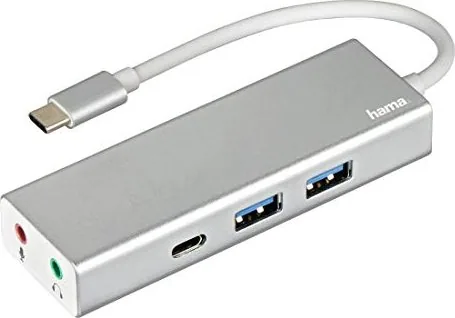
2x Audio
USB 3.1 Data Ty pe-C
USB 3.1 Gen 1
(Max. 5Gbit/s)
2x USB Ty pe-A–USB 3.1 Gen 1
(Max. 5Gbit/s)
USB-C
Data
USB USB
USB
USB-C
Data
USB USB
USB-C Ca ble
USB-C
D
A
USB-C Plug –2xUSB-A, USB-C, Au dio
B
C