
Hama USB 2.0 Hub 1:7 Manual
PDF manual · 14 Pages
English



Quick check
Incorrect answer, please try again.
Chat with your Hama USB 2.0 Hub 1:7 manual using AI
Get instant AI answers from your Hama USB 2.0 Hub 1:7 manual
Ask anything about the Hama USB 2.0 Hub 1:7. Answers come from this manual, with the pages they are based on.
Ask a Question
Do you recommend USB 2.0 Hub 1:7?
Yes NoFrequently Asked Questions
The device supports a wide range of operating systems. It is compatible with Windows 10, 8, 7, Vista, and XP. Additionally, it functions correctly with Mac OS 10.x versions. There is no need for additional drivers in most cases as it adheres to human interface device protocols. Just connect and start using it immediately.
Is this answer helpful?
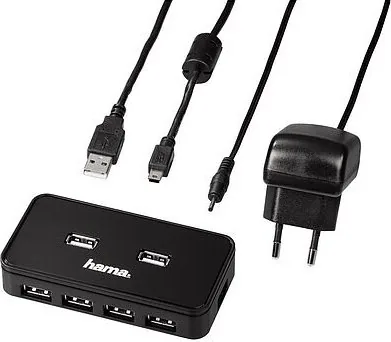
Yes, this specific model requires an external power supply. The package includes a power adapter rated at 5 volts and 1.2 amps. Connecting it to a mains socket before the USB cable ensures the devices receive adequate power. This prevents potential power fluctuations that might occur if connected only to the computer port.
Is this answer helpful?
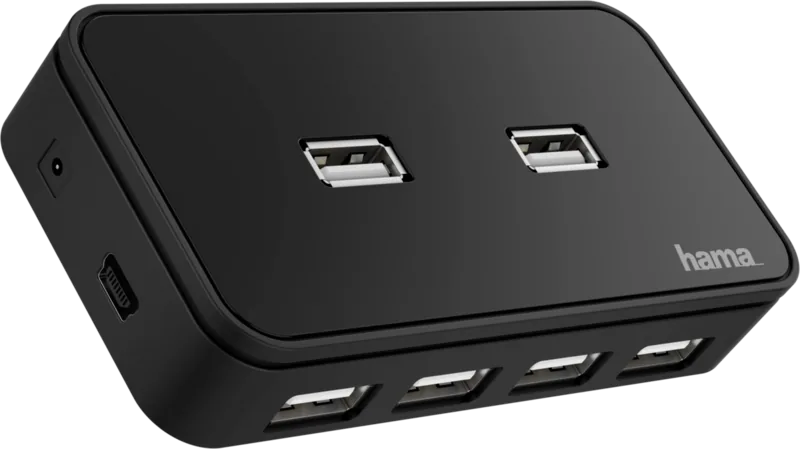
The product features seven USB-A 2.0 ports for connecting peripherals. There is also a single USB-B 2.0 port used for connecting to the main computer or laptop. This configuration allows for seven connected devices while maintaining one upstream connection for data synchronization and power distribution management.
Is this answer helpful?
Safety instructions state that equipment should be kept away from children. The manual warns about choking hazards regarding packaging materials. Electrical devices should also be out of reach. Supervision is recommended when children are near electronic equipment to prevent injuries or accidental damage to the cables and the hub itself during active sessions.
Is this answer helpful?
Do not dispose of this item with regular household waste. It must be recycled according to local EU directives. Consumers should take the electronic device to public collection points or return it to the seller. This ensures environmentally friendly disposal of the electrical components and batteries found within similar accessories.
Is this answer helpful?
Start by turning on your computer and allowing it to boot fully. Next, connect the power supply to a socket and then to the hub. After that, connect the USB cable from the hub to the computer. Finally, connect your USB devices. Install any drivers if prompted, though most should be recognized automatically by the operating system.
Is this answer helpful?
If the product is defective, users should contact their retailer or Hama Product Consulting directly. Support information can be found on the company website. They offer assistance with product claims and driver downloads. It is advisable to retain proof of purchase when seeking repair assistance through the official service center channels or authorized workshops.
Is this answer helpful?
Advantages and Disadvantages
Advantages

- Includes external 5V 1.2A power supply ensuring stable power for multiple peripherals.
- Seven USB-A ports provide ample connection options without needing additional hubs.
- Compatible with major operating systems including Windows and Mac OS families.
- CE marking indicates compliance with European safety and environmental standards.
- Plug-and-play installation process simplifies setup for non-technical users.
Disadvantages

- Requires external power adapter which reduces portability and adds clutter.
- USB 2.0 speeds are slower than modern USB 3.0 standards for file transfer.
- Bulky design due to the included power brick may limit space usage.
- Cable length is not specified which might limit placement flexibility.
- Not suitable for devices requiring higher voltage or power than provided.
Product Specification
Type
USB Hub
Form Factor
1x external wired
Input
1x USB-B 2.0 (Port, 480Mb/s), 1x USB-A 2.0 (Plug via Cable, 480Mb/s)
Output
7x USB-A 2.0 (Port)
Transfer
7x USB-A 2.0 (Port, 480Mb/s)
Power Supply
Power also via connection, AC Input (1x Barrel Plug), external power supply possible and included (1x Barrel Plug 12V/1.2A)
Case Color
black
Compatibility
universal
USB Orientation
Left
Product Description
The Hama USB Hub provides a versatile solution designed to expand connectivity for your computer significantly. Whether you are using a PC or a laptop, this hub provides a reliable way to connect multiple devices simultaneously without needing to switch cables. The specific model referenced as Hama USB Hub, 7x USB-A 2.0, USB-B 2.0 [Socket] Manual is widely supported in this context.
The primary feature is the extensive port configuration. It provides seven separate USB-A 2.0 ports alongside a dedicated USB-B 2.0 connection for upstream data transfer. This architecture allows users to attach keyboards, mice, printers, and external hard drives all at once, which is essential for a productive workspace.
Power management is crucial for high-performance hubs. This model utilizes an included power supply unit rated at 5 volts and 1.2 amps. This external power source ensures stable operation even when multiple devices are drawing significant current, unlike bus-powered hubs that might struggle under heavy usage. Users simply connect the power brick first, followed by the USB data cable. This installation sequence is designed to prevent connectivity issues during the initial setup.
Compatibility is another major strength. It supports a wide range of operating systems including Windows 10, 8, 7, Vista, and XP, as well as Mac OS 10.x versions. This cross-platform support makes it suitable for diverse office environments. The device adheres to CE standards, ensuring safety and regulatory compliance. If the product is defective, users can contact their retailer for support via the provided hotline or website.
Safety and environmental considerations are integral. Users are advised to keep the device away from moisture and direct sunlight to maintain functionality. Packaging materials should be kept away from children to prevent choking hazards. When the product reaches the end of its lifecycle, do not discard it with household waste. Recyclable electronic waste guidelines apply. The build quality suggests durability, provided care is taken to avoid physical impacts.
The hub acts as a centralized station reducing cable clutter on the desk. By organizing connections through a single socket, workspace organization improves significantly. While USB 2.0 is older, it remains compatible with legacy devices. It is a solid choice for expanding your digital workspace efficiently.
Search for 67,732 Manuals online


Type-in Brand or Model
Julian Koehler
7 months ago
I plan to connect multiple devices like a webcam and external hard drive. Will the included power adapter guarantee stable operation for all seven ports simultaneously, or is it better to use fewer devices?
Manual.ly
7 months ago
We recommend using the external power supply for optimal performance. The USB Hub requires adequate power to run all seven ports reliably, especially with high-draw devices. Using only the computer USB power might cause instability if more than three devices are active. Please consult the manual for specifications.