
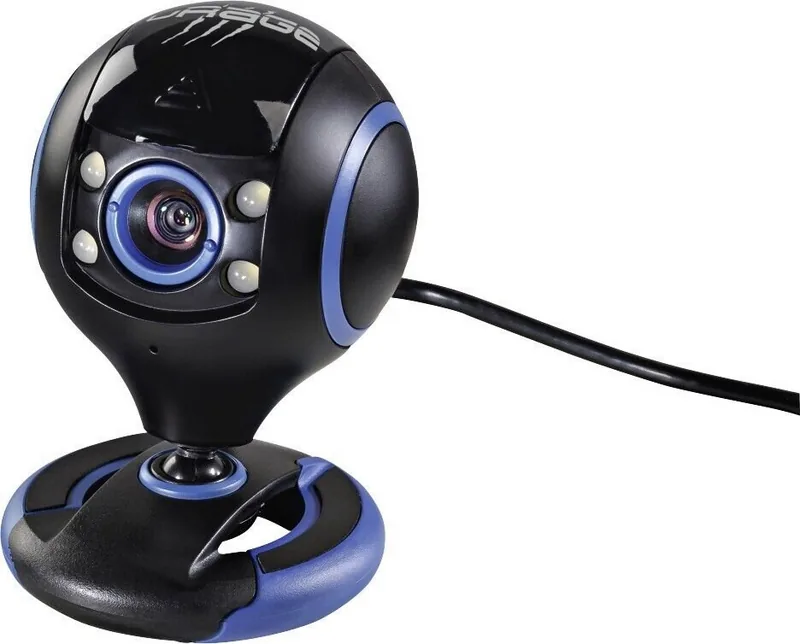

Hama uRage REC 200 HD Manual
PDF manual · 2 Pages
English



Quick check
Incorrect answer, please try again.
Chat with your Hama uRage REC 200 HD manual using AI
Get instant AI answers from your Hama uRage REC 200 HD manual
Ask anything about the Hama uRage REC 200 HD. Answers come from this manual, with the pages they are based on.
Ask a Question
Do you recommend uRage REC 200 HD?
Yes NoFrequently Asked Questions
Yes, the webcam features a standard USB connection that works with most modern operating systems. It supports a plug-and-play installation, meaning you do not need to install additional software or drivers to begin using it.
Is this answer helpful?
No, you should never expose the device to water or liquid cleaners. Clean the lens gently with a dry, soft cloth. Keeping the product away from moisture is critical to preventing internal damage.
Is this answer helpful?
If the product is dropped or subjected to major shocks, stop using it immediately. Do not attempt to open the casing to fix it. Continued operation of a damaged unit can be unsafe and may void any potential warranty coverage.
Is this answer helpful?
The device is designed for standard indoor lighting. While it performs well in bright, dry rooms, extreme darkness may affect image clarity. Ensure you are in a well-lit environment for the best results.
Is this answer helpful?
No, the manufacturer explicitly excludes liability for damages resulting from improper installation, incorrect usage, or failure to follow safety instructions. Always adhere to the provided manual for safe operation.
Is this answer helpful?
Advantages and Disadvantages
Advantages

- Delivers high-definition video quality suitable for streaming and calls
- Features a user-friendly plug-and-play setup requiring no drivers
- Compact and lightweight design fits easily on any monitor or laptop
Disadvantages

- Internal components are sensitive to drops and strong physical shocks
- Cannot be opened for repairs by the user if damage occurs
- Requires strictly dry environments to avoid moisture-related failure
Product Specification
Type
Webcam
Image Sensor
1x CMOS 0.9 MP
Resolution
1280x720 Pixels (30fps)
View Angle
76 degrees
Pan
360 degrees
Wireless
N/A
Focusing
manual
Camera Cover
present
Microphone
integrated
Speaker
N/A
Lighting
present
Cable Length
4.92 feet
Power Supply
via USB
Mounting
clip holder
Product Description
Discover the Hama uRage REC 200 HD
The Hama uRage REC 200 HD is a versatile gaming webcam designed to elevate your online presence with crystal clear video quality. Whether you are streaming gameplay, hosting virtual meetings, or connecting with friends, this device delivers reliable performance that meets modern digital communication standards. Its compact design allows for easy mounting on monitors or laptops, ensuring a perfect viewing angle for every session.
Key Features and Performance
This webcam stands out for its ability to capture smooth footage in high definition, making it an ideal choice for content creators who demand clarity without breaking the bank. The built-in microphone ensures your voice is heard clearly, reducing background noise effectively. Users appreciate the plug-and-play functionality, which eliminates the need for complex driver installations on most operating systems. Simply connect the USB cable, and you are ready to go.
Safety and Usage Guidelines
To ensure longevity and optimal performance, proper care is essential. The product should be kept away from moisture, dirt, and excessive heat. Avoid dropping the unit or exposing it to strong impacts, as internal components are sensitive to physical shock. Do not attempt to open the casing yourself; if the device becomes damaged, discontinue use immediately to prevent safety hazards. Always operate the webcam in dry environments to maintain its integrity.
Why Choose This Model?
For gamers and streamers looking for a dependable tool, the Hama uRage REC 200 HD offers a balance of affordability and quality. It integrates seamlessly into various setups, providing a stable video feed that enhances viewer engagement. By following the manufacturer's safety notes, users can enjoy years of reliable service. This device represents a solid investment for anyone seeking to improve their visual communication experience without unnecessary complexity.
Search for 67,732 Manuals online


Type-in Brand or Model