
Hama Universal Notebook Power Supply 65W Manual
PDF manual · 42 Pages
English



Quick check
Incorrect answer, please try again.
Chat with your Hama Universal Notebook Power Supply 65W manual using AI
Get instant AI answers from your Hama Universal Notebook Power Supply 65W manual
Ask anything about the Hama Universal Notebook Power Supply 65W. Answers come from this manual, with the pages they are based on.
Ask a Question
Do you recommend Universal Notebook Power Supply 65W?
Yes NoFrequently Asked Questions
The Hama Universal Netzteil provides a maximum output power of 65 watts. This is suitable for most standard notebooks but may not be sufficient for high-power gaming laptops that require more than 65W.
Is this answer helpful?
Yes, it supports an input voltage of 100 to 240 volts, making it usable worldwide. However, you will likely need a country-specific plug adapter to fit local wall sockets.
Is this answer helpful?
No, you must never change the voltage selector switch while the power supply unit is connected to a terminal device. Doing so can cause damage to both the charger and the laptop.
Is this answer helpful?
You can request missing or lost notebook connectors for free. Contact the Hama support hotline or visit their adapter service website to order replacements.
Is this answer helpful?
No, you should not use the product in damp environments or areas where water splashing might occur. It must be kept in dry conditions to prevent electric shock or short circuits.
Is this answer helpful?
Advantages and Disadvantages
Advantages

- Universal compatibility with 7 interchangeable connectors
- Wide input voltage range (100-240V) for global travel
- Adjustable output voltage (15V/19V) fits multiple devices
- Free replacement connectors available via support service
- High efficiency rating of 90.5% reduces energy waste
Disadvantages

- Requires manual voltage adjustment for each new device
- Cannot change voltage settings while connected to a laptop
- Limited to 65W output which may not suit high-performance gaming laptops
- Country-specific plug adapter may still be needed abroad
- Strict warranty voids if the device is modified or opened by user
Product Specification
Type
Third-party
Input Voltage
100-240V
Features
includes 8 adapter plugs
Product Description
Hama Universal Netzteil 15-19V Review
The Hama Universal Netzteil 15-19V is a versatile power solution designed to keep your laptop running smoothly regardless of the brand. This universal notebook power supply unit stands out for its adaptability, featuring a wide input voltage range of 100 to 240 volts. This capability ensures that users can operate the device anywhere in the world without needing complex voltage converters, provided they have the correct country-specific plug adapter.
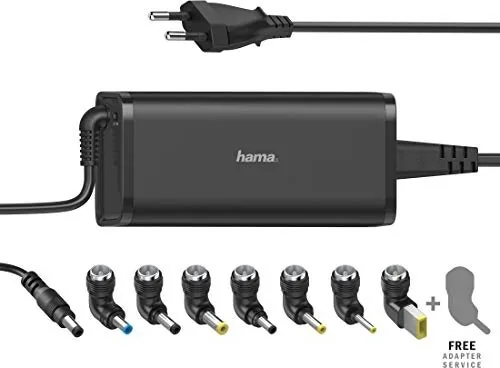
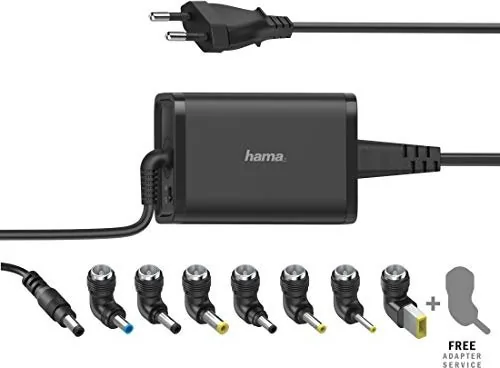
One of the most significant features of this unit is its adjustable output voltage. It supports both 15 volts and 19 volts with a tolerance of plus or minus one volt. This flexibility allows it to replace original chargers for various laptop models that require different voltage specifications. The unit delivers a maximum output power of 65 watts, which is sufficient for most standard laptops and netbooks. To ensure compatibility, the package includes seven different notebook connectors, allowing you to find the perfect mechanical fit for your specific device's charging port.
Safety is a paramount concern with electrical devices, and this Hama adapter adheres to strict safety standards. It includes clear warning symbols regarding electric shock and general hazards. Users are instructed to avoid using the device in damp environments or near heat sources like radiators. The design promotes proper heat dissipation to prevent overheating during extended use. Additionally, the cable management system is designed to minimize tripping hazards, and the unit must be disconnected from the mains after use to ensure safety.
Maintenance is straightforward. The exterior should only be cleaned with a slightly damp, lint-free cloth. No aggressive cleaning agents should be used, as they could damage the casing. If any of the included connectors are lost or damaged, Hama offers a service where replacement connectors can be requested free of charge via their support hotline or website. This commitment to customer support adds significant value to the product, ensuring longevity even if parts go missing.
Important Notes
- Always verify your laptop's required voltage before connecting.
- Do not change the voltage setting while the device is connected to the laptop.
- Ensure the total power consumption does not exceed 65 watts.
- Keep packaging material away from children due to suffocation risks.
Search for 67,732 Manuals online


Type-in Brand or Model