Manual.ly Logo

Hama TV Wall Bracket Manual

0.0 · 0 Ratings

PDF manual · 28 Pages

English

M: qwen/qwen3.5-flash-20260224
page

/ 28

Loading...
939f8f6499ab5c1e56351ab38516d14d4731 page 4
2
G Operating instruction
Thank you for choosing a Hama product.
Take your time and read the following instructions and information completely. Please keep
these instructions in a safe place for future reference. If you sell the device, please pass
these operating instructions on to the new owner.
1. Explanation of Warning Symbols and Notes
Warning
This symbol is used to indicate safety instructions or to draw your attention to specic
hazards and risks.
Note
This symbol is used to indicate additional information or important notes.
2. Package Contents
• TV wall bracket
• TV support arms (2x)
• Installation kit (see contents, Fig. 1)
• These operating instructions
Note
Please check that the installation kit is complete before installing the
bracket and ensure that none of the parts are faulty or damaged.
3. Safety Notes
Warning
• Given the multitude of terminal devices and wall structures available on the market,
the supplied mounting kit is unable to cover every option.
• It occasionally happens that the screws for attaching the terminal device to the wall
bracket are too long.
• Please note that the supplied wall plugs are for use with concrete brick and solid
brick walls only.
• Read the operating instructions for your terminal device before attempting to mount
it. The instructions provide information about the type and measurements of suitable
fastening materials.
• If the supplied mounting kit does not contain suitable fastening materials for
mounting the terminal device, purchase these from a specialised dealer.
• If the wall on which the bracket is to be mounted is made of different material types
and construction types to those specied, purchase suitable mounting materials from
a specialised dealer.
• Never apply force during mounting. This can damage your end device or wall bracket.
• If in doubt, have this product mounted by a qualied technician - do not attempt to
mount it yourself!
Note – Commercial use
• If the device is used commercially, increased duty of care requirements apply.
• Therefore, please observe the accident prevention regulations of the German
employer’s liability insurance association for electrical systems and equipment.
Please also observe all accident prevention regulations from other applicable
employer’s liability insurance associations and accident insurance companies, as
well as any legal regulations applicable to the particular industry and/or location.
• The wall bracket must be installed by trained personnel or by a special technician,
especially when installed in schools, educational institutions, hobby/self-service
workshops or other publicly accessible institutions.
• Secure the product and the attached load against falling using suitable equipment
(e.g. an arresting cable) and in accordance with locally applicable regulations. We
strongly recommend these additional safeguards even if they are not legally required.
• Have trained personnel carry out regular inspections to ensure that the product is
securely installed, properly functioning and in acceptable condition (we recommend
inspections at least every 6 months, or more frequently if required for the particular
location) and then document these inspections.
• Do not mount the product above locations where persons might linger.
• Once you have mounted the product and the attached load, check that they are
suciently secure and safe to use.
• You should repeat this check at regular intervals (at least every three months).
• When doing so, ensure that the product does not exceed its maximum permitted carrying
capacity and that no load exceeding the maximum permitted dimensions is attached.
• Make sure that the product is loaded symmetrically.
• Maintain the necessary safety clearance around the attached load (depending on the model).
• In the event of damage to the product, remove the attached load and stop using the product.
• Ensure that no electrical cables are crushed or damaged during installation or adjusting.
• Do not apply force during the installation. This may damage your device.
4. Intended use and specifications
• The bracket is only intended for use within buildings.
• Use the bracket only for the intended purpose.
Maximum load bearing capacity: 50 kg
Screen size: 94.0 - 203.0 cm (US: 37" - 80")
Depth: 4.5 cm
Wall mounting plate dimensions: 2.3 x 2.3 cm
Mounting holes:
according to the VESA standard until:
600x400
5. Installation requirements and installation
Note
• Only mount the TV wall bracket with the help of two other people! Seek assistance
and help!
• Different end devices have different options for connecting cables and other devices.
Before installation, ensure that the necessary connections will still be accessible
after installation.
• The same mounting kit is included with all of our TV wall brackets. Depending on
the product and mounting type, you may not need to use the entire mounting kit.
Unneeded screws and other small parts may be left over, even if the wall bracket
is properly mounted. Keep these leftover parts with the operating instructions in a
safe place, just in case you might need them later on (e.g. should you move, sell the
product, mount the wall bracket in a different location, buy a new TV, etc).
Warning
• This product is suitable for wall mounting only.
• Before installing the bracket, ensure that the wall on which the television is to be
mounted is suitable for the weight and make sure that no electrical wires, water, gas
or other lines are located at the installation location.
• Please note that the provided wall anchors are only approved for concrete and solid
brick walls.
• Observe the other warnings and safety instructions.
• Proceed step-for-step in accordance with the il lustrated installation instructions
(Fig. 1 ff.).
• To secure it, hang the TV with the fastening plate in the recess of the wall plate and let
it snap into place. (Fig. 5)
Note
• Given the multitude of terminal devices available on the market, we cannot describe
all possible mounting options here.
• Please ensure that the bracket lays at and evenly on the back of the television.
• Use the enclosed spacer to even out any unevenness on the back of the television.
• Ensure that all screws have the proper length and can be mounted until they are
hand-tight (see Fig. 3).
6. Setting portrait or landscape format and maintenance
Note
The TV wall mount must only be adjusted with the help of two other people! Get the
support and help you need.
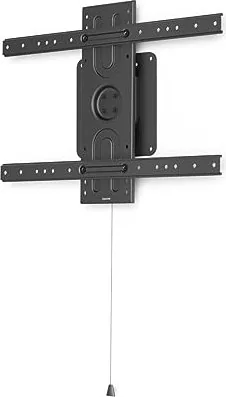
• Pull the securing cord on the bracket downwards to unlock it.
• The format of the wall bracket can now be carefully adjusted to a portrait or landscape
format with the help of another person.
• Ensure that no electrical cables are crushed or damaged during installation or adjusting.
• Check that the bracket is secure and safe to use at regular intervals (at least every three
months). Only use water or standard household cleaners for cleaning.
7. Warranty Disclaimer
Hama GmbH & Co KG assumes no liability and provides no warranty for damage resulting
from improper installation/mounting, improper use of the product or from failure to observe
the operating instructions and/or safety notes.

Chat with your Hama TV Wall Bracket manual using AI

Get instant AI answers from your Hama TV Wall Bracket manual

Ask anything about the Hama TV Wall Bracket. Answers come from this manual, with the pages they are based on.

TV Wall Bracket Maintenance Schedule

Remind me when maintenance is due
Quarterly
Inspect bracket security and load stability

Check that the product is securely installed, properly functioning, and in acceptable condition. Ensure it does not exceed maximum carrying capacity.

Semiannual
Perform professional safety inspection (commercial use)

Have trained personnel carry out regular inspections to ensure secure installation and proper function. Document these inspections.

Free maintenance reminders

Timed to your purchase date. Always free, unsubscribe anytime.

By submitting you agree to the privacy policy. Unsubscribe with one click in any email.
M: qwen/qwen3.8-flash

Ask a Question

0/1000

Do you recommend TV Wall Bracket?

Yes No

Frequently Asked Questions

A

The bracket supports a maximum load of fifty kilograms. This is suitable for most large flat screen televisions found in homes.

Is this answer helpful?

A

The supplied plugs are only suitable for concrete and solid brick walls. Drywall requires different anchors not included in the kit.

Is this answer helpful?

A

Safety guidelines suggest at least three people total to assist properly. This ensures secure placement and prevents accidents.

Is this answer helpful?

A

It supports VESA patterns up to six hundred by four hundred millimeters. This covers most major electronics brand models.

Is this answer helpful?

A

Yes, but commercial use requires trained personnel and regular inspections. Additional safety cables may be recommended by local laws.

Is this answer helpful?

A

Yes, you can adjust the orientation to portrait or landscape freely. Pull the securing cord to unlock the position first.

Is this answer helpful?

A

Hama GmbH disclaims liability for damage from improper mounting or use. Always follow the manual to maintain safety and potential coverage.

Is this answer helpful?

M: qwen/qwen3.5-flash-20260224

Advantages and Disadvantages

Advantages

  • Supports screens up to 80 inches with 50kg capacity.
  • Adjustable to portrait or landscape orientation easily.
  • Compatible with standard VESA patterns up to 600x400.
  • Minimal depth of 4.5 cm saves wall space.
  • Includes comprehensive safety instructions in many languages.
VS

Disadvantages

  • Requires three people for safe installation and adjustment.
  • Wall plugs only work on concrete and solid brick.
  • Commercial use mandates strict inspection schedules by trained staff.
  • Does not cover all possible mounting hardware for every wall type.
  • Liability is void if safety instructions are ignored during setup.
M: qwen/qwen3.5-flash-20260224

Product Specification

Type

Wall Mount

Number of Monitors

1

Screen Size

37-80"

Mobility

Swivel (360 degrees)

Distance from Wall

1.85 inches

Max Load

110.23 lbs

VESA

200x200, 300x200, 300x300, 400x200, 400x300, 400x400, 600x400, 350x350, 400x600

Color

Black

M: qwen/qwen3.5-flash-20260224

Product Description

Enhance Your Home Entertainment with the Hama TV Wall Mount Manual

Transform your living room into a modern media hub with a high quality wall mount solution. Proper planning ensures a secure and lasting setup for your television screen. The comprehensive guide helps you navigate every phase of the process safely. It covers specific safety protocols and detailed assembly steps clearly. This bracket supports screens ranging from thirtyseven to eighty inches in diagonal size. You get maximum stability and confidence for your large display. The instructions are easy to follow for beginners and experts alike.

The design is versatile to accommodate both flat and curved TV back sides. It fits perfectly against the wall to save valuable space. Only four point five centimeters of depth protrudes from the wall. This minimal profile keeps your interior decor looking clean and modern. Compatibility is universal for most major electronics brands sold today. The VESA standard support reaches up to six hundred times four hundred millimeters. This ensures a wide selection of compatible models are available for purchase. Mounting holes follow the standard patterns found in most devices.

Installation Security and Support

Safety is the primary concern during every single setup phase. The process requires at least three people to assist properly on site. Having extra hands prevents accidents and ensures precise placement of the unit. Always verify that your wall structure can support the weight safely. The maximum load capacity stands firmly at fifty kilograms of steel. The supplied wall plugs are suitable for concrete or solid brick only. Do not use drywall or hollow structures with the included anchors provided. Check behind the wall surface for pipes or electrical lines first. Drilling into hidden utilities can cause serious damage to your home. Once installed, the TV locks into place with a secure snap mechanism. This mechanism prevents accidental detachment during normal use of the device. You can adjust the orientation to portrait or landscape mode freely. Just pull the securing cord downward to unlock the position safely.

Usage and Maintenance Requirements

Regular maintenance ensures the mount stays functional over many years. Inspections should occur at least every three months consistently. Tighten any loose hardware if you notice any movement in brackets. Use water or standard household cleaners for wiping down plastic surfaces carefully. Avoid harsh chemicals that could degrade the finish over time. Do not mount the unit above areas where people might linger indoors. Falling objects could cause serious injury in public spaces or homes. Commercial settings require trained personnel to handle installation duties correctly. Employers liability associations often mandate specific accident prevention regulations for walls. Secure the product with arresting cables if needed for public safety compliance. Keep all leftover screws and parts in a safe place for later. You might need them for future adjustments or moves to new locations. Follow every warning symbol in the manual to avoid voiding coverage rights. Ensure the weight does not exceed the stated limit. Hama GmbH offers support but assumes no liability for improper mounting actions. Always document inspections for commercial use logs. This investment protects your gear from falling risks. Enjoy a stable screen with professional results today.

M: qwen/qwen3.5-flash-20260224

© Copyright 2026 Manual.ly
