Manual.ly Logo

Hama Smart Manual

0.0 · 0 Ratings

PDF manual · 64 Pages

English

M: QW-35-FL
page

/ 64

Loading...
1a693a533f1255c264a3ef2bb6dfd7b9dd1c page 4
2
G Operating instruction
1. Controls and displays
1. Display and operating display
2. The illuminated ring visually indicates the indoor air quality
Green: good room air;
Yellow:normal room air;
Red:bad room air.
• Reminder function for lter change:
when the air purier detects that the lter has reached the saturation
level, the operation indicator ashes redcontinuously.The lter should
then be replaced to ensuresucient air purication.
• With daily use, the combi-lter should be used up after approx. 6-12
months.
• The lter is not washable.
• An unpleasant odour during operation may indicate that ltered
substances aredecomposing in the lter (e.g. bacteria) and it needs to
be replaced or ventilated in the sun.
• Vacuum the lter and the inner housing every 1to2months to remove
coarse dirt. Then place the lter outdoors in direct sunlight for approx.
3hours to dry it and eliminate any bacteria, viruses etc. that may be
present through the UV rays.
• The lter can then possibly be reused. The lter must be replaced after
1year at the latest. On the one hand, thereisarisk that it will no
longer completely remove the particles mentioned from the air or that
the pollutant particles already in the lter will be released again. The
activated charcoal also loses its effect when unpacked.
• After replacing the lter,you must press the
ON/OFF button (8)
for approx. 7seconds to cancel the alarm.
3. Air outlet opening
4. Front panel
5. Air intake opening
6. Filter unit
7. Base plate
8.
ON/OFF button:
Touch the icon to switch on the device. The buzzer sounds once. Blue
light and the low wind speed indicator L light up. If you touch the button
again, the buzzer sounds once and the device switches off.
Note
The device records the working modes when you switch it off if you
do not unplug it. If,for example, automatic was selected -the device
starts again with automatic.
9.
Timer button:
When the device is switched on:
Running time of 2-4-8hours or WLAN control preselectable. After the
selected hours have elapsed, the device stops operating. On the WLAN
setting, the device is on standby and waiting for commands via the APP
control.
See also the section on WLAN/APP operation
10.
Speed button:
When the device is switched on:
Fanspeed level L-M-H-Auto.
The buzzer sounds each time the switch is made. An LED next to it
indicates the selected speed.
L Lowspeed
M Medium speed
H High speed
Auto:the device regulates the fan speed independently according to
the air quality.The illuminated ring (2) shows the air quality in colour.
If the humidity in the room is very high, condensation can form on the
sensor and negatively affect the display and cause switching back and
forth in automatic mode. In this case, use the air purier with amanual
speed setting.
11.
Light button:
When the device is switched on:
Press once, the buzzer sounds once and the LED light (2) changes to soft
mode. Press again to switch the light to standardmode. Press again to
switch off the light.
12. Control lamps. An LED lights up next to the symbols to check the
settings.
!
Important information -Quick-reference guide
• This quick-reference guide contains the most important basic
information, such as safety instructions and the steps necessary
to operate the product.
• To help protect the environmental and conserve valuable raw
materials, Hama does not issue aprinted manual and instead
makes this available exclusively as aPDF download.
• The full text of the manual is available at the following internet
address: www.hama.com -> 00186437 -> Downloads
• Save the manual on your computer for reference and print them
out if possible.
Thank you for choosing aHama product.
Take your time and read the following instructions and information completely.
Please keep these instructions in asafe place for futurereference. If you sell
the device, please pass these operating instructions on to the new owner.
2.
Explanation of warning symbols and notes
Risk of electric shock
This symbol indicates arisk of electric shock from touching product parts
carrying hazardous voltage.
Warning
This symbol is used to indicate safety instructions or to draw your attention
to specichazards and risks.
Note
This symbol is used to indicate additional information or important notes.
3. Package contents
• 1air purier
• 1combi lter
• These operating instructions
4. Safety instructions
• The product is intended for private, non-commercial use only.
• The product is intended only for use inside buildings.
• Use the product only for the intended purpose.
• Protect the product from dirt, moistureand overheating and use it in dry
rooms only.
• Always pull directly on the plug when disconnecting the cable, never on
the cable itself.
• Do not use the product in the immediate vicinity of heaters, other heat
sources or in direct sunlight.
• As with all electrical products, this device should be kept out of the reach
of children.
• Do not operate the product outside the power limits specied in the
technical data.
• Do not use the product in areas in which electronic products arenot
permitted.
• Do not use the product in adamp environment and avoid splashing water.
• Do not place the product near interference elds, metal frames, computers,
TVs, etc. Electronic devices and window frames can negatively affect the
product’sfunctionality.
• Do not drop the product and do not expose it to any major shocks.

Chat with your Hama Smart manual using AI

Get instant AI answers from your Hama Smart manual

Ask anything about the Hama Smart. Answers come from this manual, with the pages they are based on.

Smart Maintenance Schedule

Remind me when maintenance is due
Every 1-2 months
Vacuum the filter and inner housing

Vacuum the filter and inner housing to remove coarse dirt. Place the filter outdoors in direct sunlight for approx. 3 hours to dry and eliminate bacteria.

Every 6-12 months
Replace the combi-filter

With daily use, the combi-filter should be replaced after approximately 6-12 months when the indicator flashes red or saturation is reached.

Yearly
Replace the filter (maximum interval)

The filter must be replaced at the latest after 1 year to ensure it removes particles effectively and does not release pollutants back into the air.

Free maintenance reminders

Timed to your purchase date. Always free, unsubscribe anytime.

By submitting you agree to the privacy policy. Unsubscribe with one click in any email.
M: qwen/qwen3.8-flash

Ask a Question

0/1000

Do you recommend Smart?

Yes No

Frequently Asked Questions

A

For daily use, the combi-filter should be replaced after approximately 6 to 12 months. Even if the filter appears clean, it must be changed at the latest after one year to ensure pollutants are not released back into the air.

Is this answer helpful?

A

No, the filter is not washable. You can vacuum coarse dirt from it and dry it in direct sunlight for about three hours to eliminate bacteria, but it cannot be submerged in water.

Is this answer helpful?

A

No, the device cannot remove carbon monoxide (CO) or radon (Rn) from the air. It is designed to filter particulate matter, dust, pollen, and odors.

Is this answer helpful?

A

After replacing the filter, press and hold the ON/OFF button for approximately 7 seconds to cancel the alarm and reset the filter change reminder.

Is this answer helpful?

A

No, the device is intended for dry rooms only. High humidity can cause condensation on the sensor, affecting performance and potentially damaging the unit.

Is this answer helpful?

A

The air purifier is suitable for rooms up to 21 square meters according to ANSI/AHAM standards, or up to 65 square meters according to NRCC standards.

Is this answer helpful?

M: QW-35-FL

Advantages and Disadvantages

Advantages

  • Advanced HEPA 13 filtration captures 99.95% of particles as small as 0.3 microns
  • Smart app control allows remote monitoring and scheduling via WLAN
  • Real-time air quality indicator uses color-coded LED ring for instant feedback
  • Auto-mode automatically adjusts fan speed based on detected pollution levels
  • Activated charcoal filter effectively removes odors, formaldehyde, and volatile gases
VS

Disadvantages

  • Filter cannot be washed and must be replaced annually despite drying attempts
  • Device does not remove carbon monoxide or radon from the air
  • Sensor accuracy may decrease if condensation forms due to high humidity
  • Requires specific original Hama filters (item No. 00186440) for warranty compliance
  • Not suitable for use in kitchens or bathrooms due to moisture and grease risks
M: QW-35-FL

Product Specification

Power

45W

Color

black

Recommended Room Size

up to 226 sq ft

Speed Settings

3 (automatic power regulation)

Air Circulation

8.83 cu ft/h

Filtration

3-stage, HEPA filter (H13, 99.95%), activated carbon filter, pre-filter, washable coarse filter

Features

Night mode, timer

Smart Home

App control, voice assistant (Amazon Alexa, Google Assistant)

Noise Level

30-50dB(A)

Dimensions

9.6x21.4x9.6in (WxHxD)

Weight

9.0 lbs

M: QW-35-FL

Product Description

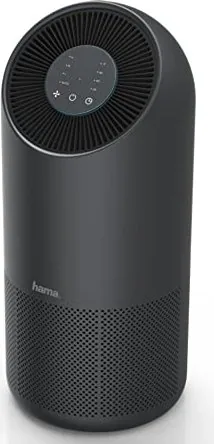
Experience Pure Air with the Hama Smart Air Purifier

The Hama Smart Air Purifier is designed to transform your living space into a sanctuary of clean, breathable air. This intelligent device utilizes a sophisticated three-stage filtration system to eliminate harmful particles, allergens, and unpleasant odors from your home. By combining a pre-filter for large debris like hair and dust, a high-efficiency HEPA 13 filter for microscopic particles down to 0.3 microns, and an activated charcoal filter for gases and smells, it ensures comprehensive air purification.

What sets this model apart is its seamless integration with smart technology. Through the Hama Smart Home app, you can control the purifier remotely, set timers, and monitor air quality in real-time. The illuminated ring provides instant visual feedback on room conditions, glowing green for good air, yellow for normal, and red when purification is needed. The automatic mode adjusts fan speed dynamically based on sensor readings, ensuring optimal performance while maintaining energy efficiency.

Maintenance is straightforward yet critical for longevity. The unit features a reminder function that alerts you when the filter needs replacement, typically every six to twelve months depending on usage. For interim care, the filter can be vacuumed and dried in sunlight to extend its life, though it must be replaced annually to maintain peak effectiveness. The device also remembers your last settings upon restart, offering convenience without sacrificing functionality.

Ideal for rooms up to 65 square meters, the Hama Smart Air Purifier combines powerful performance with sleek design. Whether you are battling seasonal allergies or simply seeking fresher indoor air, this smart solution delivers reliable results with minimal effort. Remember to keep windows closed during operation for best results and avoid placing the unit near heat sources or moisture.

Important Maintenance Notes

  • Always disconnect power before cleaning or changing filters.
  • Do not wash the filter; only vacuum and sun-dry it.
  • Replace the filter at least once a year to prevent particle re-release.
  • Ensure a clearance of 20cm around the sides and 30cm above the unit.
M: QW-35-FL

© Copyright 2026 Manual.ly
