

Hama Scribble Manual
PDF manual · 40 Pages
English



Quick check
Incorrect answer, please try again.
Chat with your Hama Scribble manual using AI
Get instant AI answers from your Hama Scribble manual
Ask anything about the Hama Scribble. Answers come from this manual, with the pages they are based on.
Ask a Question
Do you recommend Scribble?
Yes No
Cindy Ziemann
5 months ago
Is this truly a good alternative to the Apple Pencil?
Frequently Asked Questions
The stylus requires iPadOS 14 or later to function correctly with the Scribble feature on Apple iPads.
Is this answer helpful?
A complete charging cycle takes approximately 90 minutes using the supplied USB-C cable and a suitable charger.
Is this answer helpful?
While the device has protection against overcharging, it is recommended to unplug it once the LED turns green to ensure optimal battery health.
Is this answer helpful?
The stylus switches off after 5 minutes of inactivity to conserve battery power and extend the lifespan of the internal Li-Po battery.
Is this answer helpful?
No, the stylus contains a magnet that can erase data on magnetic strips. Keep bank cards and similar items away from the device.
Is this answer helpful?
When the battery capacity drops below 10%, the status LED will flash slowly blue before the device shuts off automatically after about 10 seconds.
Is this answer helpful?
Advantages and Disadvantages
Advantages

- Advanced palm rejection allows natural hand placement on the screen
- USB-C charging provides fast and convenient power replenishment
- Lightweight 14g design reduces hand fatigue during long sessions
- Compatible with iPadOS 14 and later for broad app support
- Integrated battery eliminates the need for disposable batteries
Disadvantages

- Battery is not user-replaceable if it eventually fails
- Magnet can interfere with credit cards and medical devices
- Auto-off feature activates after only 5 minutes of inactivity
- Requires careful cleaning to avoid scratching the display
- Intended for private use only, limiting commercial applications
Product Specification
Suitable for
Apple iPad
Type
active stylus
Power supply
Battery (Li-Polymer), charging port (USB-C)
Grip
hexagonal, non-recessed
Shaft
hexagonal
Size
0.35x6.5in (Dia x L)
Weight
0.49oz
Features
LED status indicator
Product Description
Elevate Your iPad Experience with the Hama Active Stylus Scribble
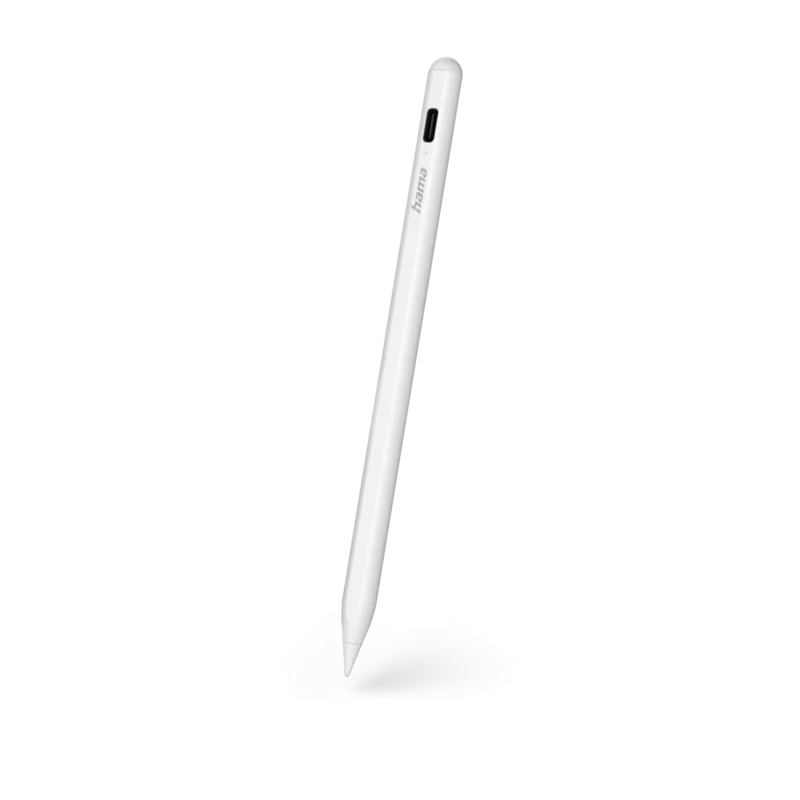
The Hama Active Stylus "Scribble" in white is a precision tool designed specifically for Apple iPads running iPadOS 14 or later. This active stylus transforms your tablet into a powerful canvas for artists, note-takers, and creative professionals. Unlike passive capacitive styli, this device features an internal rechargeable battery that powers advanced palm rejection technology, allowing you to rest your hand naturally on the screen while drawing or writing without interference.
Designed with ergonomics in mind, the sleek white body fits comfortably in your hand, measuring just 165 mm in length and weighing only 14 grams. The device utilizes a USB-C port for convenient charging, ensuring you spend more time creating and less time waiting. A full charge takes approximately 90 minutes, indicated by a status LED that glows red during charging and turns green when complete. Once charged, the stylus offers reliable performance for extended sessions, automatically switching off after five minutes of inactivity to preserve battery life.
Safety is paramount in the design of this product. It includes a built-in magnet, which requires users to keep magnetic storage cards like credit cards away from the tip to prevent data loss. Individuals with pacemakers should also maintain a safe distance from the device. The stylus is intended for private, non-commercial use and must be kept dry and free from extreme temperatures. Cleaning is simple; a slightly damp, lint-free cloth is all that is needed to maintain its pristine appearance.
Whether you are sketching intricate designs, signing documents, or taking detailed lecture notes, the Hama Active Stylus "Scribble" delivers a natural feel comparable to pen on paper. Its compatibility with iPadOS ensures seamless integration with popular drawing and productivity apps. By choosing this stylus, you gain a versatile accessory that enhances your digital workflow while maintaining the safety and durability standards expected from Hama products.
Search for 67,732 Manuals online


Type-in Brand or Model
Stefan K
7 months ago
How long does the battery last and how fast is it to recharge?
Manual.ly
7 months ago
This stylus offers excellent battery life, lasting for extended periods of use. It also features rapid charging capabilities, allowing you to get several hours of usage in just a few minutes of charging time.