
Hama Pro-S 60M Manual
PDF manual · 36 Pages
English



Quick check
Incorrect answer, please try again.
Chat with your Hama Pro-S 60M manual using AI
Get instant AI answers from your Hama Pro-S 60M manual
Ask anything about the Hama Pro-S 60M. Answers come from this manual, with the pages they are based on.
Ask a Question
Do you recommend Pro-S 60M?
Yes NoFrequently Asked Questions
It is designed for indoor power distribution and for helping protect connected telephone, computer, audio, video, and satellite equipment from certain mains-related surge events.
Is this answer helpful?
The unit uses Type III surge protection. Its stated values are Up 1.8 kV, Uc 255 V, and Uoc 3.0 kV, with a total discharge current of 13,500 A.
Is this answer helpful?
No. The integrated protection is intended for surges caused by switching processes or distant lightning. Direct lightning protection requires additional measures in the building electrical installation.
Is this answer helpful?
A lit indicator shows that the surge protection is operational. If the light does not illuminate after activation, the protection is defective and the unit should no longer be used.
Is this answer helpful?
The maximum connected load is 3680 W. Do not exceed this limit when connecting equipment to the power strip.
Is this answer helpful?
No. It should be connected directly to a properly earthed, 16 A fused wall socket. Do not connect it to extension leads, adapters, or other power strips.
Is this answer helpful?
Advantages and Disadvantages
Advantages

- Integrated Type III surge protection helps protect connected electronics from switching-related spikes and distant lightning events.
- Supports up to 3680 W at 220-240 V, making it suitable for many household computer and media setups.
- A 1.5 m cable provides flexible placement near desks, TV units, or work areas.
- A status light shows whether the surge protection is operational, supporting quick safety checks.
- Rated for use with a properly earthed 16 A socket and offers total discharge current of 13,500 A.
Disadvantages

- It is intended only for dry indoor environments and private, non-commercial use.
- It does not provide complete protection against direct lightning strikes; building-level protection is also required.
- It must not be connected to extension cables, adapters, or another power strip.
- The surge protector must be replaced if its status indicator does not illuminate after activation.
- The supplied information does not specify the number or layout of outlets.
Product Specification
Outputs
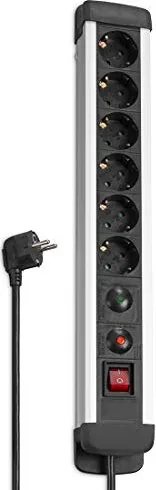
6x Type F (Schuko)
Input
1x Type F (Schuko)
Input voltage
230 V
Power
3,500 W (max.)
Additional connections
N/A
Material
Aluminum
Cable length
4.92 ft
Dimensions (W x H x D)
19.69 x 2.76 x 1.97 in
Features
Child safety, 45-degree arrangement, cable holder, surge protection, 1x safety switch (illuminated red), wall mounting
Product Description
Hama Pro-S 60M Power Strip - Read, Download & Print Free
The Hama Pro-S 60M Power Strip is designed to provide dependable indoor power distribution with integrated surge protection for valuable electronic equipment. It is a practical choice for home offices, entertainment setups, computer workstations, and telephone systems where a stable, properly protected connection matters. With a maximum connected load of 3680 W, it supports a wide range of everyday devices while helping organize power access in one convenient location.
Built-In Protection for Connected Equipment
A key benefit of the Hama Pro-S 60M Power Strip is its Type III surge protection. It is intended to help guard connected devices against mains-related voltage spikes caused by switching operations or distant lightning activity. Its stated protection values include Up 1.8 kV, Uc 255 V, and Uoc 3.0 kV, with a total discharge current of 13,500 A. This makes it suitable for protecting sensitive computer, audio, video, satellite, and telephone equipment from certain electrical disturbances.
The unit includes a status indicator for the surge protection function. When the indicator is lit, the protection feature is operational. If it does not light after switching on, the surge protector should no longer be used and must be replaced. This simple visual check helps users identify when protective functionality may no longer be available.
Everyday Electrical Specifications
The power strip operates on 220-240 V mains power at 50-60 Hz and is intended for use with a 16 A fused, properly earthed wall socket. Its 1.5 m cable offers useful reach for placing the strip near a desk, media cabinet, or other indoor setup without excessive cable routing. The 1.5 mm2 cable cross-section and maximum 3680 W load capacity support normal household electrical demands within the stated limits.
For safe use, connect the Hama Pro-S 60M Power Strip directly to an accessible, grounded wall outlet. Do not attach it to extension leads, adapters, or other power strips, and never connect multiple units in series. Keep it dry, avoid crushing or bending the cable, and discontinue use if the housing or cable shows visible damage.
Notes
- Designed for private indoor use in dry environments.
- It helps with surge events from switching and distant lightning, not direct lightning strikes.
- Direct lightning protection requires additional building-level measures.
- Clean only with a slightly damp, lint-free cloth, keeping water out of the unit.
Hama Pro-S 60M Power Strip - Read, Download & Print Free is a useful reference phrase for shoppers comparing protected power solutions and checking essential electrical safety details before use.
Search for 67,732 Manuals online


Type-in Brand or Model