
Hama Power Brick Manual
PDF manual · 75 Pages
English



Quick check
Incorrect answer, please try again.
Chat with your Hama Power Brick manual using AI
Get instant AI answers from your Hama Power Brick manual
Ask anything about the Hama Power Brick. Answers come from this manual, with the pages they are based on.
Power Brick Maintenance Schedule
When stored for a long period of time, batteries should be charged regularly (at least every three months).
Only clean this product with a slightly damp, lint-free cloth and do not use aggressive cleaning agents. Ensure no water enters.
Free maintenance reminders
Timed to your purchase date. Always free, unsubscribe anytime.
Ask a Question
Do you recommend Power Brick?
Yes NoFrequently Asked Questions
It takes approximately 6 to 7 hours to fully charge the battery using a suitable USB charger connected to the Micro-USB port.
Is this answer helpful?
The induction charging function prevents audio playback via Bluetooth or AUX while active, but you can charge your phone simultaneously.
Is this answer helpful?
The maximum range for Bluetooth is 10 meters without obstacles like walls or people obstructing the signal path.
Is this answer helpful?
Yes, you can connect your terminal device using NFC by placing it on the NFC connection area marked on the device surface.
Is this answer helpful?
Yes, you use the hands-free function when your mobile phone is connected via Bluetooth to answer or reject calls directly.
Is this answer helpful?
No, the battery is integrated and cannot be removed, so you must dispose of the product as a whole at end of life.
Is this answer helpful?
If the battery capacity is less than 10 percent, the speaker emits two acoustic signals to alert you to recharge.
Is this answer helpful?
Advantages and Disadvantages
Advantages

- Versatile connectivity options including Bluetooth, NFC, and AUX input
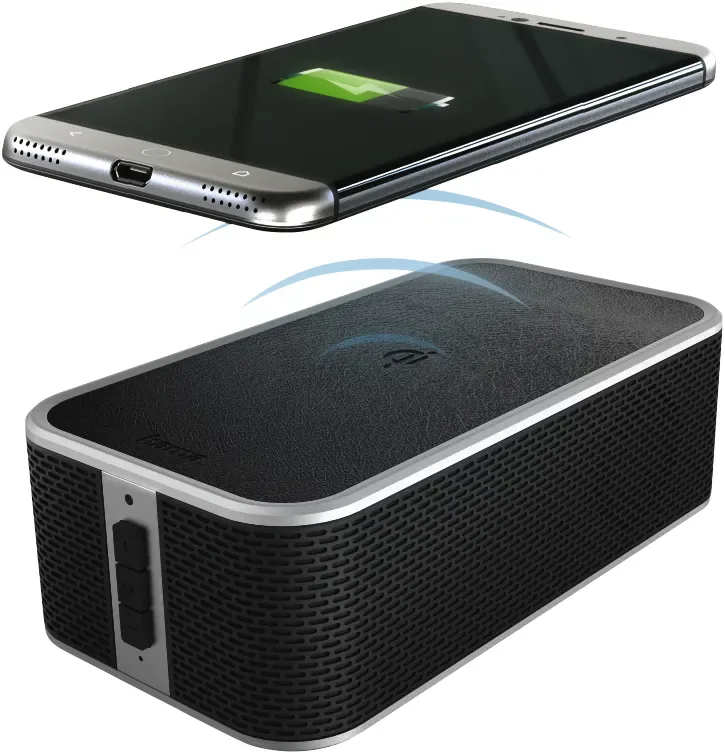
- Built-in Qi wireless charging pad for compatible smartphones
- Long battery life up to 30 hours when used with AUX connection
- Hands-free calling capability with integrated microphone
- Compact and portable design suitable for daily use
Disadvantages

- No audio playback while using the induction charging function
- Battery is not user-replaceable as it is integrated into the unit
- Bluetooth range limited to ten meters without obstacles
- Charging time for the speaker battery takes approximately six to seven hours
- Requires careful placement when using induction charging to avoid interference
Product Specification
Display
No
Tuner
No
Ports
AUX In (3.5mm Jack)
Wireless
Bluetooth 4.0, NFC
Power Source
Li-ion battery, USB
Playback Time
5h
Features
Wireless Charging (Qi)
Color
Black
Dimensions
5.55x2.95x1.93in (WxHxD)
Weight
14.82 oz
Product Description
Elevate Your Audio Experience with the Hama Power Brick
In today's digital age, having a reliable audio companion is essential. The Hama Power Brick offers a versatile solution for music lovers and tech enthusiasts alike. This device seamlessly integrates high-quality sound with wireless charging capabilities. Users often appreciate the multifunctional design that simplifies their desktop or bedside table. For detailed setup steps, refer to the Hama Power Brick Manual for complete guidance.
Versatile Connectivity Options
One of the standout features is the connectivity technology. It supports Bluetooth version 4.0 Class II. This allows wireless streaming from smartphones or tablets within a ten-meter range. The signal can face obstacles like walls. For wired connections, a 3.5 mm AUX input is available for older devices. NFC pairing enables quick connection for compatible devices. Touch the NFC area at 10 cm to link your phone instantly. Some devices may require a password during setup. Enter 0000 if prompted by the terminal.
Wireless Charging Functionality
Beyond audio, the unit functions as a Qi charger. You can place compatible smartphones on the charging area. Ensure the device is on the correct spot. Note that music playback stops during induction charging. External power helps maintain battery life during charging. Charging takes six to seven hours fully. The status LED indicates power status. Red lights while the speaker charges. Blue when connected via Bluetooth wirelessly. Metal plates on phone backs may heat up dangerously. Avoid using the charger with metal accessories.
Battery Life and Maintenance
The integrated battery is rated at 3.7V Li-Ion with 4400 mAh capacity. You get about 5 hours of music via Bluetooth connection. AUX mode extends this impressive runtime to 30 hours. This is excellent for a portable unit of this size. Do not open the device housing. The battery cannot be removed by the user. Dispose of it according to local laws at the end of life. Clean with a slightly damp cloth. Avoid water entering the product. Keep children away from packaging materials.
Audio Quality and Controls
Sound is stereo output at 10 Watts. Frequency response ranges from 180 Hz to 20 kHz. Volume controls are accessible on the device body. You can jump tracks or pause playback directly. The built-in microphone allows for hands-free calling. Simply answer incoming calls with a button press. Ensure close proximity for better call quality during conversations. The speaker also shuts off automatically after ten minutes of inactivity. This feature saves battery power effectively. It is designed for private non-commercial use only.
Technical Specifications
The dimensions measure 14.1 by 7.5 by 4.9 cm. Weight is 432 g for portability. Conforms to Directive 2014/53/EU. Includes 3.5 mm stereo jack. Micro USB port supports charging function. Warranty excludes improper installation or use. Recycle electrical devices at public collection points. This ensures environmental protection. Follow safety notes regarding heat sources. Do not use near heaters.
Service and Warranty
Hama GmbH & Co. KG assumes no liability for damage from improper use. Users are responsible for correct installation or setup. This protects the consumer and the manufacturer equally. Service is available via hotline or website for support. Contact Product Consulting if you have questions regarding operation. The product meets European safety standards. Please keep instructions for future reference. This ensures longevity and safe usage over time.
Final Thoughts
Investing in this product enhances daily convenience significantly. It manages your music and power needs efficiently in one box. Safety guidelines ensure longevity for the component. Follow the instructions for warranty compliance strictly. Enjoy superior sound and charging in one sleek package. The Hama Power Brick stands out in the market for functionality. Read the manual before first use for best results.
Search for 67,732 Manuals online


Type-in Brand or Model