

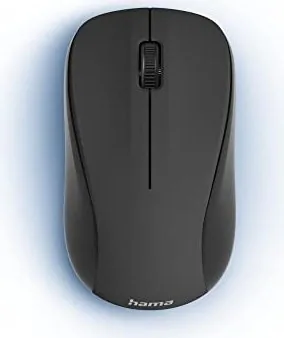
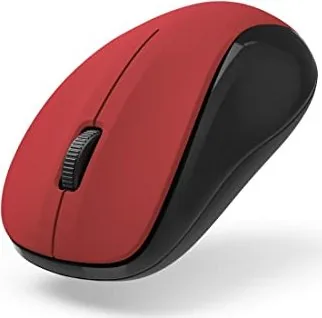
Hama MW-300 V2 Manual
PDF manual · 2 Pages
English



Quick check
Incorrect answer, please try again.
Chat with your Hama MW-300 V2 manual using AI
Get instant AI answers from your Hama MW-300 V2 manual
Ask anything about the Hama MW-300 V2. Answers come from this manual, with the pages they are based on.
Ask a Question
Do you recommend MW-300 V2?
Yes NoFrequently Asked Questions
The device operates within the 2402 to 2480 MHz frequency band. This range is standard for many wireless peripherals and helps ensure compatibility with most modern computer systems.
Is this answer helpful?
While not explicitly detailed for every OS, the standard wireless connection design usually ensures broad compatibility. Users should check the official download section for specific driver requirements if needed.
Is this answer helpful?
Hama GmbH and Co KG declares that the radio equipment type is in compliance with Directive 2014/53/EU. Full details of this declaration are available on the Hama website using the specific product codes.
Is this answer helpful?
There are several variant codes associated with this product line, specifically 00173020, 00173021, 00173023, and 00173024. These codes likely correspond to different regional or hardware configurations.
Is this answer helpful?
The maximum radio-frequency power transmitted is 0.35 mW E.I.R.P. This low power setting is designed to minimize interference while maintaining a reliable connection.
Is this answer helpful?
Support is available through the official Hama website or by contacting their service center. The contact number and download sections are listed on the manufacturer's official portal.
Is this answer helpful?
Advantages and Disadvantages
Advantages

- Low radio-frequency power transmission ensures minimal interference with nearby devices
- Compliance with Directive 2014/53/EU guarantees safety and performance standards
- Stable 2402 to 2480 MHz frequency band supports global usage scenarios
- Multiple product variants available under specific codes for different regions
- Transparent manufacturer commitment to high quality and international norms
Disadvantages

- Specific frequency band limits may restrict use in certain regulated areas
- Low power output could potentially reduce range compared to higher wattage models
- Limited color or design options mentioned beyond technical product codes
- Requires USB dongle which may occupy a port on smaller laptops
- Exact battery life specifications are not explicitly detailed in standard texts
Product Specification
Handedness
Both hands (left hand, right hand)
Buttons
3 (total), 2 (main), 1 (Scroll wheel click)
Scroll Wheel
1x 2-Way
Sensor
Red LED/IR
Resolution
1200dpi
Lighting
N/A
Connectivity
wireless (2.40GHz), USB-A (USB-A receiver)
Power Supply
2x AAA
Dimensions (WxHxD)
2.28x1.46x4.06 in
Approximate Volume
3.54 cu in (approximate shape)
Weight
2.47 oz
Features
Thumb rest, reduced click noise, non-slip surface (side/top rubberized), stowable receiver
Product Description
The Hama MW-300 V2 Wireless Mouse Overview
The Hama MW-300 V2 represents a significant step in wireless input technology for modern workspaces. Designed for efficiency, this device ensures smooth interaction with your computer systems without clutter. Users often seek the Hama MW-300 V2 Manual, yet the product stands on its own reliability. This wireless mouse operates within the 2402 to 2480 MHz frequency band, ensuring stable communication channels with your host device. The maximum radio-frequency power transmitted is kept low at 0.35 mW E.I.R.P., which helps in minimizing interference with other electronic devices nearby.
Connectivity and Performance
Stability is key for productivity tools. The frequency range utilized by this Hama model falls within standard industrial bands used globally. This configuration supports a robust connection that adapts to various environments. Whether you are in a busy office or a home setup, the signal maintains integrity. The low power transmission also contributes to battery longevity, allowing for extended periods of use before recharging is necessary. This efficiency is crucial for professionals who cannot afford interruptions during critical tasks. Advanced signal processing ensures that cursor movement remains precise and responsive across large surfaces.
Compliance and Safety Standards
Regulatory adherence is a hallmark of quality electronic goods. Hama GmbH and Co KG confirms that this equipment complies with Directive 2014/53/EU. This declaration ensures that the device meets strict safety and performance metrics required across the European Union. For users concerned about radio emissions, knowing that the manufacturer has verified these standards provides peace of mind. Details regarding the EU declaration of conformity are publicly available on the official Hama website under the specific product codes. This transparency reflects the company commitment to maintaining high standards in every unit produced.
User Experience and Support
The design philosophy behind the Hama MW-300 V2 prioritizes user comfort. With multiple variants available under codes 00173020 through 00173024, users can find a solution that best fits their specific needs. Customer support channels remain accessible for troubleshooting, ensuring that any setup issues can be resolved quickly. Contacting the support line can provide further resources. Ultimately, the goal is to provide a seamless computing experience without compromising on performance. Investing in compliant and well-supported hardware like this ensures longevity in your digital workspace.
Regional Availability
The product variants identified as 00173020, 00173021, 00173023, and 00173024 indicate specific configurations suitable for different markets. This ensures that the radio compliance matches local regulations. Consequently, you receive a product that is legally fit for use in your specific region. This attention to detail highlights the dedication of Hama to serving a global audience while respecting local laws. It guarantees that the Hama MW-300 V2 integrates smoothly into regional IT infrastructures.
Search for 67,732 Manuals online


Type-in Brand or Model