
Hama MW-110 Manual
PDF manual · 2 Pages
English



Quick check
Incorrect answer, please try again.
Chat with your Hama MW-110 manual using AI
Get instant AI answers from your Hama MW-110 manual
Ask anything about the Hama MW-110. Answers come from this manual, with the pages they are based on.
Ask a Question
Do you recommend MW-110?
Yes NoFrequently Asked Questions
No, this mouse operates on a plug-and-play basis. You simply insert the USB receiver into your computer, and it works immediately without needing any additional drivers or software installation.
Is this answer helpful?
The Hama MW-110 typically uses standard AA batteries. It is important to check the specific packaging as configurations can vary, but standard alkaline batteries are commonly recommended for optimal performance.
Is this answer helpful?
While the optical sensor works well on most opaque surfaces, performance on glass or highly reflective surfaces may be inconsistent. A mouse pad is recommended for the best tracking experience.
Is this answer helpful?
The wireless range is generally sufficient for typical home or office use, allowing you to sit comfortably away from your computer. However, physical obstructions can affect the signal strength.
Is this answer helpful?
Do not throw the mouse in regular household trash. According to EU directives, it must be taken to a designated electronic waste collection point or returned to the retailer for proper recycling.
Is this answer helpful?
The Hama MW-110 features standard left, right, and scroll buttons. It does not include extra programmable buttons or software customization options for macro recording.
Is this answer helpful?
Advantages and Disadvantages
Advantages

- Plug-and-play USB connectivity requires no driver installation
- Optical sensor ensures accurate cursor control on various surfaces
- Wireless design eliminates cable clutter and increases desk space
- Ergonomic black finish suits both professional and home environments
Disadvantages

- Battery life depends on usage frequency and may require frequent replacement
- No dedicated software for customizing button functions or sensitivity
- Lacks advanced gaming features like adjustable DPI settings
- Requires a free USB port for the wireless receiver
Product Specification
Compatibility
both hands (left hand, right hand)
Keys
3 (total), 2 (main), 1 (scroll wheel click)
Scroll Wheel
1x 2-way
Tracking
LED red/IR
Resolution
1000 dpi
Lighting
N/A
Connection
wireless (2.40GHz), USB-A (USB-A receiver)
Power Supply
2x AAA
Dimensions (WxDxH)
2.36x1.22x4.13 inches
Approximate Volume
3.11 cubic inches (approximate shape)
Color
solid, black
Features
thumb rest, reduced click noise, stowable receiver
Product Description
Hama MW-110 Optical Wireless Mouse Black, USB - Read, Download & Print Free
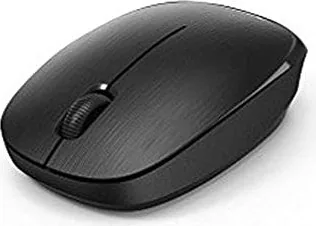
The Hama MW-110 Optical Wireless Mouse is a sleek and efficient peripheral designed for modern computing needs. This black mouse combines style with functionality, offering a wireless connection via a USB receiver that ensures seamless operation without the clutter of cables. The optical sensor provides precise tracking on most surfaces, making it ideal for everyday tasks ranging from office work to casual browsing.
Designed with user comfort in mind, the ergonomic shape fits naturally in the hand, reducing fatigue during extended use. The three-button configuration includes a standard left click, right click, and a scroll wheel for easy navigation through documents and web pages. Its compact size makes it perfect for laptops and desktop setups alike, ensuring portability for users who move between locations frequently.
One of the standout features of this device is its ease of setup. Simply plug the USB receiver into your computer, and the mouse is ready to use immediately. There are no complex drivers or software installations required, which saves valuable time. The wireless technology allows for a comfortable distance from your computer, giving you freedom of movement while maintaining a stable connection.
Environmental responsibility is also a key consideration with this product. As per European directives, electrical devices like the Hama MW-110 must not be disposed of with household waste. Users are encouraged to return these items to designated collection points at the end of their lifecycle. Recycling these materials helps protect our environment and supports sustainable practices.
Whether you are upgrading your home office or need a reliable backup mouse, the Hama MW-110 offers a solid balance of performance and affordability. Its wireless capability and optical precision make it a practical choice for anyone looking to streamline their workspace.
Search for 67,732 Manuals online


Type-in Brand or Model