
Hama MoveData Manual
PDF manual · 54 Pages
English



Quick check
Incorrect answer, please try again.
Chat with your Hama MoveData manual using AI
Get instant AI answers from your Hama MoveData manual
Ask anything about the Hama MoveData. Answers come from this manual, with the pages they are based on.
Ask a Question
Do you recommend MoveData?
Yes NoFrequently Asked Questions
It works with computers through USB-A and with Apple devices through Lightning, including iPhone, iPad, and iPod models that support the MoveData app.
Is this answer helpful?
The reader supports microSD, microSDHC, and microSDXC cards, making it suitable for many common removable storage formats.
Is this answer helpful?
Yes. The MoveData app is required for Lightning use and enables features such as contact backup, storage browsing, and media transfer.
Is this answer helpful?
No. The manual clearly warns against using both connectors simultaneously.
Is this answer helpful?
Wait until transfers are finished and always use the operating system’s eject function before removing the card or disconnecting the reader.
Is this answer helpful?
FAT32 formatting is recommended for easier compatibility and smoother operation when the reader is used with Apple devices.
Is this answer helpful?
The app can back up and restore contacts, manage local and external storage, create folders, rename files, delete items, and handle photos or videos.
Is this answer helpful?
Advantages and Disadvantages
Advantages

- Dual connectivity: USB-A for computers and Lightning for iOS devices.
- Supports microSD, microSDHC, and microSDXC cards.
- MoveData app adds backup, storage, and file management features.
- Compact and easy to use for quick transfers on the go.
Disadvantages

- USB-A and Lightning plugs cannot be used at the same time.
- iOS use requires the MoveData app and proper permissions.
- FAT32 formatting may be needed for smooth card use on Apple devices.
- Safe eject is essential, or data loss may occur.
Product Specification
Type
Card reader
Form factor
1x USB stick
Interface
1x USB-A 2.0 (Connector, 480 Mb/s), 1x Apple Lightning (Connector)
Connection
1x microSD
Transfer
1x microSD (microSD)
Power supply
Power supply only via interface (max. 900 mA)
Case color
gold
Compatibility
Universal
USB designation
Link
Product Description
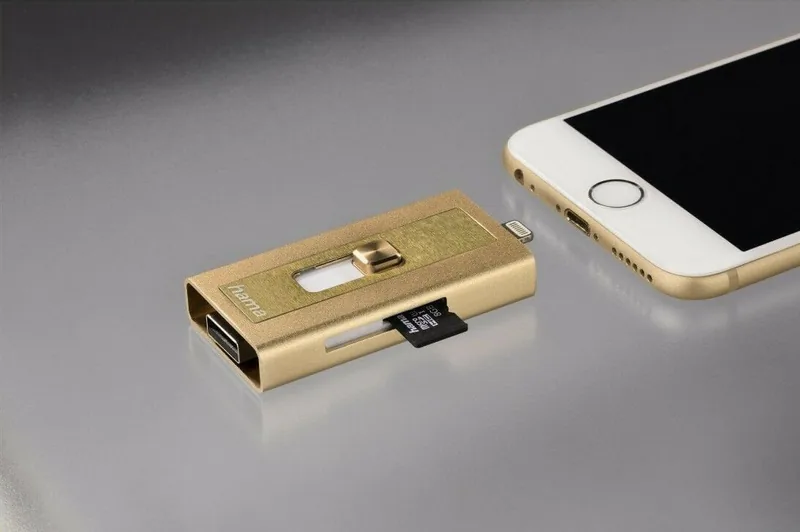
Hama MoveData Gold Single-Slot Card Reader: simple storage access for mobile and desktop
The Hama MoveData gold Single-Slot Card Reader, Lightning/USB-A 2.0 Plug Manual highlights a compact accessory designed for users who want quick access to microSD cards across different devices. With both a USB-A 2.0 connector and a Lightning plug, it bridges the gap between a computer and Apple mobile devices, making file handling feel more flexible and convenient.
This reader supports microSD, microSDHC, and microSDXC cards, which means it covers a wide range of everyday storage needs. On a PC or Mac, it works as a straightforward card reader for transferring photos, documents, and other files. On iPhone, iPad, or iPod touch, it becomes more than a reader: paired with the Hama MoveData app, it opens up tools for contact backup, media access, local storage, and file management.
One of the strongest points of the device is how it combines hardware and app features. Users can back up contacts, restore them later, browse local or external storage, move or copy files, create folders, rename items, and even create text documents in the app. That makes it useful not only for casual transfers, but also for basic on-the-go organization.
The product is best suited to users who want a small, portable solution without complicated setup. Still, the manual makes clear that it should be used carefully: the USB-A and Lightning connectors must not be used at the same time, the memory card should be formatted in FAT32 for smooth use on iOS, and safe removal is important to avoid data loss. Class 10 cards are recommended for better transfer performance.
Notes
- Use the eject function before removing cards or disconnecting the reader.
- Grant app permissions when using contact backup or photo functions.
- The device is intended for private, non-commercial use only.
In short, the Hama MoveData card reader is a practical companion for users who need a compact way to connect microSD storage to both computers and Lightning-enabled Apple devices.
Search for 67,732 Manuals online


Type-in Brand or Model