
Hama EWS-3000 Manual
PDF manual · 94 Pages
English



Quick check
Incorrect answer, please try again.
Chat with your Hama EWS-3000 manual using AI
Get instant AI answers from your Hama EWS-3000 manual
Ask anything about the Hama EWS-3000. Answers come from this manual, with the pages they are based on.
EWS-3000 Maintenance Schedule
Only clean this product with a slightly damp, lint-free cloth. Do not use aggressive cleaning agents or allow water to enter.
When the low battery symbol appears, replace the 2 AAA batteries. Remove old batteries and insert new ones with correct polarity.
When the low battery symbol appears, replace the 3 AA batteries. Remove dead batteries and insert new ones with correct polarity.
Ask a Question
Do you recommend EWS-3000?
Yes NoFrequently Asked Questions
Insert batteries in the measuring station first followed by the base station. Wait three minutes for the radio symbol to stop flashing indicating successful connection. Press channel button if search fails manually to force signal acquisition.
Is this answer helpful?
Indoor measures zero to fifty degrees Celsius while outdoor handles negative twenty to sixty degrees Celsius. Accuracy remains plus or minus two degrees Celsius generally depending on conditions encountered.
Is this answer helpful?
Yes but position it to avoid direct water exposure constantly. Mount securely on a wall under shelter if possible to extend lifespan. Ensure protection from direct sunlight always to maintain reading precision.
Is this answer helpful?
Hold the plus button for three seconds while viewing the max min screen. Stored values will clear allowing fresh tracking cycle start immediately for new data collection.
Is this answer helpful?
Search takes seven minutes nightly after power up. If failed check location for interference causing blockage. Manually activate search by holding minus button for three seconds occasionally to retry.
Is this answer helpful?
The base station supports a maximum number of three outdoor sensors connected simultaneously. Assign channels CH1 CH2 and CH3 to distinguish them correctly without confusion.
Is this answer helpful?
Yes DST appears on display automatically when activated seasonally according to region. You can disable search by holding minus button if you prefer manual setting control instead of auto mode.
Is this answer helpful?
Advantages and Disadvantages
Advantages

- Automatic DCF radio-controlled clock keeps time perfectly without adjustment needed manually
- Stores and displays indoor and outdoor temperature maxima and minima easily for history tracking
- Dual alarm modes allow separate scheduling for weekday work versus weekend relaxation times efficiently
- Wireless outdoor sensor transmits data up to thirty meters clearly under open sky conditions
- Snooze and backlight features enhance usability during early mornings or dark nighttime hours
Disadvantages

- Requires resynchronization every single time batteries are replaced in either base or sensor unit
- Signal strength decreases significantly when passing through concrete walls or dense buildings
- Outdoor sensor needs alkaline AAA batteries specifically for subzero performance to avoid failure
- Radio reception fails in areas with high electromagnetic interference from other electronics
- Warranty excludes damage resulting from improper mounting or unauthorized user modifications made to device
Product Specification
Type
digital
Temperature
indoor and outdoor
Humidity
No
Weather Forecast
No
Forecast Technology
Barometer
Other Displays
Time, Date, Weekday, Battery status, stored min./max. temperature
Alarms
Temperature alarm, Wake-up time
Outdoor Temperature Range
-4°F to +140°F
Mounting
Wall mountable
Power Supply
3x AA battery
Color
white
Package Contents
1 outdoor sensor (with integrated temperature display)
Product Description
Advanced Home Weather Monitoring
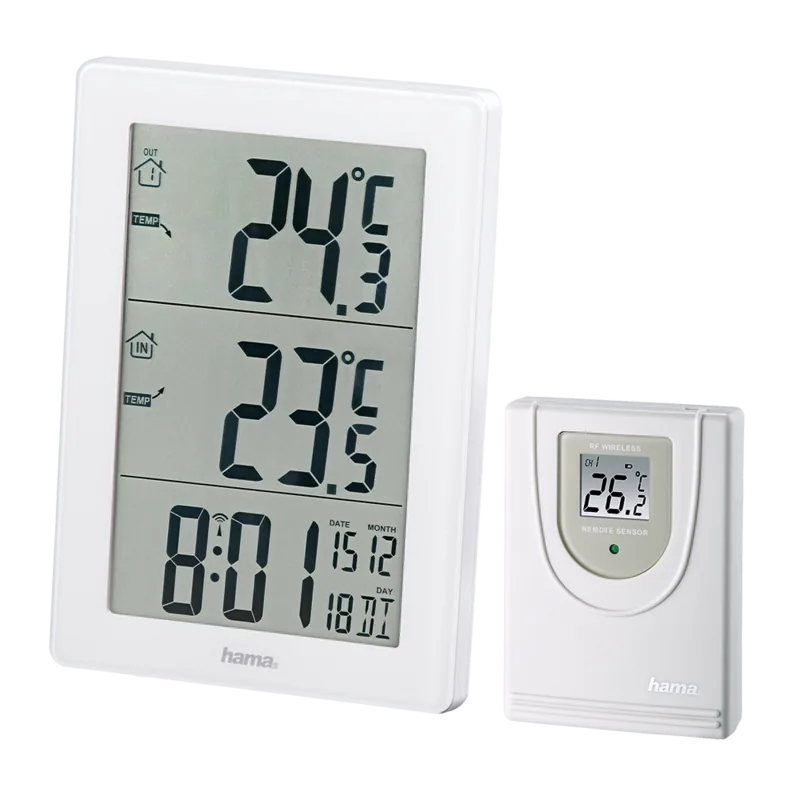
Understanding your local climate helps manage daily routines and protect property from extreme conditions. The Hama EWS-3000 Digital Weather Station provides continuous tracking of temperature fluctuations both inside and outside your home. This system relies on a wireless connection between a central base unit and an external measuring sensor. Many users consult the Hama EWS-3000 Digital Weather Station Manual to achieve accurate channel synchronization during the initial setup phase. Accurate calibration ensures stable data transmission across various household distances up to fifty meters with three possible sensors.
The base station features a large LCD screen displaying current readings alongside historical maximum and minimum records. You can track temperature trends to predict whether conditions will rise or fall over the next few hours. A built-in radio clock automatically adjusts via DCF signals to maintain precise timekeeping without manual intervention. Dual alarm modes allow customization for weekday work schedules or weekend relaxation times. The snooze function pauses ringing briefly if you require extra rest time before starting your day. Backlight activation via touch sensor improves visibility in low-light environments quickly.
Proper installation is crucial for signal reliability and measurement accuracy. Place the external sensor at least 1.25 meters above ground level to adhere to international standards. Avoid placing devices near metal structures or high-voltage lines which may disrupt radio waves. The transmission range reaches thirty meters in open spaces but may decrease indoors due to thick walls. Using alkaline batteries recommended for the outdoor sensor prevents freezing issues in subzero temperatures below zero degrees. Remember to replace batteries immediately when low power symbols appear to avoid losing stored data permanently.
Maintenance involves occasional wiping with a dry lint-free cloth to remove dust from the display area. Do not expose the equipment to rain or excessive moisture despite its durable plastic casing construction. The device supports switching between metric and imperial temperature scales instantly via simple button presses. Compliance with safety standards ensures reliable operation in private residential settings effectively. Always follow local regulations regarding electronic disposal when ending product lifecycle responsibly. This versatile tool remains an excellent choice for eco-conscious households seeking detailed environmental insight today. Warning symbols guide users regarding battery handling and general safety precautions throughout the usage period. Calibration accuracy remains plus or minus two degrees Celsius for consistent reporting results.
This device allows seamless integration into modern homes offering practical utility without complexity. Users appreciate the intuitive layout of buttons located on the front panel for easy access. Configuration parameters remain stable even after power interruptions ensuring continuous service availability. Regular updates to firmware are not required as the design prioritizes hardware durability. Cost effectiveness compared to other models makes this a popular selection among budget shoppers worldwide. Enjoy peace of mind knowing your environment is monitored continuously by reliable technology.
Search for 67,732 Manuals online


Type-in Brand or Model