
Hama Energy Cost Meter Manual
PDF manual · 26 Pages
English



Quick check
Incorrect answer, please try again.
Chat with your Hama Energy Cost Meter manual using AI
Get instant AI answers from your Hama Energy Cost Meter manual
Ask anything about the Hama Energy Cost Meter. Answers come from this manual, with the pages they are based on.
Energy Cost Meter Maintenance Schedule
Plug the energy cost meter into a mains plug for approx. 24 hours to charge the internal rechargeable battery if not used for longer periods.
Clean only with a slightly damp, lint-free cloth. Do not use aggressive cleaning agents and ensure no water enters the product.
Free maintenance reminders
Timed to your purchase date. Always free, unsubscribe anytime.
Ask a Question
Do you recommend Energy Cost Meter?
Yes NoDo you recommend Energy Cost Meter?
Yes NoFrequently Asked Questions
The Hama Energy Consumption Meter Digital supports devices up to a maximum of 3680 watts. If you connect a device exceeding this limit, the display will show an OVERLOAD warning.
Is this answer helpful?
No, the values provided by this meter are intended for personal estimation and monitoring. They are not suitable as a legal basis for calculating power costs for billing between energy providers and consumers.
Is this answer helpful?
Hold the FUNC button until COST/Kwh appears. Use SET to select the digit position and UP to enter the value. You can also configure different prices for different days of the week.
Is this answer helpful?
Yes, it features an internal rechargeable battery that charges during operation. If not used for long periods, plug it into a mains socket for about 24 hours every three months to keep it charged.
Is this answer helpful?
Pressing the Reset button with a pointed object returns the device to factory settings and deletes all stored data, including usage history and custom price configurations.
Is this answer helpful?
While the device is safe when used correctly, it should be kept out of reach of children as it is an electrical product. Always ensure cables are laid safely to prevent tripping hazards.
Is this answer helpful?
Advantages and Disadvantages
Advantages

- Accurately measures voltage, current, power, and energy consumption in real time
- Allows custom pricing inputs to calculate exact electricity costs for specific devices
- Built-in rechargeable battery eliminates the need for frequent external charging
- Compact design fits easily between wall sockets and appliance plugs
- Clear LCD display shows multiple modes including max wattage and total usage time
Disadvantages

- Not suitable for calculating official utility bills due to potential minor inaccuracies
- Maximum load capacity is limited to 3680 watts preventing use with heavy machinery
- Requires manual entry of time and price settings before accurate tracking begins
- Battery may discharge if left unplugged for extended periods without recharging
- Cannot measure multiple high-power devices simultaneously on one unit
Product Specification
Type
Energy cost meter
Product Description
Master Your Home Energy with the Hama Energy Consumption Meter Digital Manual
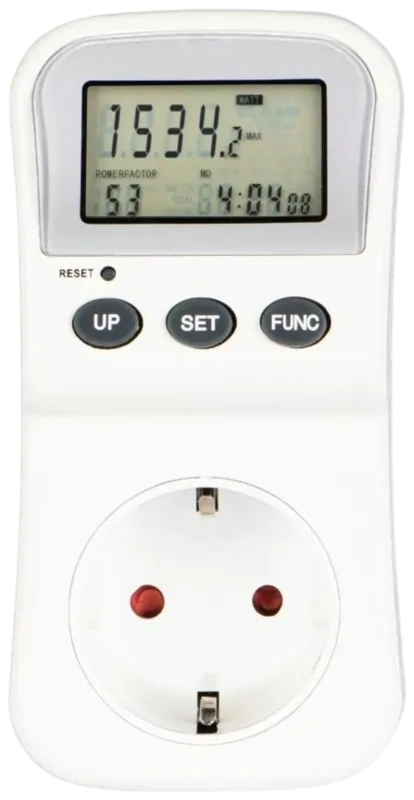
Taking control of your household electricity costs has never been easier with the Hama Energy Consumption Meter Digital. This compact and user-friendly device is designed to help you monitor the power usage of any appliance plugged into a standard wall socket. By providing real-time data on voltage, current, frequency, and power factor, this meter empowers you to make informed decisions about which devices are draining your wallet.
The interface is straightforward, featuring an LCD display that cycles through various metrics using simple buttons labeled FUNC, SET, UP, and RESET. You can view immediate wattage consumption, track total kilowatt-hours used, and even calculate the running cost based on custom price settings you input for different times of the day or week. Whether you want to check if your old refrigerator is more efficient than a newer model or simply verify the energy draw of a gaming console, this tool offers precise measurements down to small appliances.
Safety is a top priority in the design of this unit. It includes clear warnings against overloading the device beyond its 3680-watt limit and advises keeping it away from moisture and children. The internal rechargeable battery ensures that the device retains its settings and charges itself during normal operation, though it recommends plugging it in every few months to maintain battery health. With a measurement accuracy of +/- 1.5 percent, users can rely on the data for long-term consumption analysis without needing professional-grade equipment.
Setting up the meter involves entering your local electricity price per kWh and configuring the time. Once configured, the device automatically starts measuring as soon as an appliance is connected. If an overload occurs, the display clearly indicates "OVERLOAD" to prevent damage. For those who need a fresh start, a reset function restores all factory defaults and clears stored data instantly.
Important Usage Notes
- Do not use this device for commercial billing calculations as values are for estimation only.
- Ensure the device is plugged into a grounded socket near the appliance.
- Never attempt to open the casing or repair the unit yourself.
- Clean only with a dry or slightly damp cloth; avoid chemicals.
- Dispose of the unit at designated electronic recycling points when finished.
Search for 67,732 Manuals online


Type-in Brand or Model