
Hama Dual-Slot Card Reader USB 3.0 Manual
PDF manual · 36 Pages
English



Quick check
Incorrect answer, please try again.
Chat with your Hama Dual-Slot Card Reader USB 3.0 manual using AI
Get instant AI answers from your Hama Dual-Slot Card Reader USB 3.0 manual
Ask anything about the Hama Dual-Slot Card Reader USB 3.0. Answers come from this manual, with the pages they are based on.
Ask a Question
Do you recommend Dual-Slot Card Reader USB 3.0?
Yes No
Rudolph Stiedemann
7 months ago
Is the protective cap difficult to remove? Some reviews mention it is stuck tight.
Frequently Asked Questions
It supports SD, SDHC, SDXC, microSD, microSDHC, microSDXC, miniSD, miniSDHC, MMC, MMCplus, RS-MMC, MMCmobile, and MMCmicro (with adapter).
Is this answer helpful?
No, the device is plug-and-play. Drivers are not needed as the installation runs automatically on supported operating systems.
Is this answer helpful?
Yes, you can transfer data between two memory cards plugged into the reader simultaneously using the hot swapping feature.
Is this answer helpful?
Yes, it is backward compatible with USB 2.0 and USB 1.1, though speeds will be limited to those standards.
Is this answer helpful?
Always wait for the transfer to finish and use the eject function in your operating system before physically removing the card.
Is this answer helpful?
Yes, but for SDXC cards formatted with exFAT, you need at least XP SP2 and the Microsoft exFAT update.
Is this answer helpful?
Advantages and Disadvantages
Advantages

- Supports a vast array of memory card formats including SD, microSD, and MMC variants
- Enables hot swapping for direct data transfer between two inserted cards
- Backward compatible with USB 2.0 and USB 1.1 ports for universal use
- No driver installation needed as setup is fully automatic
- Features an LED indicator light for easy connection and transfer status monitoring
Disadvantages

- Requires a USB 3.0 interface and driver for maximum transfer speeds
- MMCmicro cards cannot be used without a separate adapter
- ExFAT file system support on Windows XP requires manual updates
- Intended only for private non-commercial household use
- Must be kept dry and away from heat sources to prevent damage
Product Specification
Type
Card reader
Form factor
1x USB stick
Connection
1x USB-A 3.0 (plug, 5 Gb/s)
Interface
1x microSD, 1x SD Card
Transfer
1x microSD (microSD), 1x SD Card (SD Card)
Power supply
Power supply only via connection
Dimensions
0.91x0.47x2.68 in (WxHxD)
Weight
0.67 oz
Housing color
silver, black
Compatibility
universal
USB spelling
Link
Product Description
Discover the Hama Dual-Slot Card Reader
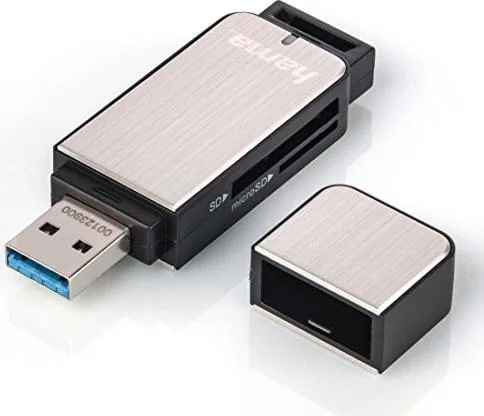
The Hama Dual-Slot Card Reader in silver is a versatile and efficient tool designed for modern digital users who need to manage data from various memory cards. This sleek USB-A 3.0 device offers a seamless way to transfer files between your computer and storage media without the hassle of multiple adapters or complex setups.
Designed with convenience in mind, this card reader supports a wide range of formats including SD, SDHC, SDXC, microSD, microSDHC, microSDXC, miniSD, miniSDHC, MMC, MMCplus, RS-MMC, MMCmobile, and MMCmicro. The dual-slot design allows you to insert two cards simultaneously, enabling direct data transfer between them via hot swapping capabilities. This feature is particularly useful for photographers and videographers who need to quickly move footage from one card to another without connecting to a PC.
Speed is a key advantage of this unit. Utilizing the USB 3.0 interface, it delivers significantly faster data transfer rates compared to older USB 2.0 standards. However, it remains fully backward compatible with USB 2.0 and USB 1.1 ports, ensuring you can use it with virtually any computer. The installation process is entirely automatic; no additional drivers are required, making it a true plug-and-play solution for Windows and Mac operating systems.
The device features an intuitive LED indicator that lights up upon successful connection and flashes during data transfer, providing visual confirmation of its status. For optimal performance with SD and microSD cards, ensure your memory cards support the UHS-I standard. While most SDXC cards come formatted with exFAT, which is supported by modern versions of Windows and macOS, users on older Windows XP systems may need to install specific updates to access these files.
Built with safety and durability in mind, the Hama card reader should be kept dry and away from direct heat sources. It is intended strictly for private, non-commercial use. Regular maintenance involves simply wiping the device with a slightly damp, lint-free cloth. Proper disposal of the product at the end of its life cycle is essential to protect the environment, following local electronic waste regulations.
Important Notes
- Always use the eject function before removing a card to prevent data loss.
- The device requires a USB 3.0 driver installed for full speed operation.
- MMCmicro cards require an adapter not included in the package.
Search for 67,732 Manuals online


Type-in Brand or Model
Marcel Jaskolski
6 months ago
Does this card reader work with both SD and microSD cards directly, or do I need an adapter for microSD?
Manual.ly
6 months ago
The Hama USB 3.0 Card Reader features two dedicated slots: one for standard SD cards and one for microSD cards. Both types can be inserted directly without requiring an external adapter. However, please note that the device supports UHS-I speeds only. If you have faster UHS-II cards, they will function but operate at UHS-I transfer rates.