
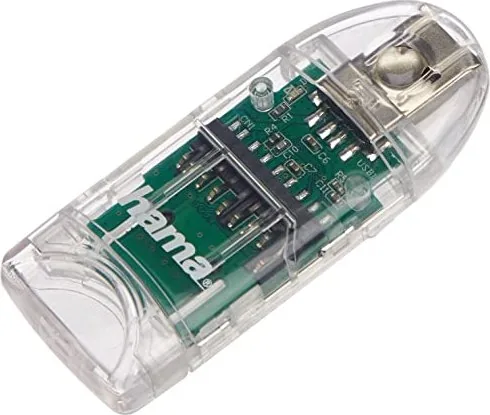
Hama Dual-Slot Card Reader USB 2.0 Manual
PDF manual · 36 Pages
English



Quick check
Incorrect answer, please try again.
Chat with your Hama Dual-Slot Card Reader USB 2.0 manual using AI
Get instant AI answers from your Hama Dual-Slot Card Reader USB 2.0 manual
Ask anything about the Hama Dual-Slot Card Reader USB 2.0. Answers come from this manual, with the pages they are based on.
Ask a Question
Do you recommend Dual-Slot Card Reader USB 2.0?
Yes NoFrequently Asked Questions
Yes, no additional drivers are needed. The installation runs automatically when you connect the USB 2.0 Card Reader to an available USB port on your computer.
Is this answer helpful?
It supports SD, SDHC, SDXC, microSD, microSDHC, microSDXC, MMC, and MMCplus. Some smaller formats like miniSD require an adapter which is not included.
Is this answer helpful?
Yes, it is possible to transfer data between two memory cards which are plugged simultaneously into the same Card Reader using the dual slots.
Is this answer helpful?
Yes, the Card Reader supports Mac OS 9.x or higher. Ensure you have the correct file system drivers for newer exFAT formatted cards.
Is this answer helpful?
Always use the eject function of your operating system before you remove a memory card or disconnect the Card Reader from your device.
Is this answer helpful?
Do not modify the product or open the device yourself. Doing so changes the warranty status and you may void your warranty coverage.
Is this answer helpful?
Advantages and Disadvantages
Advantages

- Supports wide range of SD and microSD cards
- No additional drivers required for operation
- LED indicator provides connection visual feedback
- Allows transfer between two cards simultaneously
Disadvantages

- Adapters for older mini cards not included
- Not compatible with USB 3.0 speeds (USB 2.0)
- Requires specific OS updates for SDXC on XP
- Warranty voids if device is opened or modified
Product Specification
Type
Card reader
Form Factor
1x USB Stick
Interface
1x USB-A 2.0 (Connector, 480Mbps)
Card Slots
1x microSD, 1x SD Card
Transfer Support
1x microSD (microSD), 1x SD Card (SD Card, MMC)
Power Supply
Powered via interface only
Dimensions
1.06 x 0.39 x 2.83 in (W x H x D)
Weight
0.03 lbs
Housing Color
transparent
Compatibility
universal
USB Designation
Link
Product Description
Discover the Hama Dual-Slot Card Reader
If you manage a large volume of digital content, transferring files between devices can often be a significant bottleneck in your daily workflow. The Hama Dual-Slot Card Reader solves this problem efficiently and quickly for many users. This device allows you to read multiple memory card formats without needing complex internal installations inside your computing machine. It connects directly to your computer via a standard USB cable.
This card reader is designed primarily for private and non-commercial use only. It supports a vast array of popular memory card formats including standard SD, SDHC, and modern SDXC. Additionally, it handles MicroSD variants effectively. You can consult the instructions for usage guidelines whenever needed. For very old cards like miniSD, an adapter is required but it is usually not included in the standard box. System requirements are quite broad for general compatibility, supporting Windows versions from XP all the way to 10. It also supports Mac OS 9 upwards for macOS users.
Setup is incredibly simple as no drivers are needed for operation. The software system installs automatically when plugged into a free USB port on your laptop or desktop. A helpful LED indicator light signals when the physical connection is successful for the first time. During active data transfer, this light will flash rapidly to indicate ongoing activity. You can even copy files directly between two memory cards inserted simultaneously in the dual slots. This feature saves an extra step in your workflow significantly. Data transfer speed is consistent with USB 2.0 standards.
To keep the device working well over time, avoid moisture and extreme heat sources. Do not open the unit yourself as this voids the manufacturer warranty immediately. Clean it gently with a slightly damp cloth suitable for electronics. Keep it out of reach of children at all times for maximum safety. Disposal follows strict environmental regulations for electronic waste. Do not modify the product code or internals to maintain warranty validity. Always eject cards safely through your operating system to prevent sudden data loss. Water intrusion can damage the electronics.
The Hama Dual-Slot-Cardreader, USB-A 2.0 [Plug] Manual indicates these features clearly. It is built for reliability and speed in the USB 2.0 standard. This reader is perfect for photographers or anyone needing fast access to data cards on the go. With no installation, it is ready to use immediately upon connection.
Search for 67,732 Manuals online


Type-in Brand or Model
Thomas Schmidt
8 months ago
Does this reader support both standard SD and Micro SD cards simultaneously, and are there any known compatibility issues with newer SDXC cards?
Manual.ly
8 months ago
Yes, this adapter supports both standard SD and Micro SD cards simultaneously. Most users confirm compatibility with SD, SDHC, and Micro SD formats without issues. While a few reviews mention occasional recognition problems with specific SDXC cards on older hardware, the majority find it works reliably with modern systems, including Android OTG devices and PCs. The device is plug-and-play with no installation required. If issues arise, checking the card format or trying a different USB port may help.