Manual.ly Logo

Hama Delta Allround Manual

5.0 · 6 Ratings

PDF manual · 27 Pages

English

M: QW-35-FL
page

/ 27

Loading...
65b062d3195d5d1f2d322b5665fa6c618200 page 2
2
3
G Operating instruction
Controls and Displays
1. Slide cover
2. Display/release button
3. Setting wheel (vertical)
4. Right adjustable charging contact (horizontal)
5. Left adjustable charging contact (horizontal)
LED display:
Power supply: Dark blue
Charging: Blue (ashing)
Fully charged: Blue
Error/
battery defect detection: Blue and green
(ashing alternately)
Thank you for choosing a Hama product.
Take your time and read the following instructions and
information completely. Please keep these instructions in
a safe place for future reference.
1. Explanation of Warning Symbols and Notes
Warning
This symbol is used to indicate safety instructions or
to draw your attention to specific hazards and risks.
Note
This symbol is used to indicate additional information
or important notes.
2. Package Contents
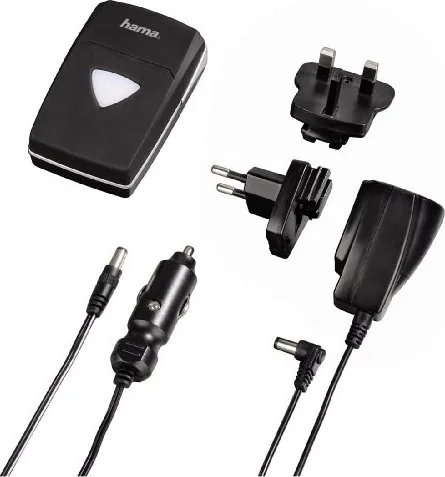
•Delta Allround charger
•110-240 V power supply unit
•12 V car adapter
•Power adapter plug for Europe
•Power adapter plug for the U.K.
•Power adapter plug for the U.S.
•These operating instructions
3. Safety Notes
•The product is intended for private, non-commercial use only.
•Use the product for its intended purpose only.
•Do not operate the product outside the power limits
given in the specications.
•Protect the product from dirt, moisture and
overheating, and only use it in a dry environment.
•Do not use the product in moist environments and
avoid splashes.
•Do not bend or crush the cable.
•Always pull directly on the plug when disconnecting
the cable, never on the cable itself.
•Do not drop the product and do not expose it to any
major shocks.
•Keep this product, as all electrical products, out of the
reach of children!
•Dispose of packaging material immediately according
to locally applicable regulations.
•Do not modify the product in any way. Doing so voids
the warranty.
•This device may be used by children 8 years of
age and older, by persons with impaired physical,
sensory or mental abilities or by persons with
insucient experience or knowledge as long as they
are supervised or have been informed about how to
use the device safely and the risks of unsafe use. Do
not allow children to play with the device. Do not
let children clean or perform maintenance on the
device without supervision.
•Only operate the product with the included power
supply.
•An alternative power supply must provide Safety Extra
Low Voltage of the same connection load/values as
specied on the included power supply.
Warning
• Only connect the product to a socket that has
been approved for the device. The socket must be
installed close to the product and easily accessible.
• Do not continue to operate the device if it becomes
visibly damaged.
Warning
• Only charge the rechargeable batteries as
described in the operating instructions.
• Only use batteries (or rechargeable batteries) that
match the specied type.
• Do not short circuit the batteries/rechargeable
batteries and keep them away from uncoated
metal objects.
• Never open, damage or swallow batteries or allow
them to enter the environment. They can contain
toxic, environmentally unfriendly heavy metals.
• Do not attempt to charge non-rechargeable
batteries, as they may explode.
4. Startup and Operation
You can use this device to quickly and safely charge
rechargeable Li-ion and NiMH batteries.
Note – Batteries
You can only charge batteries with the same size and
type (AA/AAA).
4.1 Adjusting the charging contacts before charging:
•Slide the adjustable left (5) and right (4) charging
contacts on the device until they match horizontally with
the position of the charging contacts on the battery.
•Turn the setting wheel (3) until the charging contacts
match vertically with the position of the charging
contacts on the battery.
•The device automatically recognizes the polarity of the
battery.
3
4/5
You can find the compatibility of charging contacts
and setting wheel for individual batteries at:
www.hama.com
4.2 Adjusting the slide cover (1):
•For smaller standard batteries, simply pull the slide cover
(1) back.
•For larger batteries, press down on the release button (2).
This moves the slide cover (1) forwards or backwards.
4.3 Inserting Li-ion batteries
•Pull the slide cover (1) back, and insert the battery,
positioning it so that it is ush with the right side of
the charging compartment.
•If the battery is longer or larger than normal, press the
release button (2) before insertion. This will further
open the slide cover (1).
4.4 Charging AA or AAA batteries:
•You can recharge two rechargeable NiMH AA or AAA
batteries at the same time.
•Pull the slide cover (1) back and insert two AA or AAA
batteries into the charging compartment. Ensure that
both batteries are identical in type (AA or AAA), size,
and capacity.
•Be sure to insert the round cells with the correct polarity.
•Slide the adjustable left (5) and right (4) charging
contacts to the position AA/AAA.
•Set the setting wheel (3) to position “C”.
1
2
3
4
5

Chat with your Hama Delta Allround manual using AI

Get instant AI answers from your Hama Delta Allround manual

Ask anything about the Hama Delta Allround. Answers come from this manual, with the pages they are based on.

Ask a Question

0/1000

Do you recommend Delta Allround?

Yes No
0
User Pic

dweimann16

7 months ago

Is this charger compatible with my old camcorder batteries, and does it come with a car charging cable?

0
User Pic

Manual.ly

7 months ago

Yes, this charger is designed to be compatible with a wide range of older camcorder batteries, allowing you to reuse your existing equipment without needing expensive original parts. The kit includes essential accessories such as a clear instruction manual and a car charging cable for convenient on-the-go power.

M: QW-35-FL
M: QW-35-FL
0
User Pic

Ruby Thomas

6 months ago

How easy is the setup process, and are the instructions clear for someone who isn't tech-savvy?

M: QW-35-FL

Frequently Asked Questions

A

No, you must only charge batteries of the exact same type, size, and capacity simultaneously. Mixing AA and AAA batteries or different capacities in one session is not recommended.

Is this answer helpful?

A

If the LED display flashes blue and green alternately, the device has detected an error or a defective battery. Stop using that battery immediately.

Is this answer helpful?

A

Yes, the package includes a 110-240 V power supply and interchangeable plugs for Europe, the UK, and the US, along with a 12 V car adapter.

Is this answer helpful?

A

Once the battery reaches full capacity, the LED indicator will turn solid blue, signaling that the charging cycle is complete.

Is this answer helpful?

A

Absolutely not. Attempting to charge non-rechargeable batteries can cause them to leak or explode. Use this device only for rechargeable Li-ion and NiMH batteries.

Is this answer helpful?

M: QW-35-FL

Advantages and Disadvantages

Advantages

  • Adjustable contacts accommodate various Li-ion and AA/AAA battery sizes
  • LED display provides clear status updates on charging progress
  • Includes car adapter and multiple plug types for global travel
  • Built-in timer protection prevents overcharging after 6 hours
  • Negative delta V detection ensures safe charging for NiMH batteries
VS

Disadvantages

  • Cannot charge mixed battery types like AA and AAA together
  • Requires manual adjustment of contacts for each battery change
  • Not suitable for charging single-use alkaline batteries
  • Limited to specific voltage ranges for input power
  • No warranty coverage for damage caused by improper use
M: QW-35-FL

Product Specification

Compatibility

Mignon AA, Micro AAA

Charging slots

2x round cell

M: QW-35-FL

Product Description

Hama Delta Allround Fast Charger Review

The Hama Delta Allround Fast Charger is a versatile solution designed to keep your essential devices powered up. This universal charger handles both rechargeable Li-ion batteries and standard AA/AAA NiMH cells, making it an indispensable tool for photographers, outdoor enthusiasts, and anyone with multiple battery-powered gadgets. Its intelligent design ensures that you can charge different battery types quickly and safely without needing multiple chargers cluttering your desk or travel bag.

One of the standout features of this device is its adjustable charging contacts. The left and right horizontal contacts can be slid to match the width of various battery sizes, while the vertical setting wheel allows for precise alignment with different battery heights. This adaptability means the charger works seamlessly with everything from compact AAA cells to larger Li-ion packs. The LED display provides clear visual feedback during the entire process: a dark blue light indicates power is connected, a flashing blue light shows active charging, a solid blue light confirms a full charge, and alternating blue and green flashes alert you to any battery defects or errors.

Safety is paramount in the design of the Delta Allround. The unit includes built-in timer protection that stops charging after six hours to prevent overheating or overcharging. It also features negative delta V detection for NiMH batteries, ensuring they are charged efficiently and safely. The package includes a comprehensive set of accessories, such as a 110-240 V power supply unit, a 12 V car adapter, and interchangeable plugs for Europe, the UK, and the US, making it perfect for international travel. Always remember to use only identical battery types and sizes in the same slot to ensure optimal performance and safety.

Important Notes

  • Only charge batteries of the same type and size simultaneously.
  • Do not attempt to charge non-rechargeable batteries as they may explode.
  • Keep the device away from moisture and direct sunlight.
  • Clean the unit only with a slightly damp, lint-free cloth.
  • Dispose of old batteries at designated recycling points according to local laws.
M: QW-35-FL

© Copyright 2026 Manual.ly