
Hama Dashcam 30 Manual
PDF manual · 108 Pages
English



Quick check
Incorrect answer, please try again.
Chat with your Hama Dashcam 30 manual using AI
Get instant AI answers from your Hama Dashcam 30 manual
Ask anything about the Hama Dashcam 30. Answers come from this manual, with the pages they are based on.
Dashcam 30 Maintenance Schedule
Clean the product only with a slightly damp, lint-free cloth and do not use aggressive cleaning agents. Ensure no water enters the product.
Verify that the product is securely mounted before starting your journey.
If storing the device for a long time, recharge the battery at regular intervals of at least every three months.
Free maintenance reminders
Timed to your purchase date. Always free, unsubscribe anytime.
Ask a Question
Do you recommend Dashcam 30?
Yes NoFrequently Asked Questions
It is designed to record driving footage, capture photos, and store important road events. The camera is meant for use in vehicles and supports automatic recording features for convenience and safety.
Is this answer helpful?
Yes. When connected to the vehicle power supply, it can switch on and off automatically with the ignition. This makes it easier to use during daily driving without manual setup each time.
Is this answer helpful?
The dashcam supports microSD cards up to 32 GB. When the card becomes full, older video files are overwritten unless they have been manually saved or protected by the camera.
Is this answer helpful?
It includes motion detection, a G-sensor for impact detection, and a save button for protecting key recordings. These features help preserve important footage after sudden vibrations or accidents.
Is this answer helpful?
Yes. Audio recording can be enabled or disabled in the settings. When active, the dashcam records sound together with video, which may be useful for reviewing driving situations.
Is this answer helpful?
No. The internal battery is only a short buffer, lasting about 2–3 minutes. For regular use, the dashcam should stay connected to vehicle power.
Is this answer helpful?
Advantages and Disadvantages
Advantages

- Easy mounting with a suction cup holder and adjustable viewing angle.
- Includes loop recording, motion detection, and G-sensor protection.
- Supports photo, video, playback, and direct file management on the device.
- Automatic power behavior makes it convenient for daily vehicle use.
Disadvantages

- The microSD limit of 32 GB may feel small for frequent recording.
- The built-in battery is only a short buffer, not for long unplugged use.
- Video resolution is limited compared with newer high-end dashcams.
- Legal restrictions and privacy rules can limit where and how it may be used.
Product Specification
Sensor
CMOS
Removable Storage
microSD/microSDHC
Video Function
AVI, 1920x1080@30p (16:9)
Viewing Angle
120°
Display
2.7" LCD
Connections
USB 2.0
Special Features
Motion Sensor, Loop Function
Dimensions
3.50x1.89x1.38in (WxHxD)
Product Description
Hama Dashcam 30 Manual: A Compact Driving Companion
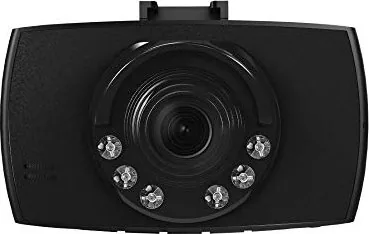
The Hama Dashcam 30 Manual reveals a straightforward dash camera designed for everyday driving security. Compact in size, it fits neatly behind the windshield and uses a suction-cup holder for quick mounting and easy adjustment. With a 2.7-inch screen and simple physical controls, it focuses on practical use rather than complexity, making it approachable for drivers who want reliable recording without a steep learning curve.
At its core, the Hama Dashcam 30 is built to record road events in video mode, take still photos, and replay saved clips directly on the device. It supports video resolutions up to 1080i and photo capture up to 12 megapixels, giving users a flexible way to document journeys or unexpected incidents. The loop recording feature helps manage storage automatically by overwriting the oldest files when the card is full, while motion detection and the G-sensor can trigger or protect recordings during sudden impacts or vibrations.
The camera also includes useful everyday conveniences. Automatic start and stop functions let it power on with the vehicle, and a short internal battery buffer keeps time continuity when the engine is off. Night mode, audio recording, white balance adjustments, contrast settings, watermark stamping, and screen saver options allow drivers to fine-tune recording conditions. A dedicated save button adds an extra layer of protection for important clips, especially after an incident.
Storage and playback are equally practical. The device works with microSD cards up to 32 GB, and recorded files can be transferred to a PC using the included card reader. This makes it easier to review footage, free space, and organize files labeled for normal or protected recordings. Overall, the camera is a functional tool for drivers who value clear operation and essential safety features over advanced smart functions.
Notes
- Best used with a vehicle power connection for continuous operation.
- Check local dashcam and privacy laws before recording.
- Remove the device from the windshield during long periods of non-use to avoid heat damage.
- Manual saving is recommended for critical recordings after a driving incident.
Summary
The Hama Dashcam 30 offers a balanced mix of simplicity, recording control, and safety-focused features. It is a practical choice for drivers who want a dependable dashcam with easy setup and essential protection tools.
Search for 67,706 Manuals online


Type-in Brand or Model