
Hama Basic Manual
PDF manual · 58 Pages
English



Quick check
Incorrect answer, please try again.
Chat with your Hama Basic manual using AI
Get instant AI answers from your Hama Basic manual
Ask anything about the Hama Basic. Answers come from this manual, with the pages they are based on.
Basic Maintenance Schedule
Use a vacuum cleaner to remove coarse dirt from the filter and the inner housing. Also clean the sensor opening.
Place the filter outdoors in direct sunlight for approx. 3 hours to dry it and eliminate bacteria/viruses via UV rays.
With daily use, the filter is exhausted after approx. 6-12 months. Replace it at the latest after 1 year.
Clean only with a slightly damp, lint-free cloth. Do not use aggressive cleaning agents or allow water to enter.
Free maintenance reminders
Timed to your purchase date. Always free, unsubscribe anytime.
Ask a Question
Do you recommend Basic?
Yes NoFrequently Asked Questions
The combi-filter should be replaced approximately every 6 to 12 months with daily use. Even if it looks clean, the filter must be changed at least once a year to prevent re-release of trapped pollutants and maintain air cleaning efficiency.
Is this answer helpful?
No, do not use the device in humid environments like bathrooms, toilets, or kitchens. High humidity can cause condensation on the sensor, affecting performance, and moisture can damage the internal electronics.
Is this answer helpful?
A red light indicates inadequate air quality. The device detects high levels of fine dust or pollutants and will automatically increase the fan speed to clean the air more aggressively until the quality improves.
Is this answer helpful?
Yes, the ionizer generates small amounts of ozone along with negative ions. You should avoid using this function in bedrooms, rooms with children, or areas with tobacco smoke if you are sensitive to ozone.
Is this answer helpful?
No, the filter itself is not washable. However, you can gently vacuum the surface of the filter and the inner housing every one to two months to remove coarse dirt before drying it in the sun.
Is this answer helpful?
According to ANSI/AHAM standards, it is suitable for rooms up to 17 square meters. Using NRCC standards, it can effectively purify spaces up to 52 square meters.
Is this answer helpful?
Advantages and Disadvantages
Advantages

- Advanced three-stage filtration removes dust, pollen, bacteria, and odors
- Auto mode with air quality sensor adjusts speed dynamically
- Sleep mode operates quietly with dimmed lights for better rest
- Ionizer function enhances particle capture efficiency
- Visual air quality display shows real-time status clearly
Disadvantages

- Filter must be replaced annually regardless of condition
- Ionizer produces trace ozone which may bother sensitive individuals
- Not suitable for removing carbon monoxide or radon gas
- Cannot be used in humid environments like bathrooms
- Requires specific original Hama filters for warranty compliance
Product Specification
Power
55W
Color
black
Recommended Room Size
up to 560 sq ft
Power Levels
3 (automatic power regulation)
Air Circulation
7.06 cu ft/min
Filtration
4-stage, EPA filter (E11, 95%), activated carbon filter, pre-filter, cold catalyst filter
Display
Touchscreen
Features
Remote control, filter saturation indicator, night mode, timer, ionization, air quality monitoring (particulate matter, temperature)
Noise Level
40-50 dB(A)
Dimensions
13x23.6x7.9 in (WxDxH)
Weight
12.79 lbs
Product Description
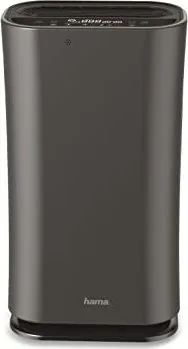
Hama Basic Air Purifier: Breathe Easier with Advanced Filtration
The Hama Basic Air Purifier is designed to transform the air quality in your home, offering a reliable solution for those seeking cleaner, fresher breathing environments. This compact yet powerful device utilizes a multi-stage filtration system to tackle common indoor pollutants effectively. Whether you are dealing with fine dust, pollen, pet dander, or unpleasant odors, this purifier works silently and efficiently to maintain a healthy atmosphere.
At the heart of its operation is a sophisticated three-layer filter system. It begins with a pre-filter that captures larger particles like hair and dust. The air then passes through an EPA11 filter capable of trapping microscopic particles as small as 0.1 microns, including bacteria and fine PM2.5 dust. Finally, an activated charcoal filter with a cold catalyst layer neutralizes harmful gases such as formaldehyde and benzene while eliminating bad smells. An optional ionizer function can further enhance purification by releasing negative ions that clump together with dirt particles for easier removal, though it should be used with caution around children or pets sensitive to ozone.
User convenience is paramount with the Hama Basic Air Purifier. A built-in air quality sensor automatically adjusts the fan speed based on real-time conditions, ensuring optimal performance without manual intervention. The intuitive display provides clear visual feedback with color-coded indicators: green for good air quality, orange for normal levels, and red when the air needs attention. Additional features include a whisper-quiet sleep mode for undisturbed rest, a programmable timer ranging from one to twelve hours, and remote control operation for added flexibility.
Maintenance is straightforward but essential for longevity. The device includes a filter replacement indicator that alerts users when the combi-filter needs changing, typically every six to twelve months depending on usage. Regular vacuuming of the filter and housing, followed by sun drying, helps extend the filter's life, though replacement is mandatory after one year to ensure maximum efficiency. Always remember to use original Hama filters to guarantee safety and performance.
This air purifier is ideal for bedrooms, living rooms, and offices up to 52 square meters. By combining smart automation with robust filtration technology, the Hama Basic Air Purifier stands as an excellent choice for anyone looking to improve their indoor air health naturally and effectively.
Search for 67,732 Manuals online


Type-in Brand or Model